
Update src/seedsigner/gui/screens/psbt_screens.py
What changed, and why it matters
This commit is a massive initial repository import or merge of the entire SeedSigner project into the branch. It adds documentation, images, 3D enclosure files, GitHub workflows, Docker files, and source code. The commit title mentions only one file (psbt_screens.py), but the actual diff covers 328 files and is almost entirely additive. There is no evidence in the supplied materials of any security vulnerability, malicious change, or code defect.
No security action required based on the supplied diff. If reviewing for security, focus future inspection on the actual psbt_screens.py change and on CI workflows that handle build artifacts or secrets, but those are not shown to be problematic here.
Security signals we found
No strong security signals were identified.
Evidence from the diff
The supplied diff is an all-files initial import/additive merge for the SeedSigner repository. It includes README, docs, binary assets, CI workflows (build, tests, telegram notification), Docker/dev files, and the full Python source tree. No modifications to existing logic are shown; everything is newly created. The single changed source file referenced in the title (src/seedsigner/gui/screens/psbt_screens.py) is not shown in the text diff excerpt, so its contents cannot be assessed. No security-relevant signals (e.g., secrets, backdoors, weakened crypto, unsafe deserialization, network exposure) are visible in the provided materials.
Changed components
Repository root / all filesGitHub Actions workflowsDocumentation and assetssrc/seedsigner/gui/screens/psbt_screens.py (title only; diff not shown)Inspect captured patch +131777 / −0
diff --git a/.github/pull_request_template.md b/.github/pull_request_template.md
new file mode 100644
index 0000000..095ea96
--- /dev/null
+++ b/.github/pull_request_template.md
@@ -0,0 +1,32 @@
+## Description
+
+_Describe the change simply. Provide a reason for the change._
+
+_Include screenshots of any new or modified screens (or at least explain why they were omitted)_
+
+This pull request is categorized as a:
+
+- [ ] New feature
+- [ ] Bug fix
+- [ ] Code refactor
+- [ ] Documentation
+- [ ] Other
+
+## Checklist
+
+- [ ] I’ve run `pytest` and made sure all unit tests pass before sumbitting the PR
+
+If you modified or added functionality/workflow, did you add new unit tests?
+
+- [ ] No, I’m a fool
+- [ ] Yes
+- [ ] N/A
+
+I have tested this PR on the following platforms/os:
+
+- [ ] Raspberry Pi OS [Manual Build](https://github.com/SeedSigner/seedsigner/blob/dev/docs/manual_installation.md)
+- [ ] [SeedSigner OS](https://github.com/SeedSigner/seedsigner-os) on a Pi0/Pi0W board
+- [ ] Other
+
+
+Note: Keep your changes limited in scope; if you uncover other issues or improvements along the way, ideally submit those as a separate PR. The more complicated the PR the harder to review, test, and merge.
diff --git a/.github/workflows/build.yml b/.github/workflows/build.yml
new file mode 100644
index 0000000..87a407f
--- /dev/null
+++ b/.github/workflows/build.yml
@@ -0,0 +1,173 @@
+name: Build
+
+on:
+ pull_request:
+ # Build on changes to this workflow files in PRs to test proposed changes
+ paths:
+ - '.github/workflows/build.yml'
+ push:
+ branches:
+ - main
+ - dev
+ workflow_dispatch:
+ inputs:
+ os-ref:
+ description: The seedsigner-os ref (tag/branch/sha1) to use
+ default: main
+ required: true
+
+# Increment this number as part of a PR to trigger an image build for the PR
+# trigger = 0
+
+jobs:
+ build:
+ name: build
+ runs-on: ubuntu-latest
+ # Prevent resource consuming cron triggered runs in forks
+ if: (!github.event.repository.fork || github.event_name == 'workflow_dispatch')
+ strategy:
+ fail-fast: false
+ matrix:
+ target: [ "pi0", "pi2", "pi02w", "pi4" ]
+ steps:
+ - name: checkout seedsigner-os
+ uses: actions/checkout@v4
+ with:
+ repository: "seedsigner/seedsigner-os"
+ # use the os-ref input parameter in case of workflow_dispatch or default to main in case of cron triggers
+ ref: ${{ github.event_name == 'workflow_dispatch' && github.event.inputs.os-ref || 'main' }}
+ submodules: true
+ path: "seedsigner-os"
+ # get full history + tags for "git describe"
+ fetch-depth: 0
+
+ - name: checkout source
+ uses: actions/checkout@v4
+ with:
+ # ref defaults to repo default-branch=dev (cron) or SHA of event (workflow_dispatch)
+ path: "seedsigner-os/opt/rootfs-overlay/opt"
+ # get full history + tags for "git describe"
+ fetch-depth: 0
+
+ - name: Get and set meta data
+ run: |
+ # The builder_hash (seedsigner-os hash) for the cache action step key
+ echo "builder_hash=$(git -C seedsigner-os rev-parse --short HEAD)"| tee -a $GITHUB_ENV
+
+ # Derive tag based versions, like 0.7.0-40-g0424967 (=$tag-$number-of-commits-since-tag-$short-sha1),
+ # or just e.g. 0.7.0, if we are exactly on a 0.7.0 tagged commit.
+ # --always to fall back to commit sha, if no tag present like in partial forks of the repo
+ os_version="$(git -C seedsigner-os describe --tags --always)"
+ source_version="$(git -C seedsigner-os/opt/rootfs-overlay/opt describe --tags --always)"
+
+ # Combine seedsigner and seedsigner-os version into one version string and squash the versions, if
+ # they are identical: So os_version=0.7.0 + source_version=0.7.0 combine to just only "0.7.0",
+ # whereas os_version=0.6.0-61-g9fafebe + source_version=0.7.0-40-g0424967 combine to "os0.6.0-61-g9fafebe_sw0.7.0-40-g0424967"
+ if [ "${os_version}" = "${source_version}" ]; then
+ # seedsigner + seedsigner_os have the same tag
+ echo "img_version=${source_version}"| tee -a $GITHUB_ENV
+ else
+ echo "img_version=os${os_version}_sw${source_version}"| tee -a $GITHUB_ENV
+ fi
+
+ - name: delete unnecessary files
+ run: |
+ cd seedsigner-os/opt/rootfs-overlay/opt
+ find . -mindepth 1 -maxdepth 1 ! -name src -exec rm -rf {} +
+ ls -la .
+ ls -la src
+
+ - name: restore build cache
+ uses: actions/cache@v4
+ # Caching reduces the build time to ~50% (currently: ~30 mins instead of ~1 hour,
+ # while consuming ~850 MB storage space).
+ with:
+ path: |
+ ~/.buildroot-ccache/
+ seedsigner-os/buildroot_dl
+ key: build-cache-${{ matrix.target }}-${{ env.builder_hash }}
+ restore-keys: |
+ build-cache-${{ matrix.target }}-
+
+ - name: Create build container
+ run: |
+ cd seedsigner-os
+ docker build -t seedsigner-os-build .
+
+ - name: build
+ run: |
+ mkdir -p \
+ ~/.buildroot-ccache \
+ seedsigner-os/buildroot_dl
+ docker run \
+ --rm \
+ -v "$(pwd)/seedsigner-os/opt:/opt" \
+ -v "$(pwd)/seedsigner-os/images:/images" \
+ -v "$(pwd)/seedsigner-os/buildroot_dl:/buildroot_dl" \
+ -v "${HOME}/.buildroot-ccache:/root/.buildroot-ccache" \
+ seedsigner-os-build \
+ --${{ matrix.target }} --skip-repo --no-clean
+ sudo chown -R $USER:$USER seedsigner-os/images seedsigner-os/buildroot_dl ~/.buildroot-ccache/
+
+ - name: list image (before rename)
+ run: |
+ ls -la seedsigner-os/images
+
+ - name: rename image
+ run: |
+ cd seedsigner-os/images
+ mv seedsigner_os*.img seedsigner_os.${{ env.img_version }}.${{ matrix.target }}.img
+
+ - name: print sha256sum
+ run: |
+ cd seedsigner-os/images
+ sha256sum *.img
+
+ - name: list image (after rename)
+ run: |
+ ls -la seedsigner-os/images
+
+ - name: upload images
+ uses: actions/upload-artifact@v4
+ with:
+ name: seedsigner_os_images-${{ matrix.target }}
+ path: "seedsigner-os/images/*.img"
+ if-no-files-found: error
+ # maximum 90 days retention
+ retention-days: 90
+
+ sha256sum:
+ name: calculate sha256sum
+ runs-on: ubuntu-latest
+ needs: build
+ steps:
+ - name: download images
+ uses: actions/download-artifact@v4
+ with:
+ path: images
+
+ - name: list images
+ run: |
+ ls -lRa images
+
+ - name: get seedsigner latest commit hash
+ id: get-seedsigner-hash
+ run: |
+ git init
+ echo "source_hash=$(git rev-parse --short ${{ github.sha }})" >> $GITHUB_ENV
+
+ - name: write sha256sum
+ run: |
+ cd images
+ # each downloaded image is in its own subfolder
+ find . -name "*.img" -exec mv {} . \;
+ sha256sum *.img > seedsigner_os.${{ env.source_hash }}.sha256
+
+ - name: upload checksums
+ uses: actions/upload-artifact@v4
+ with:
+ name: seedsigner_os_images_sha256
+ path: "images/*.sha256"
+ if-no-files-found: error
+ # maximum 90 days retention
+ retention-days: 90
diff --git a/.github/workflows/telegram.yml b/.github/workflows/telegram.yml
new file mode 100644
index 0000000..78b506d
--- /dev/null
+++ b/.github/workflows/telegram.yml
@@ -0,0 +1,18 @@
+name: GitHub Notify on Telegram
+on:
+ pull_request_target:
+ branches:
+ - dev
+ types:
+ - closed
+
+jobs:
+ if_merged:
+ if: github.event.pull_request.merged == true
+ runs-on: ubuntu-latest
+ steps:
+ - name: Notify on Telegram
+ uses: EverythingSuckz/github-telegram-notify@main
+ with:
+ bot_token: '${{ secrets.BOT_TOKEN }}'
+ chat_id: '${{ secrets.CHAT_ID }}'
diff --git a/.github/workflows/tests.yml b/.github/workflows/tests.yml
new file mode 100644
index 0000000..9be339c
--- /dev/null
+++ b/.github/workflows/tests.yml
@@ -0,0 +1,73 @@
+name: CI
+
+on:
+ push:
+ branches:
+ - dev
+ - main
+ pull_request:
+
+concurrency:
+ # Concurrency group that uses the workflow name and PR number if available
+ # or commit SHA as a fallback. If a new build is triggered under that
+ # concurrency group while a previous build is running it will be canceled.
+ # Repeated pushes to a PR will cancel all previous builds, while multiple
+ # merges to main will not cancel.
+ group: ${{ github.workflow }}-${{ github.event.pull_request.number || github.sha }}
+ cancel-in-progress: true
+
+jobs:
+ test:
+ runs-on: ubuntu-latest
+ strategy:
+ matrix:
+ # 3.10: currently used by Seedsigner
+ # 3.12: latest stable Python as upper test bound
+ python-version: ["3.10", "3.12"]
+
+ steps:
+ - uses: actions/checkout@v4
+ with:
+ # Needs to also pull the seedsigner-translations repo
+ submodules: recursive
+ - name: Set up Python ${{ matrix.python-version }}
+ uses: actions/setup-python@v5
+ with:
+ python-version: ${{ matrix.python-version }}
+ - name: Install dependencies
+ run: |
+ sudo apt-get install libzbar0
+ python -m pip install --upgrade pip
+ pip install -r requirements.txt -r tests/requirements.txt
+ pip install .
+ - name: Test with pytest
+ run: |
+ mkdir artifacts
+ python -m pytest \
+ --color=yes \
+ --cov=seedsigner \
+ --cov-append \
+ --cov-branch \
+ --durations 5 \
+ -vv
+ - name: Generate screenshots
+ run: |
+ python -m pytest tests/screenshot_generator/generator.py \
+ --color=yes \
+ --cov=seedsigner \
+ --cov-append \
+ --cov-branch \
+ --cov-report html:./artifacts/cov_html \
+ -vv
+ cp -r ./seedsigner-screenshots ./artifacts/
+ - name: Coverage report
+ run: coverage report
+ - name: Archive CI Artifacts
+ uses: actions/upload-artifact@v4
+ with:
+ name: ci-artifacts-${{ matrix.python-version }}
+ path: artifacts/**
+ retention-days: 10
+ # Upload also when tests fail. The workflow result (red/green) will
+ # be not effected by this.
+ if: always()
diff --git a/.gitignore b/.gitignore
new file mode 100644
index 0000000..9c70709
--- /dev/null
+++ b/.gitignore
@@ -0,0 +1,11 @@
+.DS_Store
+__pycache__/
+src/seedsigner.egg-info/
+.nova
+.vscode
+src/seedsigner/models/settings_definition.json
+.idea
+.coverage*
+
+*.po
+*.mo
\ No newline at end of file
diff --git a/.gitmodules b/.gitmodules
new file mode 100644
index 0000000..d4ffa6e
--- /dev/null
+++ b/.gitmodules
@@ -0,0 +1,9 @@
+[submodule "src/seedsigner/resources/seedsigner-translations"]
+ path = src/seedsigner/resources/seedsigner-translations
+ url = https://github.com/SeedSigner/seedsigner-translations.git
+ branch = dev
+[submodule "seedsigner-screenshots"]
+ path = seedsigner-screenshots
+ url = https://github.com/SeedSigner/seedsigner-screenshots.git
+ branch = dev
+ update = none
diff --git a/LICENSE.md b/LICENSE.md
new file mode 100644
index 0000000..62c2688
--- /dev/null
+++ b/LICENSE.md
@@ -0,0 +1,21 @@
+MIT License
+
+Copyright (c) 2021 SeedSigner
+
+Permission is hereby granted, free of charge, to any person obtaining a copy
+of this software and associated documentation files (the "Software"), to deal
+in the Software without restriction, including without limitation the rights
+to use, copy, modify, merge, publish, distribute, sublicense, and/or sell
+copies of the Software, and to permit persons to whom the Software is
+furnished to do so, subject to the following conditions:
+
+The above copyright notice and this permission notice shall be included in all
+copies or substantial portions of the Software.
+
+THE SOFTWARE IS PROVIDED "AS IS", WITHOUT WARRANTY OF ANY KIND, EXPRESS OR
+IMPLIED, INCLUDING BUT NOT LIMITED TO THE WARRANTIES OF MERCHANTABILITY,
+FITNESS FOR A PARTICULAR PURPOSE AND NONINFRINGEMENT. IN NO EVENT SHALL THE
+AUTHORS OR COPYRIGHT HOLDERS BE LIABLE FOR ANY CLAIM, DAMAGES OR OTHER
+LIABILITY, WHETHER IN AN ACTION OF CONTRACT, TORT OR OTHERWISE, ARISING FROM,
+OUT OF OR IN CONNECTION WITH THE SOFTWARE OR THE USE OR OTHER DEALINGS IN THE
+SOFTWARE.
diff --git a/README.md b/README.md
new file mode 100644
index 0000000..e483bc4
--- /dev/null
+++ b/README.md
@@ -0,0 +1,358 @@
+# Build an offline, airgapped Bitcoin signing device for less than $50!
+
+
+
+---------------
+
+* [Project Summary](#project-summary)
+* [Shopping List](#shopping-list)
+* [Software Installation](#software-installation)
+ * [Verifying your download](#verifying-your-download)
+* [Enclosure Designs](#enclosure-designs)
+* [SeedQR Printable Templates](#seedqr-printable-templates)
+* [Build from Source](#build-from-source)
+* [Developer Local Build Instructions](#developer-local-build-instructions)
+
+
+---------------
+
+# Project Summary
+
+[](https://github.com/SeedSigner/seedsigner/actions/workflows/tests.yml)
+[](https://github.com/SeedSigner/seedsigner/actions/workflows/build.yml)
+
+The goal of SeedSigner is to lower the cost and complexity of Bitcoin multisignature wallet use. To accomplish this goal, SeedSigner offers anyone the opportunity to build a verifiably air-gapped, stateless Bitcoin signing device using inexpensive, publicly available hardware components (usually < $50). SeedSigner helps users save with Bitcoin by assisting with trustless private key generation and multisignature (aka "multisig") wallet setup, and helps users transact with Bitcoin via a secure, air-gapped QR-exchange signing model.
+
+Additional information about the project can be found at [SeedSigner.com](https://seedsigner.com).
+
+You can follow [@SeedSigner](https://twitter.com/SeedSigner) on Twitter for the latest project news and developments.
+
+If you have specific questions about the project, our [Telegram Group](https://t.me/joinchat/GHNuc_nhNQjLPWsS) is a great place to ask them.
+
+### Feature Highlights:
+* Stateless, air-gapped operation:
+ * Temporarily stores seeds in memory while the device is powered; all memory is wiped when power is removed.
+ * SD card removable after boot to ensure no secret data can be written to it.
+ * No wifi or Bluetooth hardware onboard.
+ * Can only receive data via reading QR codes with its camera.
+ * Can only send data by displaying QR codes on its screen.
+
+* Trustless, auditable:
+ * Completely FOSS code, MIT license
+ * Reproducible builds
+ * Created and maintained by volunteers. There is no corporation. No profit motive.
+
+* Creating and handling seeds:
+ * Create a seed phrase by picking BIP39 words, calculates the final word (aka checksum).
+ * Create a seed phrase [via dice rolls](docs/dice_verification.md).
+ * Create a seed phrase via image entropy from the onboard camera.
+ * Guided interface to manually transcribe a seed to the SeedQR format for instant seed loading [(video)](https://youtu.be/c1-PqTNx1vc).
+ * BIP39 passphrase (aka 13th or 25th word) support.
+ * Import any existing seed phrase via an optimized seed word entry interface.
+ * Partial support for Electrum Segwit seed phrases [(info)](docs/electrum.md).
+
+* Wallet setup and transaction signing
+ * Script types: Taproot, native segwit, nested segwit, legacy (p2pkh).
+ * Single sig and multisig xpub export.
+ * Support for user-defined custom derivation paths.
+ * In-depth transaction (aka PSBT) review flow before signing.
+ * Verify the PSBT's single sig or multisig change outputs or self-transfer outputs.
+ * Mainnet, testnet, and regtest.
+
+* Additional utilities
+ * [SettingsQR](https://github.com/SeedSigner/seedsigner-settings-generator) to instantly reconfigure a SeedSigner for beginners, advanced users, or tailored to your preferences.
+ * Scan a software wallet's receive or change address to verify that it's correct.
+ * Address Explorer for single sig and multisig wallets.
+ * Message signing to prove address ownership.
+ * BIP85 child seed generation.
+
+* Compatible with:
+ * Sparrow
+ * Nunchuk
+ * Keeper
+ * BlueWallet
+ * Specter Desktop
+ * Any bitcoin wallet software that supports QR codes
+
+* Supported languages:
+ * English
+ * Español
+ * Many more coming soon!
+
+
+---------------
+
+# Shopping List
+
+To build a SeedSigner, you will need:
+
+* Raspberry Pi Zero
+ * Preferably version 1.3 which has no WiFi/Bluetooth capability, but any Raspberry Pi 2/3/4 or Zero "W"/"2W" model will work.
+* Waveshare 1.3" 240x240 LCD (MUST be the 240x240 version!) https://www.waveshare.com/wiki/1.3inch_LCD_HAT.
+* Pi Zero-compatible camera (tested to work with the Aokin / AuviPal 5MP 1080p with OV5647 Sensor).
+
+Notes:
+* You may need to solder the 40 GPIO pins (20 pins per row) to the Raspberry Pi Zero board. If you don't want to solder, most stores offer the board "with headers" already soldered on.
+* The Pi Zero "W" or "2W" is often easier to find but has wifi/Bluetooth hardware. You can still use these boards and can optionally [disable the wifi/Bluetooth hardware](https://github.com/DesobedienteTecnologico/rpi_disable_wifi_and_bt_by_hardware).
+* Other cameras with the above sensor module should work, but may not fit in the Orange Pill enclosure.
+* Choose the Waveshare screen carefully; they make a number of different boards that look very similar but ARE NOT COMPATIBLE! Make sure you purchase the model that has a resolution of 240x240 pixels.
+* Raspberry Pi 1 is also compatible, but will require a [hardware modification to the Waveshare LCD Hat](./docs/legacy_hardware.md).
+
+---------------
+
+# Software Installation
+
+## A Special Note On Minimizing Trust
+As is the nature of pre-packaged software downloads, downloading and using the prepared SeedSigner release images means implicitly placing trust in the people preparing those images; in our project the released images are prepared and signed by the eponymous creator of the project, SeedSigner "the person". That individual is additionally the only person in possession of the PGP keys that are used to sign the release images.
+
+Starting with v0.7.0, the images distributed via GitHub are reproducible. This means you and others can verify the released images are byte-for-byte the same when built from source. You can contribute to this project by building from source and sharing the hash of the final images.
+
+Instructions to build a SeedSigner OS image (using precisely the same process that is used to create the prepared release images) have been made available. We have put a lot of thought and work into making these instructions easy to understand and follow, even for less technical users. These instructions can be found [here](https://github.com/SeedSigner/seedsigner-os/blob/main/docs/building.md).
+
+## Downloading the Software
+
+
+Download the current Version (0.8.5) software image that is compatible with your Raspberry Pi Hardware. The Pi Zero 1.3 is the most common and recommended board.
+| Board | Download Image Link/Name |
+| --------------------- | --------------------------------- |
+|**[Raspberry Pi Zero 1.3](https://www.raspberrypi.com/products/raspberry-pi-zero/)** |[`seedsigner_os.0.8.5.pi0.img`](https://github.com/SeedSigner/seedsigner/releases/download/0.8.5/seedsigner_os.0.8.5.pi0.img) |
+|[Raspberry Pi Zero W](https://www.raspberrypi.com/products/raspberry-pi-zero-w/) |[`seedsigner_os.0.8.5.pi0.img`](https://github.com/SeedSigner/seedsigner/releases/download/0.8.5/seedsigner_os.0.8.5.pi0.img) |
+|[Raspberry Pi Zero 2 W](https://www.raspberrypi.com/products/raspberry-pi-zero-2-w/) |[`seedsigner_os.0.8.5.pi02w.img`](https://github.com/SeedSigner/seedsigner/releases/download/0.8.5/seedsigner_os.0.8.5.pi02w.img) |
+|[Raspberry Pi 1 Model B/B+](https://www.raspberrypi.com/products/raspberry-pi-1-model-b-plus/) |[`seedsigner_os.0.8.5.pi0.img`](https://github.com/SeedSigner/seedsigner/releases/download/0.8.5/seedsigner_os.0.8.5.pi0.img) |
+|[Raspberry Pi 2 Model B](https://www.raspberrypi.com/products/raspberry-pi-2-model-b/) |[`seedsigner_os.0.8.5.pi2.img`](https://github.com/SeedSigner/seedsigner/releases/download/0.8.5/seedsigner_os.0.8.5.pi2.img) |
+|[Raspberry Pi 3 Model B](https://www.raspberrypi.com/products/raspberry-pi-3-model-b/) |[`seedsigner_os.0.8.5.pi02w.img`](https://github.com/SeedSigner/seedsigner/releases/download/0.8.5/seedsigner_os.0.8.5.pi02w.img) |
+|[Raspberry Pi 4 Model B](https://www.raspberrypi.com/products/raspberry-pi-4-model-b/) |[`seedsigner_os.0.8.5.pi4.img`](https://github.com/SeedSigner/seedsigner/releases/download/0.8.5/seedsigner_os.0.8.5.pi4.img) |
+|[Raspberry Pi 400](https://www.raspberrypi.com/products/raspberry-pi-400-unit/) |[`seedsigner_os.0.8.5.pi4.img`](https://github.com/SeedSigner/seedsigner/releases/download/0.8.5/seedsigner_os.0.8.5.pi4.img) |
+
+Note: If you have physically removed the WiFi component from your board, you will still use the image file of the original(un-modified) hardware. (Our files are compiled/based on the *processor* architecture). Although it is better to spend a few minutes upfront to determine which specific Pi hardware/model you have, if you are still unsure which hardware you have, you can try using the pi0.img file. Making an incorrect choice here will not ruin your board, because this is software, not firmware.
+
+**also download** these 2 signature verification files to the same folder
+[The Plaintext manifest file](https://github.com/SeedSigner/seedsigner/releases/download/0.8.5/seedsigner.0.8.5.sha256.txt)
+[The Signature of the manifest file](https://github.com/SeedSigner/seedsigner/releases/download/0.8.5/seedsigner.0.8.5.sha256.txt.sig)
+
+Users familiar with older versions of the SeedSigner software might be surprised with how fast their software downloads now are, because since version 0.6.0 the software image files are now 100x smaller! Each image file is now under 42 Megabytes so your downloads and verifications will be very quick now (and might even seem *too* quick)!
+
+Once the files have all finished downloading, follow the steps below to verify the download before continuing on to write the software onto a MicroSD card. Next, insert the MicroSD into your assembled hardware and connect the USB power. Allow about 45 seconds for our logo to appear, and then you can begin using your SeedSigner!
+
+[Our previous software versions are available here](https://github.com/SeedSigner/seedsigner/releases). Choose a specific version and then expand the *Assets* sub-heading to display the .img file binary and also the 2 associated signature files. **Note:** The prior version files will have lower numbers than the scripts and examples provided in this document, but the naming format will be the same, so you can edit them as required for signature verification etc.
+
+
+## Verifying your download
+
+You can quickly verify that the software you just downloaded is both authentic and unaltered by following these instructions.
+We assume you are running the commands from a computer where both [GPG](https://gnupg.org/download/index.html) and [shasum](https://command-not-found.com/shasum) are already installed and that you also know [how to navigate on a terminal](https://terminalcheatsheet.com/guides/navigate-terminal).
+
+> You must run the following verification before opening or mounting the .img file.
+> Some operating systems modify the file on mount, causing verification to fail.
+
+### Step 1. Verify that the signature (.sig) file is genuine:
+
+Run GPG's *fetch-keys* command to import the SeedSigner projects public key from the popular online keyserver called *Keybase.io*, into your computers *keychain*.
+
+
+```
+gpg --fetch-keys https://keybase.io/seedsigner/pgp_keys.asc
+```
+The result should confirm that 1 key was *either* imported or updated. *Ignore* any key ID's or email addresses shown.
+
+
+
+Next, you will run the *verify* command on the signature (.sig) file. (*Verify* must be run from inside the same folder that you downloaded the files into earlier.)
+```
+gpg --verify seedsigner.0.8.5.sha256.txt.sig
+```
+
+When the verify command completes successfully, it should display output like this:
+<BR>
+
+The result must display "**Good signature**". Ignore any email addresses - *only* matching Key fingerprints count here. Stop immediately if it displays "*Bad signature*"!
+<BR>
+
+On the *last* output line, look at your *rightmost* 16 characters (the 4 blocks of 4).
+**Crucially, we must now check WHO that Primary key fingerprint /ID belongs to.** We will start by looking at Keybase.io to see if it is the *SeedSigner project* 's public key or not.
+
+<details><summary> About the warning message:</summary>
+<p> Since you are about to match the outputted fingerprint/ID against the proofs at Keybase.io/SeedSigner, and thereby confirm who the pubkey really belongs to-, you can safely ignore this warning message:
+
+```
+> WARNING: This key is not certified with a trusted signature!
+> There is no indication that the signature belongs to the owner.
+ ```
+</p>
+</details>
+<br>
+
+<details><summary> More about how the verify command works:</summary>
+<p>
+The verify command will attempt to decrypt the signature file (sha256.sig) by trying each public key already imported into your computer. If the public key we just imported (via fetch-keys), manages to: (a) successfully decrypt the .sig file , and (b), that result matches exactly to the clear-text equivalent (.sha256) of the .sig file, then its "a good signature"!
+
+Crucially, we must still manually check who *exactly* owns the Key ID which gave us that "Good signature". Thats what the warning message means- Who does the matching key really belong to? We will start by looking at keybase.io to see if it is "The SeedSigner project"'s public Key or not.
+Note that it is the file hashes of .sig and .sha256 that *verify* compares, not their raw contents.
+
+</p>
+</details>
+<br>
+
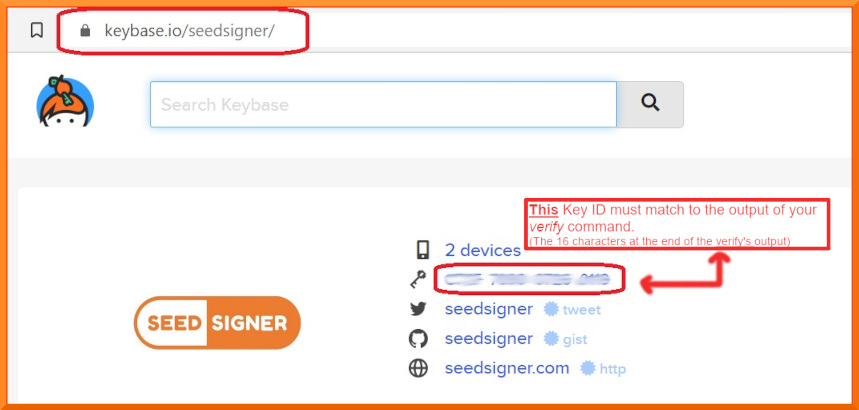
+Now to determine ***who*** the Public key ID belongs to: Goto [Keybase.io/SeedSigner](https://keybase.io/seedsigner)
+<BR>
+
+
+
+
+**You must now *manually* compare: The 16 character fingerprint ID (as circled in red above) to, those *rightmost* 16 characters from your *verify* command.**
+
+**If they match exactly, then you have successfully confirmed that your .sig file is authentically from the SeedSigner Project!**
+<BR>
+
+<details><summary>Learn more about how keybase.io helps you check that someone (online) is who they say they are:</summary>
+<p>
+Keybase.io allows you to independently verify that the public key saved on Keybase.io, is both authentic and that it belongs to the organization it claims to represent.
+ Keybase has already checked the three pubkey file locations cryptographically when they were saved there. You can further verify the key publications if you would like:
+
+ - *via Keybase*: By clicking on any of the three blue badges to see that the "proof" was published at that location. (The blue badge marked as tweet, is in the most human-readable form and it is also a bi-directional link on Twitter)
+or,
+ - *without keybase (out-of-band)*: By using these 3 links directly: [Twitter](https://twitter.com/SeedSigner/status/1530555252373704707), [Github](https://gist.github.com/SeedSigner/5936fa1219b07e28a3672385b605b5d2) and [SeedSigner.com](https://seedsigner.com/keybase.txt). This method can be used if you would like to make an even deeper, independent inspection without relying on Keybase at all, or if the Keybase.io site is no longer valid or it is removed entirely.
+
+Once you have used one of these methods, you will know if the Public Key stored on Keybase, is genuinely from the SeedSinger Project or not.
+</p>
+</details>
+<br>
+
+If the two ID's do *not* match, then you must stop here immediately. Do not continue. Contact us for assistance in the Telegram group address above.
+
+<br>
+
+### Step 2. Verifying that the *software images/binaries* are genuine
+
+Now that you have confirmed that you do have the real SeedSigner Project's Public Key (ie the 16 characters match) - you can return to your terminal window. Running the *shasum* command, is the final verification step and will confirm (via file hashing) that the software code/image files, were also not altered since publication, or even during your download process.
+(Prior to version 0.6.0 , your verify command will check the .zip file which contains the binary files.)
+
+ **On Linux or OSX:** Run this command
+```
+shasum -a 256 --ignore-missing --check seedsigner.0.8.5.sha256.txt
+```
+
+**On Windows (inside Powershell):** Run this command
+```
+CertUtil -hashfile seedsigner_os.0.8.5.Insert_Your_Pi_Models_binary_here_For_Example_pi02w.img SHA256
+```
+On Windows, you must then manually compare the resulting file hash value to the corresponding hash value shown inside the .SHA256 cleartext file.
+ <BR>
+
+Wait up to 30 seconds for the command to complete, and it should display:
+```
+seedsigner_os.0.8.5.[Your_Pi_Model_For_Example:pi02w].img: OK
+```
+**If you receive the "OK" message** for your **seedsigner_os.0.8.5.[Your_Pi_Model_For_Example:pi02w].img file**, as shown above, then your verification is fully complete!
+**All of your downloaded files have now been confirmed as both authentic and unaltered!** You can proceed to create/write your MicroSD card😄😄 !!
+
+If your file result shows "FAILED", then you must stop here immediately. Do not continue. Contact us for assistance at the Telegram group address above.
+
+<BR>
+
+Please recognize that this process can only validate the software to the extent that the entity that first published the key is an honest actor, and their private key is not compromised or somehow being used by a malicious actor.
+<BR>
+<BR>
+
+
+## Writing the software onto your MicroSD card
+
+To write the SeedSigner software onto your MicroSD card, there are a few options available:
+| Application | Description | Platform and official Source |
+|--------------------------|--------------------------------------------------------------------------------------------------------------------------------------------------------------|--------------------------------------------------------------------------------------|
+| Balena Etcher | The application is called Etcher, and the company that wrote it is called Balena. Hence *Etcher by Balena* or *Balena Etcher* | [Available for Windows, Mac and Linux](https://www.balena.io/etcher#download-etcher) |
+| Raspberry Pi Imager | Produced by the Raspberry Pi organization. | [Available for Windows, Mac and Linux](https://www.raspberrypi.com/software/) |
+| DD Command Line Utility | Built-in to Linux and MacOS, the DD (Data Duplicator) is a tool for advanced users. If not used carefully it can accidentally format the incorrect disk! | Built-in to Linux and MacOS |
+
+Be sure to download the software from the genuine publisher.
+Either of the Etcher or Pi Imager software is recommended. Some SeedSigner users have reported a better experience with one or the other. So, if the one application doesn’t work well for your particular machine, then please try the other one.
+<BR>
+### **General Considerations:**
+The writing and verify steps are very quick from version 0.6.0 upwards, so please pay close attention to your screen.
+Make sure to set any write-protection physical slider on the MicroSD Card Adapter to UN-locked.
+You also don’t need to pre-format the MicroSD beforehand. You *dont* need to unzip any .zip file beforehand.
+Current Etcher and Pi Imager software will perform a verify action (by default) to make sure the card was written successfully! Watching for that verify step to complete successfully, can save you a lot of headaches if you later need to troubleshoot issues where your SeedSigner device doesn’t boot up at power on.
+Writing the MicroSd card is also known as flashing.
+It will overwrite everything on the MicroSD card.
+If the one application fails for you, then please try again using our other recommended application.
+Advanced users may want to try the Linux/MacOS *DD* command instead of using Etcher or Pi Imager, however, a reminder is given that DD can overwrite the wrong disk if you are not careful !
+#### **Specific considerations for Windows users:**
+Use the Pi imager software as your first choice on Windows. Windows can sometimes flag the writing of a MicroSD as risky behaviour and hence it may prevent this activity. If this happens, your writing/flashing will fail, hang or wont even begin, in which case you should to try to run the Etcher/Pi-Imager app "As administrator", (right-click and choose that option). It can also be blocked by windows security in some cases, so If you have the (non-default) *Controlled Folder Access* option set to active, try turning that *off* temporarily.
+
+
+
+
+---------------
+
+# Enclosure Designs
+
+### Open Pill
+
+The Open Pill enclosure design is all about quick, simple and inexpensive depoloyment of a SeedSigner device. The design does not require any additional hardware and can be printed using a standard FDM 3D printer in about 2 hours, no supports necessary. A video demonstrating the assembly process can be found [here](https://youtu.be/gXPFJygZobEa). To access the design file and printable model, click [here](https://github.com/SeedSigner/seedsigner/tree/main/enclosures/open_pill).
+
+### Orange Pill
+
+The Orange Pill enclosure design offers a more finished look that includes button covers and a joystick topper. You'll also need the following additional hardware to assemble it:
+
+* 4 x F-F M2.5 spacers, 10mm length
+* 4 x M2.5 pan head screws, 6mm length
+* 4 x M2.5 pan head screws, 12mm length
+
+The upper and lower portions of the enclosure can be printed using a standard FDM 3D printer, no supports necessary. The buttons and joystick nub should ideally be produced with a SLA/resin printer. An overview of the entire assembly process can be found [here](https://youtu.be/aIIc2DiZYcI). To access the design files and printable models, click [here](https://github.com/SeedSigner/seedsigner/tree/main/enclosures/orange_pill).
+
+### Community Designs
+
+* [Lil Pill](https://cults3d.com/en/3d-model/gadget/lil-pill-seedsigner-case) by @_CyberNomad
+* [OrangeSurf Case](https://github.com/orangesurf/orangesurf-seedsigner-case) by @OrangeSurfBTC
+* [PS4 SeedSigner](https://www.thingiverse.com/thing:5363525) by @Silexperience
+* [OpenPill Faceplate](https://www.printables.com/en/model/179924-seedsigner-open-pill-cover-plates-digital-cross-jo) by @Revetuzo
+* [Waveshare CoverPlate](https://cults3d.com/en/3d-model/various/seedsigner-coverplate-for-waveshare-1-3-inch-lcd-hat-with-240x240-pixel-display) by @Adathome1
+
+---------------
+
+# SeedQR Printable Templates
+You can use SeedSigner to export your seed to a hand-transcribed SeedQR format that enables you to instantly load your seed back into SeedSigner.
+
+[More information about SeedQRs](docs/seed_qr/README.md)
+
+<table align="center">
+ <tr><td><img src="docs/seed_qr/img/handmade_qr.jpg"></td></tr>
+</table>
+
+Standard SeedQR templates:
+* [12-word SeedQR template dots (25x25)](docs/seed_qr/printable_templates/dots_25x25.pdf)
+* [24-word SeedQR template dots (29x29)](docs/seed_qr/printable_templates/dots_29x29.pdf)
+* [12-word SeedQR template grid (25x25)](docs/seed_qr/printable_templates/grid_25x25.pdf)
+* [24-word SeedQR template grid (29x29)](docs/seed_qr/printable_templates/grid_29x29.pdf)
+* [Baseball card template: 24-word SeedQR (29x29)](docs/seed_qr/printable_templates/trading_card_29x29_w24words.pdf)
+
+CompactSeedQR templates:
+* [12-word CompactSeedQR template dots (21x21)](docs/seed_qr/printable_templates/dots_21x21.pdf)
+* [24-word CompactSeedQR template dots (25x25)](docs/seed_qr/printable_templates/dots_25x25.pdf)
+* [12-word CompactSeedQR template grid (21x21)](docs/seed_qr/printable_templates/grid_21x21.pdf)
+* [24-word CompactSeedQR template grid (25x25)](docs/seed_qr/printable_templates/grid_25x25.pdf)
+* [Baseball card template: 12-word Compact SeedQR (21x21)](docs/seed_qr/printable_templates/trading_card_21x21_w12words.pdf)
+* [Baseball card template: 24-word Compact SeedQR (25x25)](docs/seed_qr/printable_templates/trading_card_25x25_w24words.pdf)
+
+
+
+2-sided SeedQR templates - 8 per sheet
+Printing settings - (2-sided)("flip on long edge")("Actual Size")
+If printing on cardstock, adjust your printer settings via its control panel
+
+A4 templates(210mm * 297mm):
+* [21x21 - stores 12-word seeds ONLY in CompactSeedQR format ONLY](docs/seed_qr/printable_templates/21x21_A4_trading_card_2sided.pdf)
+* [25x25 - stores 12-word or 24 word seeds depending on SeedQR format](docs/seed_qr/printable_templates/25x25_A4_trading_card_2sided.pdf)
+* [29x29 - stores 24-word seeds ONLY as plaintext SeedQR format ONLY](docs/seed_qr/printable_templates/29x29_A4_trading_card_2sided.pdf)
+
+Letter templates(8.5in * 11in):
+* [21x21 - stores 12-word seeds ONLY in CompactSeedQR format ONLY](docs/seed_qr/printable_templates/21x21_letter_trading_card_2sided.pdf)
+* [25x25 - stores 12-word or 24 word seeds depending on format](docs/seed_qr/printable_templates/25x25_letter_trading_card_2sided.pdf)
+* [29x29 - stores 24-word seeds ONLY as plaintext SeedQR format ONLY](docs/seed_qr/printable_templates/29x29_letter_trading_card_2sided.pdf)
+---------------
+
+# Build from Source
+See the [SeedSigner OS repo](https://github.com/SeedSigner/seedsigner-os/) for instructions.
+
+# Developer Local Build Instructions
+Raspberry Pi OS is commonly used for development. See the [Raspberry Pi OS Build Instructions](docs/raspberry_pi_os_build_instructions.md)
diff --git a/docker-compose.yml b/docker-compose.yml
new file mode 100644
index 0000000..17c4511
--- /dev/null
+++ b/docker-compose.yml
@@ -0,0 +1,10 @@
+version: '3.7'
+
+services:
+ seedsigner-dev:
+ build:
+ context: .
+ dockerfile: docker/Dockerfile
+ command: sh -c 'bash -c "docker/setup.sh"'
+ volumes:
+ - ../seedsigner:/seedsigner
\ No newline at end of file
diff --git a/docker/Dockerfile b/docker/Dockerfile
new file mode 100644
index 0000000..32a1a7c
--- /dev/null
+++ b/docker/Dockerfile
@@ -0,0 +1,20 @@
+FROM python:3.10-bullseye
+
+# install zbar dependencyy
+RUN apt-get -qq update
+RUN apt-get -y -qq install zbar-tools
+
+# temp copy requirements files to local repo to do pip3 install
+COPY ../requirements.txt /requirements.txt
+COPY ../tests/requirements.txt /tests-requirements.txt
+
+WORKDIR /
+RUN pip3 install -r requirements.txt
+RUN pip3 install -r tests-requirements.txt
+
+# clean up copied files
+RUN rm /requirements.txt
+RUN rm /tests-requirements.txt
+
+# set working dir
+WORKDIR /seedsigner
\ No newline at end of file
diff --git a/docker/setup.sh b/docker/setup.sh
new file mode 100755
index 0000000..d31b5f9
--- /dev/null
+++ b/docker/setup.sh
@@ -0,0 +1,4 @@
+#!/bin/bash
+
+pip3 install -e .
+tail -f /dev/null
\ No newline at end of file
diff --git a/docs/code_structure.md b/docs/code_structure.md
new file mode 100644
index 0000000..50b7d31
--- /dev/null
+++ b/docs/code_structure.md
@@ -0,0 +1,21 @@
+# Code Structure
+
+SeedSigner roughly follows a Model-View-Controller approach. Like in a typical web app (e.g. Flask) the `View`s can be called as needed like individual web urls. After completing display and interaction with the user, the `View` then decides where to route the user next, analogous to a web app returning a `response.redirect(url)`.
+
+The `Controller` then ends up being quite stripped down. For example, there's no need for a web app's `urls.py` since there are no mappings from url to `View` to maintain since we're not actually using a url/http routing approach.
+
+`View`s have to handle user interaction so there are `while True` loops that cycle between waiting for user input, gathering data, and then updating the UI components accordingly. You wouldn't find this kind of cycle in a web app because this sort of interactive user input is handled in the browser at the html/css/js level.
+
+
+
+* `Model`s: Store the persistent settings, the in-memory seeds, current wallet information, etc.
+* `Controller`: Manages the state of the world and controls access to global resources.
+* `View`s: Implementation of each screen. Prepares relevant data for display. Must also instantiate the display objects that will actually render the UI.
+* `gui.screens`: Re-usable formatted UI renderers.
+* `gui.components`: Basic individual UI elements that are used by the `templates` such as the top nav, buttons, button lists, text displays.
+
+In an typical webserver context the `View` would send data to an html template (e.g. Jinja) which would then dynamically populate the page with html elements like `<input>`, `<button>`, `<img>`, etc. This is analgous to our `gui.screens` constructing a UI renderer by piecing together various `gui.components` as needed.
+
+
+
+`Controller` is a global singleton that any `View` can access and update as needed.
diff --git a/docs/debug_crash.md b/docs/debug_crash.md
new file mode 100644
index 0000000..b53b6b5
--- /dev/null
+++ b/docs/debug_crash.md
@@ -0,0 +1,37 @@
+## Debugging a Crash for advanced (technical) users
+
+These instructions are intended to help users of SeedSigner provide crash exception and traceback logs to developers to aid in troubleshooting and resolving bugs.
+
+### Testnet vs Mainnet
+
+Whenever possible recreate a crash in testnet. This will help avoid accidently revealing private information about yourself, your bitcoin transactions, or lose any funds.
+
+### Network connected SeedSigner
+
+If you are using SeedSigner for development and testing, then I recommend network access via ssh to view crash logs. Follow [these](https://github.com/SeedSigner/seedsigner/blob/main/docs/usb_relay.md) instructions to setup a USB relay for internet access. You can also connect your SeedSigner to Wifi if you have a rasp pi zero w/ wifi.
+
+### Airgapped debugging setup
+
+If you are using SeedSigner for mainnet transactions, then do not connect your device to a network or the internet. Instead connect your SeedSigner to a HDMI display (without internet) and a USB keyboard. This will require an HDMI adapter and micro USB to USB A adapter. Plug in the HDMI display and keyboard before powering on SeedSigner. The password for the SeedSigner pi user is `raspberry`.
+
+### Debugging steps
+
+At this point you should be signed into the pi user either on a HDMI display (via command line) or a ssh connection.
+
+Follow these steps to setup a debug session.
+
+`cd seedsigner/src`
+
+`nano settings.ini`
+
+in nano editor change `debug = False` to `debug = True` (case sensitive). Save and exit settings.ini.
+
+stop the seedsigner systemd process by running
+
+`sudo systemctl stop seedsigner.service`
+
+now start the python app manually by running
+
+`python3 main.py`
+
+SeedSigner should now be up and running. Keep it connected to the display and keyboard. Recreate the steps to cause the crash. The traceback log and exception will be displayed on the HDMI display.
\ No newline at end of file
diff --git a/docs/developer_tips.md b/docs/developer_tips.md
new file mode 100644
index 0000000..b068e1d
--- /dev/null
+++ b/docs/developer_tips.md
@@ -0,0 +1,62 @@
+# Developer Tips
+
+### Quickly generate a new seed to test with
+Generate a new 12- or 24-word seed via [https://iancoleman.io/bip39/](https://iancoleman.io/bip39/).
+
+Access a `python3` environment that has the `embit` library installed (e.g. your own local machine, ssh into the SeedSigner, etc)
+
+Start a python REPL session by just typing: `python3`
+
+Paste in the following but insert your newly generated mnemonic:
+```
+from embit import bip39
+seed_phrase = "smoke chimney announce candy glory tongue refuse fatigue cricket once consider beef treat urge wing deny gym robot tobacco adult problem priority wheat diagram"
+data = ""
+for word in seed_phrase.split(" "):
+ index = bip39.WORDLIST.index(word)
+ data += "%04d" % index
+
+print(data)
+```
+
+For the seed in the snippet, you should see:
+```
+163803200074026607961827144306700411123603780160185419152013046908321497181700301371136719990487
+```
+
+Take the output and paste it into a [QR code generator](https://www.the-qrcode-generator.com/).
+
+Start up SeedSigner's UI to import a seed from a QR code. Scan the new QR code and you're good to go!
+
+
+# Advanced developer notes
+
+## Backup an SD card
+
+You can back up and restore any size SD card but the process is a little inefficient so the bigger the source SD card, the bigger the backup will be and the longer it'll take to create (and even longer to image back to a new SD card), even if most of the card is blank.
+
+You can restore a backup image to an SD card of the same or larger size. So it's strongly recommended to do repetitive development work on a smaller card that's easier to backup and restore. Once the image is stabilized, then write it to a bigger card, if necessary (that being said, there's really no reason to use a large SD card for SeedSigner. An 8GB SD card is more than big enough).
+
+Insert the SD card into a Mac/Linux machine and create a compressed img file.
+
+First verify the name of your SD card:
+
+```
+# Mac:
+diskutil list
+
+# Linux:
+sudo fdisk -l
+```
+
+It will most likely be `/dev/disk1` on most systems.
+
+Now we use `dd` to clone and `gzip` to compress it. Note that we reference the SD card by adding an `r` in front of the disk name. This speeds up the cloning considerably.
+
+```
+sudo dd if=/dev/rdisk1 conv=sparse bs=4m | gzip -9 > seedsigner.img.gz
+```
+
+The process should take about 15 minutes and will typically generate a roughly 1.1GB image.
+
+To restore from your backup image, just use the Raspberry Pi Imager. Remember that you can only write it to an SD card of equal or greater size than the original SD card.
diff --git a/docs/dice_verification.md b/docs/dice_verification.md
new file mode 100644
index 0000000..7e3833b
--- /dev/null
+++ b/docs/dice_verification.md
@@ -0,0 +1,274 @@
+# Verifying dice seed generation
+
+The intention of this documentation is to describe how to verify the seed generation code used in SeedSigner against other independent tools, to prove that they all generate the same results, despite them using different programming languages and code libraries.<br><br>
+As it is an important step to verify all software releases being used to ensure that the installation files downloaded have not been compromised, the same is true especially for the seed generation procedure which unknowingly might not work as expected due to bugs or even on purpose.<br><br>
+This guide describes how this can be achieved.<br><br>
+As usual: Don't Trust, Verify!<br>
+<br><br>
+**Note:**<br>
+**Do NOT use this with any seed you want to use later with real funds. This exercise is only for checking that the independent codebases get to the same end result!**<br>
+**However, if you do want to check your real seedphrases you should download the Iancoleman and/or Bitcoiner.Guide tools onto an airgapped, ephemeral computer (e.g. using tails-OS) and perform these tests on there. Destroy/abandon the TailsOS afterwards.**<br>
+**Never input seed phrases that you intend to use to store real funds onto an internet-connected computer!!!**
+<br><br><br>
+
+## 99 Dice Rolls / 24 Seed Words Example
+
+The following 99 dice roll results are used in the verification steps as an example for a 24 words seed:<br>
+> 655152231316521321611331544441236164664431121534415633526456254462245546236542364246312613322234612
+
+The corresponding 24 seed words are:<br>
+> eyebrow obvious such suggest poet seven breeze blame virtual frown dynamic donor harsh pigeon express broccoli easy apology scatter force recipe shadow claim radio
+
+(Scroll down near the end to see result values for a 50 dice rolls / 12 seed words example)
+<br><br><br>
+
+## Creating seed via Dice rolls in SeedSigner (here v0.6.0)
+
+First we create a new seed based on dice rolls in SeedSigner:<br><br>
+Power on your SeedSigner, go to the 'Tools' menu and select 'New Seed' (with the dice symbols):<br>
+<img src="img/dicedoc/sesi_tools_dice_seed.png" width="600">
+
+Select '24 words (99 rolls)' and on the next screen enter the dice numbers one after another:<br>
+<img src="img/dicedoc/sesi_dice_1.png" width="600">
+
+Go on until the end (99 dice roll numbers):<br>
+<img src="img/dicedoc/sesi_dice_2.png" width="600">
+
+After that the 24 seed words are shown (in 6 screens of 4 words each):<br>
+<img src="img/dicedoc/sesi_seed_1.png" width="600">
+<br>**.....**<br>
+<img src="img/dicedoc/sesi_seed_2.png" width="600">
+
+The fingerprint for this seed is:<br>
+<img src="img/dicedoc/sesi_finger_print.png" width="600">
+<br><br><br>
+Having now created a dice-based seed in the SeedSigner, we will go on to compare those details to what appears in the:
+* Sparrow desktop wallet software
+* Ian Coleman's Mnemonic Code Converter website
+* Seed Tool website
+
+We will create a wallet to have the complete zpub and receive/change addresses to check against the two web pages.<br>
+SeedSigner currently supports BlueWallet, Nunchuk, Sparrow and Specter Desktop. Here we will use Sparrow wallet as an example.<br>
+
+Keep the SeedSigner open and the newly created seed still loaded as we will need it in the next step.
+<br><br><br>
+
+## Create new wallet from seed in Sparrow Wallet to see xpub/zpub and addresses
+
+Go to https://www.sparrowwallet.com/download/ and download the release version supported by your operating system.<br><br>
+Open Sparrow Wallet, go to 'File' menu and select 'New Wallet'. Enter a name (e.g. test), and click 'Create Wallet'.<br><br>
+Click 'Airgapped Hardware Wallet' (1) and click on the 'Scan' button in the SeedSigner entry (2) which will open the camera scan screen:<br>
+<kbd><img src="img/dicedoc/sparrow_wallet_1.png"></kbd>
+
+On SeedSigner go to the seed just created and click 'Export Xpub':<br>
+<img src="img/dicedoc/sesi_export_xpub_1.png" width="600">
+
+Follow these menu entries in SeedSigner:<br>
+> Export Xpub --> Single Sig --> Native Segwit --> Sparrow<br>
+
+<img src="img/dicedoc/sesi_export_xpub_2.png" width="600">
+
+Click 'Export Xpub' and SeedSigner will show an animated QR code to be scanned in Sparrow Wallet (where we are still in the wallet creation).<br>
+Scan the QR code SeedSigner is showing in Sparrow Wallet.<br><br>
+The wallet has now been created in Sparrow. Click 'Apply' button to finalize. The wallet's settings screen now looks like this:<br>
+<kbd><img src="img/dicedoc/sparrow_wallet_2.png"></kbd>
+
+We will later use this to verify: (1) fingerprint, (2) zpub (click this button to switch between xpub and zpub!) and (3) addresses on the 'Addresses' tab.
+<br><br><br>
+
+## Verifying with Ian Coleman BIP39 website
+
+Go to https://iancoleman.io/bip39 and check 'Show entropy details' (1):<br>
+<kbd><img src="img/dicedoc/coleman_entropy.png"></kbd>
+
+<br>
+Make sure to check (1) 'Hex' and (2) '24 Words' as 'Mnemonic Length'.<br>
+(Do not use 'dice' format because dice 6 will be replaced by 0).<br>
+Then enter the 99 dices numbers in (3). The corresponding seed words are shown in (4):<br>
+<kbd><img src="img/dicedoc/coleman_verify.png"></kbd>
+<br><br>
+The 24 seed words are the same in SeedSigner and the Ian Coleman tool.
+<br><br>
+
+### Verification of (1) fingerprint, (2) zpub and (3) generated addresses
+**Fingerprint:**<br>
+Fingerprint is not shown in the Ian Coleman tool (so cannot be verified here)
+<br><br>
+**Zpub:**<br>
+Scroll down to the 'Derivation Path' section, click on the 'BIP84' tab (1) and find the zpub in (2):
+<kbd><img src="img/dicedoc/coleman_zpub.png"></kbd><br><br>
+Compare to zpub in Sparrow:<br>
+<kbd><img src="img/dicedoc/sparrow_zpub.png"></kbd>
+<br>
+
+Zpub is the same as shown in SeedSigner and Sparrow wallet.
+<br><br>
+**Addresses:**<br>
+Scroll down to the 'Derived Addresses' section and compare the receive addresses to the ones generated in Sparrow ('Addresses' tab of the wallet):
+<kbd><img src="img/dicedoc/coleman_addresses.png"></kbd>
+<br>
+
+Check that the receive addresses all match.<br><br>
+To verify the change addresses, change 'External / Internal' to 1 (1):
+<kbd><img src="img/dicedoc/coleman_change_addresses_1.png"></kbd><br><br>
+Compare the change addresses to the ones generated in Sparrow ('Addresses' tab of the wallet):
+<kbd><img src="img/dicedoc/coleman_change_addresses_2.png"></kbd>
+<br>
+
+Check that the change addresses all match.
+<br><br><br>
+
+## Verifying with Seed Tool website
+
+Go to https://bitcoiner.guide/seed/ and click on 'Seed Generation Input' (1):<br>
+<kbd><img src="img/dicedoc/seedtool_1.png"></kbd>
+
+Then click on the 'Show the Entropy Section' tab (1):<br>
+<kbd><img src="img/dicedoc/seedtool_2.png"></kbd>
+
+Enter the 99 dice numbers in (1), in (2) change back to 'Hex', check that (3) is still '24 Words' and the calculated seed words are shown in (4):<br>
+<kbd><img src="img/dicedoc/seedtool_3.png"></kbd>
+
+Seed words shown are the same as in SeedSigner and the Ian Coleman web tool seen before.
+<br><br>
+
+### Verification of (1) fingerprint, (2) zpub and (3) generated addresses
+
+**Fingerprint:**<br>
+Fingerprint can be seen here (1): <br>
+<kbd><img src="img/dicedoc/seedtool_fingerprint.png"></kbd><br><br>
+**Zpub:**<br>
+Scroll down to the 'Derived Addresses' section (1), click on it, make sure that '84' is selected for 'Purpose' (2) and check the zpub at (3):<br>
+<kbd><img src="img/dicedoc/seedtool_zpub.png"></kbd><br><br>
+Compare to zpub in Sparrow:<br>
+<kbd><img src="img/dicedoc/sparrow_zpub.png"></kbd>
+<br>
+
+Zpub is the same as shown in SeedSigner, Sparrow and Ian Colemand tool.
+<br><br>
+**Addresses:**<br>
+Scroll down a little bit where the receive addresses are shown and compare to the ones generated in Sparrow ('Addresses' tab of the wallet):<br>
+<kbd><img src="img/dicedoc/seedtool_addresses.png"></kbd>
+<br>
+
+Check that the receive addresses all match.<br><br>
+To verify the change addresses, change the 'Receive/Change' dropdown box to '1 (Change)' (1):
+<kbd><img src="img/dicedoc/seedtool_change_addresses_1.png"></kbd><br><br>
+Compare the change addresses to the ones generated in Sparrow ('Addresses' tab of the wallet):
+<kbd><img src="img/dicedoc/seedtool_change_addresses_2.png"></kbd>
+<br>
+
+Check that the change addresses all match.
+<br><br><br>
+
+## 50 Dice Rolls / 12 Seed Words Example
+
+SeedSigner supports the creation of mnenomic seeds both with 12 or 24 seed words corresponding to 50 or 99 dice rolls. Below are some example result values for using 50 dice rolls only.<br><br>
+All the steps shown can be executed the same way, just select the '12 words (50 rolls)' option in SeedSigner and change the 'Mnenomic Length' dropdown boxes in both web tools to '12 Words'.<br><br>
+
+50 dice roll results as an example for a 12 words seed:<br>
+> 65515223131652132161133154444123616466443112153441
+
+The corresponding 12 seed words are:<br>
+> hole luggage safe present express tragic orbit shed switch metal identify path
+
+Fingerprint:<br>
+> 8d9cced8
+
+Zpub:<br>
+> zpub6qf9ziL759pzyhKMWaPfNSiCETkoA6oq3fbCDvXqcURiMtPnkEg3nH93W5mrSkvGPoJC9xTYZheYDsYoiYc5AkSk9iY3DkCJHkFgHMdijW6
+
+Addresses:<br>
+Receive:<br>
+> bc1q00lln3r4mt4uwvg7mxv96xgpewauwmggkex2ff<br>
+> bc1q0jj2cv965f3642mv4lgq5za80jtfpkd0jhjefr<br>
+> bc1qpecssejm2678v0rknk9tsxd5fsshezfr0vr5m5<br>
+> bc1qcsl37xn5rkfz8qhcfwq5u52acxecyyfz0kv4gh<br>
+> bc1q8ehx53re0wck4m9tzek8mlnctp2ztm7jq94zm4<br>
+> ...<br>
+
+Change:<br>
+> bc1qz0ckhg3m349qpmweyn5v6r6tvx2wfw4nv8h75q<br>
+> bc1qme5tu2t424ws3z69u445q0yw88vpc7fwygra4r<br>
+> bc1qznuyuc087ky7fhv4nvlmll4p586ks4ggcyt36d<br>
+> bc1qjcqxv22j0g00pehruwwh34sw5znu6vp3myaspy<br>
+> bc1q6dpfl7czd22wt0max6p09vr6lvvpag7xw9u8lc<br>
+> ...
+
+<br><br>
+## Conclusion
+
+What did we achieve now?<br>
+
+We created a dice-based seed in SeedSigner and set up a wallet using this seed in Sparrow wallet (as this is what a seed is used for).<br><br>
+We double-checked in two different web tools implementing different methods for seed creation that what SeedSigner generates perfectly matches up with what the other tools calculate based on the same dice entropy used.<br>
+
+So congratulations if the fingerprints, zpubs and addresses all match up in your example so you can be much more confident that nothing is wrong with your generated seed.
+
+---
+
+# Command Line Tool
+_(for more advanced/python-savvy users)_
+
+Run the exact same SeedSigner mnemonic generation code from the command line to quickly test and externally verify the results.
+
+Create a python virtualenv (out of the scope of this doc) and install dependencies:
+```bash
+pip3 install embit
+
+# Install the main project code to make it importable
+pip3 install -e .
+```
+
+
+Then run the utility script with `-h` to view the usage instructions:
+```bash
+cd tools
+python3 mnemonic.py -h
+```
+
+```
+ Verify SeedSigner's dice rolls and coin flip entropy-to-mnemonic conversion via this tool.
+
+ Compare its results against iancoleman.io/bip39 and bitcoiner.guide/seed
+
+ Usage:
+ # 50 dice rolls / 12-word mnemonic
+ python3 mnemonic.py dice 5624433434...
+
+ # 99 dice rolls / 24-word mnemonic
+ python3 mnemonic.py dice 6151463561...
+
+ # 50 dice rolls, entered as 0-5 / 12-word mnemonic
+ python3 mnemonic.py --zero-indexed-dice dice 5135535514...
+
+ # 128 coin flips / 12-word mnemonic
+ python3 mnemonic.py coins 1111100111...
+
+ # 256 coin flips / 24-word mnemonic
+ python mnemonic.py coins 0010111010...
+
+ # GENERATE 50 random dice rolls / 12-word mnemonic
+ python3 mnemonic.py dice rand12
+
+ # GENERATE 99 random dice rolls / 24-word mnemonic
+ python3 mnemonic.py dice rand24
+
+ # GENERATE 99 random dice rolls, entered as 0-5 / 24-word mnemonic
+ python3 mnemonic.py --zero-indexed-dice dice rand24
+
+ # GENERATE 128 random coin flips / 12-word mnemonic
+ python3 mnemonic.py coins rand12
+
+ # GENERATE 256 random coin flips / 24-word mnemonic
+ python3 mnemonic.py coins rand24
+```
+
+### How to get the same results in iancoleman.io
+Always specify your expected length in the "Mnemonic Length" droplist (defaults to "Use Raw Entropy (3 words per 32 bits)").
+
+Dice Rolls: Do NOT use the "Dice [1-6]" option; select "Base 10 [0-9]" or "Hex [0-9A-F]"
+
+Zero-indexed dice rolls: Select "Base 6 [0-5]", "Base 10 [0-9]", or "Hex [0-9A-F]"
+
+Coin Flips: Select "Binary [0-1]", "Base 6 [0-5]", "Base 10 [0-9]", or "Hex [0-9A-F]"
diff --git a/docs/electrum.md b/docs/electrum.md
new file mode 100644
index 0000000..6c07ca3
--- /dev/null
+++ b/docs/electrum.md
@@ -0,0 +1,15 @@
+# SeedSigner Electrum seed phrase support
+
+SeedSigner supports loading of [Electrum's Segwit seed phrases](https://electrum.readthedocs.io/en/latest/seedphrase.html#electrum-seed-version-system). This is considered an Advanced feature that is disabled by default.
+
+To load an Electrum Segwit seed phrase, first enable Electrum seed support in Settings -> Advanced -> Electrum seed support. After this option is enabled, the user will now be able to enter an Electrum seed phrase by selecting "Enter Electrum seed" in the Load Seed screen.
+
+Some SeedSigner functionality is deliberately disabled when using an Electrum mnemonic:
+
+- BIP-85 child seeds
+ - Not applicable for Electrum seed types
+- SeedQR backups
+ - Since Electrum seeds are not supported by other SeedQR implementations, it would be dangerous to use SeedQR as a backup tool for Electrum seeds and is thus disabled
+- Custom derivations
+ - Hard coded derivation path and script types in SeedSigner to match Electrum wallet software. These are m/0h for single sig and m/1h for multisig
+ - User-chosen custom derivations are thus not supported for Electrum seeds
diff --git a/docs/feature_roadmap.md b/docs/feature_roadmap.md
new file mode 100644
index 0000000..2406eb1
--- /dev/null
+++ b/docs/feature_roadmap.md
@@ -0,0 +1,70 @@
+# Feature Roadmap
+
+Current focus: v0.5.0 preview releases.
+
+*Note: It may or may not make sense to do minor bugfix preview releases along the way (e.g. 1.0 -> 1.1).*
+
+
+## v0.5.0 Pre-Release 1.x
+* Scan SeedQR / CompactSeedQR
+* Add/Edit passphrase
+* View seed words w/configurable warnings
+* Export xpub w/configurable warnings and flow determined by Settings
+* Scan PSBT
+* Full PSBT review screens
+* "Full Spend" (no change) warning
+* Fully verify PSBT change addrs
+* Send signed PSBT via QR
+* QR display dimming/brightness UP/DOWN
+* Subset of configurable Settings; persistent Settings storage
+* SettingsQR integration proof-of-concept
+
+Screens will be functional but not necessarily in their final presentation state (icons, text, positioning, etc).
+
+
+## v0.5.0 Pre-Release 2.x
+* Existing screen refinement (visual presentation, text, etc)
+* Create new seed via image entropy
+* Manual mnemonic seed word entry
+* 12th/24th word calc
+* SeedQR/CompactSeedQR manual transcription UI w/configurable UI style (dots vs grid)
+* Single sig address scan and verification
+* SettingsQR standalone UI refinement
+* Fix broken tests
+* All GUI Components support scrollable Screens
+
+
+## v0.5.0 Pre-Release 3.x
+* Settings: I/O Test
+* Create new seed via dice rolls
+* Custom derivation paths in xpub export flow
+* QR display dimming/brightness, framerate, density(?) controls in transparent overlay
+* HRF partner logo on startup
+* Improve test suite coverage
+* Further existing screen refinement
+* "Final" bugfixes
+
+
+## Initial v0.5.0 Release
+All of the above!
+
+
+## Beyond v0.5.0
+These features will not be included in the initial v0.5.0 release and will have varying degrees of priority for subsequent releases (or possibly not at all).
+
+* Multisig wallet descriptor QR scan(?) and addr verification(?)
+* Sign taproot txs
+* Multi-language support (Transifex free for open source projects)
+* Multisig: sign PSBT with multiple keys at once.
+* Custom OS, possibly with swappable SD card PSBT and multisig wallet descriptor storage
+* Decoy game mode at launch (Snake, Tetris, Sudoku...?)
+* BIP-39 wordlists in additional languages
+* Address message signing
+* UI color scheme customization
+* Specify missing entropy for 12th/24th word calc
+
+
+# v0.6 and Beyond...?
+* Alternate hardware profile / touchscreen
+* PGP signer
+* Liquid?
diff --git a/docs/img/Mini_Pill_Main_Photo.jpg b/docs/img/Mini_Pill_Main_Photo.jpg
new file mode 100644
index 0000000..bf52af8
Binary files /dev/null and b/docs/img/Mini_Pill_Main_Photo.jpg differ
diff --git a/docs/img/Open_Pill_Mini_Models.JPG b/docs/img/Open_Pill_Mini_Models.JPG
new file mode 100644
index 0000000..47f69a8
Binary files /dev/null and b/docs/img/Open_Pill_Mini_Models.JPG differ
diff --git a/docs/img/Open_Pill_Mini_w_Faceplate.JPG b/docs/img/Open_Pill_Mini_w_Faceplate.JPG
new file mode 100644
index 0000000..68a9cef
Binary files /dev/null and b/docs/img/Open_Pill_Mini_w_Faceplate.JPG differ
diff --git a/docs/img/Open_Pill_Models.JPG b/docs/img/Open_Pill_Models.JPG
new file mode 100644
index 0000000..f687faa
Binary files /dev/null and b/docs/img/Open_Pill_Models.JPG differ
diff --git a/docs/img/Open_Pill_Star.JPG b/docs/img/Open_Pill_Star.JPG
new file mode 100644
index 0000000..d42d2b9
Binary files /dev/null and b/docs/img/Open_Pill_Star.JPG differ
diff --git a/docs/img/Open_Pill_w_Comfort_Joystick.png b/docs/img/Open_Pill_w_Comfort_Joystick.png
new file mode 100644
index 0000000..c4d21f7
Binary files /dev/null and b/docs/img/Open_Pill_w_Comfort_Joystick.png differ
diff --git a/docs/img/OrangePillMini_Thumb.jpg b/docs/img/OrangePillMini_Thumb.jpg
new file mode 100644
index 0000000..a31293c
Binary files /dev/null and b/docs/img/OrangePillMini_Thumb.jpg differ
diff --git a/docs/img/Orange_Pill.JPG b/docs/img/Orange_Pill.JPG
new file mode 100644
index 0000000..d1b1271
Binary files /dev/null and b/docs/img/Orange_Pill.JPG differ
diff --git a/docs/img/Orange_Pill_Models.JPG b/docs/img/Orange_Pill_Models.JPG
new file mode 100644
index 0000000..40a5015
Binary files /dev/null and b/docs/img/Orange_Pill_Models.JPG differ
diff --git a/docs/img/Rugged_Pill_Thumb.jpg b/docs/img/Rugged_Pill_Thumb.jpg
new file mode 100644
index 0000000..d40b878
Binary files /dev/null and b/docs/img/Rugged_Pill_Thumb.jpg differ
diff --git a/docs/img/Simple_Pill_Models.JPG b/docs/img/Simple_Pill_Models.JPG
new file mode 100644
index 0000000..5a4a36f
Binary files /dev/null and b/docs/img/Simple_Pill_Models.JPG differ
diff --git a/docs/img/dice_entr.png b/docs/img/dice_entr.png
new file mode 100644
index 0000000..e9a70f2
Binary files /dev/null and b/docs/img/dice_entr.png differ
diff --git a/docs/img/dice_pic1.png b/docs/img/dice_pic1.png
new file mode 100644
index 0000000..58496d8
Binary files /dev/null and b/docs/img/dice_pic1.png differ
diff --git a/docs/img/dice_pic2.png b/docs/img/dice_pic2.png
new file mode 100644
index 0000000..c568a92
Binary files /dev/null and b/docs/img/dice_pic2.png differ
diff --git a/docs/img/dice_pic3.png b/docs/img/dice_pic3.png
new file mode 100644
index 0000000..e258a0a
Binary files /dev/null and b/docs/img/dice_pic3.png differ
diff --git a/docs/img/dice_type.png b/docs/img/dice_type.png
new file mode 100644
index 0000000..463ec76
Binary files /dev/null and b/docs/img/dice_type.png differ
diff --git a/docs/img/dicedoc/coleman_addresses.png b/docs/img/dicedoc/coleman_addresses.png
new file mode 100644
index 0000000..e9200e9
Binary files /dev/null and b/docs/img/dicedoc/coleman_addresses.png differ
diff --git a/docs/img/dicedoc/coleman_change_addresses_1.png b/docs/img/dicedoc/coleman_change_addresses_1.png
new file mode 100644
index 0000000..d1c62cd
Binary files /dev/null and b/docs/img/dicedoc/coleman_change_addresses_1.png differ
diff --git a/docs/img/dicedoc/coleman_change_addresses_2.png b/docs/img/dicedoc/coleman_change_addresses_2.png
new file mode 100644
index 0000000..f809cb8
Binary files /dev/null and b/docs/img/dicedoc/coleman_change_addresses_2.png differ
diff --git a/docs/img/dicedoc/coleman_entropy.png b/docs/img/dicedoc/coleman_entropy.png
new file mode 100644
index 0000000..8f9ad7f
Binary files /dev/null and b/docs/img/dicedoc/coleman_entropy.png differ
diff --git a/docs/img/dicedoc/coleman_verify.png b/docs/img/dicedoc/coleman_verify.png
new file mode 100644
index 0000000..c976fe3
Binary files /dev/null and b/docs/img/dicedoc/coleman_verify.png differ
diff --git a/docs/img/dicedoc/coleman_zpub.png b/docs/img/dicedoc/coleman_zpub.png
new file mode 100644
index 0000000..f69e3e9
Binary files /dev/null and b/docs/img/dicedoc/coleman_zpub.png differ
diff --git a/docs/img/dicedoc/seedtool_1.png b/docs/img/dicedoc/seedtool_1.png
new file mode 100644
index 0000000..2b4ed01
Binary files /dev/null and b/docs/img/dicedoc/seedtool_1.png differ
diff --git a/docs/img/dicedoc/seedtool_2.png b/docs/img/dicedoc/seedtool_2.png
new file mode 100644
index 0000000..6c4f252
Binary files /dev/null and b/docs/img/dicedoc/seedtool_2.png differ
diff --git a/docs/img/dicedoc/seedtool_3.png b/docs/img/dicedoc/seedtool_3.png
new file mode 100644
index 0000000..cc52e85
Binary files /dev/null and b/docs/img/dicedoc/seedtool_3.png differ
diff --git a/docs/img/dicedoc/seedtool_addresses.png b/docs/img/dicedoc/seedtool_addresses.png
new file mode 100644
index 0000000..8c6cfc3
Binary files /dev/null and b/docs/img/dicedoc/seedtool_addresses.png differ
diff --git a/docs/img/dicedoc/seedtool_change_addresses_1.png b/docs/img/dicedoc/seedtool_change_addresses_1.png
new file mode 100644
index 0000000..9f2e7eb
Binary files /dev/null and b/docs/img/dicedoc/seedtool_change_addresses_1.png differ
diff --git a/docs/img/dicedoc/seedtool_change_addresses_2.png b/docs/img/dicedoc/seedtool_change_addresses_2.png
new file mode 100644
index 0000000..99c4118
Binary files /dev/null and b/docs/img/dicedoc/seedtool_change_addresses_2.png differ
diff --git a/docs/img/dicedoc/seedtool_fingerprint.png b/docs/img/dicedoc/seedtool_fingerprint.png
new file mode 100644
index 0000000..c1ef3b0
Binary files /dev/null and b/docs/img/dicedoc/seedtool_fingerprint.png differ
diff --git a/docs/img/dicedoc/seedtool_zpub.png b/docs/img/dicedoc/seedtool_zpub.png
new file mode 100644
index 0000000..e43a38a
Binary files /dev/null and b/docs/img/dicedoc/seedtool_zpub.png differ
diff --git a/docs/img/dicedoc/sesi_dice_1.png b/docs/img/dicedoc/sesi_dice_1.png
new file mode 100644
index 0000000..b85f7a6
Binary files /dev/null and b/docs/img/dicedoc/sesi_dice_1.png differ
diff --git a/docs/img/dicedoc/sesi_dice_2.png b/docs/img/dicedoc/sesi_dice_2.png
new file mode 100644
index 0000000..4c73d96
Binary files /dev/null and b/docs/img/dicedoc/sesi_dice_2.png differ
diff --git a/docs/img/dicedoc/sesi_export_xpub_1.png b/docs/img/dicedoc/sesi_export_xpub_1.png
new file mode 100644
index 0000000..601b7aa
Binary files /dev/null and b/docs/img/dicedoc/sesi_export_xpub_1.png differ
diff --git a/docs/img/dicedoc/sesi_export_xpub_2.png b/docs/img/dicedoc/sesi_export_xpub_2.png
new file mode 100644
index 0000000..f43eea5
Binary files /dev/null and b/docs/img/dicedoc/sesi_export_xpub_2.png differ
diff --git a/docs/img/dicedoc/sesi_finger_print.png b/docs/img/dicedoc/sesi_finger_print.png
new file mode 100644
index 0000000..de15f02
Binary files /dev/null and b/docs/img/dicedoc/sesi_finger_print.png differ
diff --git a/docs/img/dicedoc/sesi_seed_1.png b/docs/img/dicedoc/sesi_seed_1.png
new file mode 100644
index 0000000..7693d67
Binary files /dev/null and b/docs/img/dicedoc/sesi_seed_1.png differ
diff --git a/docs/img/dicedoc/sesi_seed_2.png b/docs/img/dicedoc/sesi_seed_2.png
new file mode 100644
index 0000000..87b2f13
Binary files /dev/null and b/docs/img/dicedoc/sesi_seed_2.png differ
diff --git a/docs/img/dicedoc/sesi_tools_dice_seed.png b/docs/img/dicedoc/sesi_tools_dice_seed.png
new file mode 100644
index 0000000..1eeec19
Binary files /dev/null and b/docs/img/dicedoc/sesi_tools_dice_seed.png differ
diff --git a/docs/img/dicedoc/sparrow_wallet_1.png b/docs/img/dicedoc/sparrow_wallet_1.png
new file mode 100644
index 0000000..02d24af
Binary files /dev/null and b/docs/img/dicedoc/sparrow_wallet_1.png differ
diff --git a/docs/img/dicedoc/sparrow_wallet_2.png b/docs/img/dicedoc/sparrow_wallet_2.png
new file mode 100644
index 0000000..cf459a4
Binary files /dev/null and b/docs/img/dicedoc/sparrow_wallet_2.png differ
diff --git a/docs/img/dicedoc/sparrow_zpub.png b/docs/img/dicedoc/sparrow_zpub.png
new file mode 100644
index 0000000..ccd22ab
Binary files /dev/null and b/docs/img/dicedoc/sparrow_zpub.png differ
diff --git a/docs/img/legacy_hardware_remapped_pins.jpg b/docs/img/legacy_hardware_remapped_pins.jpg
new file mode 100644
index 0000000..f6af8b4
Binary files /dev/null and b/docs/img/legacy_hardware_remapped_pins.jpg differ
diff --git a/docs/img/legacy_hardware_remapped_pins_photo.jpg b/docs/img/legacy_hardware_remapped_pins_photo.jpg
new file mode 100644
index 0000000..a7abccc
Binary files /dev/null and b/docs/img/legacy_hardware_remapped_pins_photo.jpg differ
diff --git a/docs/img/logo.svg b/docs/img/logo.svg
new file mode 100644
index 0000000..1b94c14
--- /dev/null
+++ b/docs/img/logo.svg
@@ -0,0 +1,203 @@
+<?xml version="1.0" encoding="utf-8"?>
+<!-- Generator: Adobe Illustrator 24.1.2, SVG Export Plug-In . SVG Version: 6.00 Build 0) -->
+<svg version="1.1" id="Layer_1" xmlns="http://www.w3.org/2000/svg" xmlns:xlink="http://www.w3.org/1999/xlink" x="0px" y="0px"
+ viewBox="0 0 1080 1080" style="enable-background:new 0 0 1080 1080;" xml:space="preserve">
+<style type="text/css">
+ .st0{fill:#FF7300;}
+ .st1{fill:#FFFFFF;}
+</style>
+<g>
+ <path class="st0" d="M569.64,542.84c2.02,3.52,3.02,7.85,3.02,12.98s-1.02,9.66-3.08,13.57c-2.05,3.91-4.74,6.93-8.06,9.06
+ c-6.4,4.19-13.23,6.28-20.5,6.28c-3.71,0-7.22-0.45-10.54-1.36c-3.32-0.91-6.01-2.03-8.06-3.38c-4.19-2.52-7.11-4.97-8.77-7.34
+ l-1.07-1.31c-2.05-2.53-3.07-4.8-3.07-6.81c0-2.02,1.69-4.68,5.09-8c1.97-1.9,4.07-2.84,6.28-2.84s5.29,1.97,9.24,5.92
+ c1.11,1.34,2.69,2.63,4.74,3.85c2.06,1.23,3.95,1.84,5.69,1.84c7.35,0,11.02-3,11.02-9.01c0-1.81-1.01-3.33-3.02-4.56
+ c-2.01-1.22-4.52-2.11-7.53-2.67c-3-0.55-6.24-1.44-9.71-2.66c-3.48-1.23-6.72-2.67-9.72-4.33c-3-1.66-5.51-4.28-7.52-7.88
+ c-2.02-3.59-3.03-7.92-3.03-12.97c0-6.95,2.59-13.02,7.76-18.19c5.18-5.18,12.23-7.76,21.16-7.76c4.74,0,9.06,0.61,12.97,1.83
+ c3.91,1.23,6.62,2.47,8.12,3.74l2.96,2.25c2.45,2.29,3.68,4.22,3.68,5.81c0,1.58-0.95,3.75-2.85,6.51
+ c-2.69,3.95-5.45,5.93-8.29,5.93c-1.66,0-3.72-0.79-6.16-2.37c-0.24-0.16-0.7-0.56-1.37-1.19c-0.67-0.63-1.28-1.14-1.83-1.54
+ c-1.66-1.03-3.78-1.54-6.34-1.54c-2.57,0-4.7,0.61-6.4,1.84c-1.7,1.22-2.55,2.92-2.55,5.09c0,2.18,1.01,3.93,3.02,5.28
+ c2.02,1.34,4.52,2.25,7.53,2.72c3,0.47,6.28,1.21,9.83,2.19c3.56,0.99,6.83,2.2,9.84,3.62
+ C565.12,536.86,567.63,539.33,569.64,542.84z"/>
+ <path class="st0" d="M605.67,501.21c0.39,1.34,0.59,3.39,0.59,6.16v65.88c0,1.9-0.06,3.28-0.18,4.15s-0.49,1.9-1.12,3.08
+ c-1.11,2.14-4.19,3.2-9.25,3.2c-5.53,0-8.76-1.5-9.71-4.5c-0.48-1.27-0.72-3.28-0.72-6.05v-65.88c0-1.81,0.06-3.18,0.18-4.09
+ c0.12-0.9,0.49-1.95,1.13-3.14c1.11-2.13,4.18-3.2,9.24-3.2C601.36,496.82,604.64,498.28,605.67,501.21z"/>
+ <path class="st0" d="M695.09,534.62c0.79,1.5,1.19,3.72,1.19,6.64v26.07c0,2.53-1.11,4.94-3.32,7.23
+ c-6.63,6.87-16.59,10.31-29.86,10.31c-11.77,0-22-4.45-30.69-13.33c-8.69-8.89-13.03-19.62-13.03-32.18s4.42-23.05,13.27-31.46
+ c8.85-8.41,19.27-12.62,31.28-12.62c9.32,0,18.13,3.08,26.43,9.24c2.13,1.58,3.19,3.35,3.19,5.28s-0.9,4.17-2.72,6.69
+ c-3.08,4.19-5.89,6.28-8.42,6.28c-1.5,0-3.9-1.08-7.22-3.25c-3.32-2.18-7.27-3.26-11.85-3.26c-6.01,0-11.34,2.11-16,6.33
+ c-4.66,4.23-6.99,9.76-6.99,16.6c0,6.83,2.37,12.64,7.11,17.41c4.74,4.78,10.11,7.17,16.12,7.17c4.34,0,8.25-0.71,11.73-2.13
+ v-12.91h-9.37c-2.44,0-4.18-0.32-5.21-0.96c-1.03-0.62-1.7-1.55-2.01-2.78c-0.32-1.22-0.48-2.88-0.48-4.98
+ c0-2.09,0.18-3.77,0.53-5.03c0.36-1.26,1.01-2.14,1.96-2.61c1.42-0.71,3.32-1.07,5.69-1.07h20.85
+ C691.54,531.46,694.15,532.57,695.09,534.62z"/>
+ <path class="st0" d="M784.03,501.44c0.47,1.27,0.71,3.28,0.71,6.05v65.76c0,1.9-0.06,3.28-0.18,4.15s-0.49,1.9-1.13,3.08
+ c-1.1,2.14-4.18,3.2-9.24,3.2c-3.08,0-5.21-0.24-6.4-0.71c-1.18-0.47-2.17-1.23-2.96-2.25c-17.77-23.7-29.47-39.18-35.07-46.45
+ v38.98c0,1.9-0.06,3.28-0.18,4.15s-0.49,1.9-1.13,3.08c-1.1,2.14-4.18,3.2-9.24,3.2c-4.9,0-7.9-1.06-9.01-3.2
+ c-0.63-1.18-1-2.25-1.12-3.2s-0.18-2.33-0.18-4.15v-66.12c0-3,0.37-5.19,1.13-6.57c0.75-1.38,1.87-2.31,3.37-2.79
+ c1.51-0.47,3.44-0.71,5.81-0.71s4.25,0.22,5.63,0.65c1.38,0.44,2.35,0.93,2.9,1.49c0.32,0.23,1.22,1.26,2.73,3.08
+ c16.66,22.67,27.8,37.64,33.41,44.9v-40.05c0-3,0.38-5.19,1.13-6.57s1.87-2.31,3.38-2.79c1.49-0.47,3.38-0.71,5.63-0.71
+ s4.06,0.2,5.44,0.59c1.39,0.4,2.42,0.88,3.09,1.42C783.22,499.51,783.71,500.34,784.03,501.44z"/>
+ <path class="st0" d="M818.33,517.8v11.97h23.46c1.82,0,3.18,0.06,4.09,0.17c0.91,0.12,1.96,0.5,3.14,1.13
+ c2.13,1.1,3.2,4.19,3.2,9.24c0,5.53-1.5,8.77-4.5,9.72c-1.34,0.47-3.4,0.71-6.16,0.71h-23.23v11.97h36.5
+ c1.82,0,3.18,0.06,4.09,0.17c0.9,0.12,1.95,0.5,3.14,1.13c2.13,1.11,3.2,4.19,3.2,9.24c0,5.53-1.47,8.77-4.39,9.72
+ c-1.34,0.47-3.4,0.71-6.16,0.71h-46.92c-5.53,0-8.77-1.5-9.72-4.5c-0.47-1.27-0.71-3.28-0.71-6.05v-65.88
+ c0-4.03,0.75-6.77,2.25-8.23c1.5-1.47,4.34-2.2,8.53-2.2h46.69c1.82,0,3.18,0.06,4.09,0.18c0.9,0.12,1.95,0.49,3.14,1.13
+ c2.13,1.1,3.2,4.18,3.2,9.24c0,5.53-1.47,8.77-4.39,9.72c-1.34,0.47-3.4,0.71-6.16,0.71H818.33z"/>
+ <path class="st0" d="M946.13,575.15c0,3-2.45,5.53-7.34,7.58c-2.53,1.11-4.56,1.66-6.1,1.66c-1.55,0-2.81-0.37-3.8-1.12
+ s-1.72-1.53-2.19-2.32c-0.79-1.5-3.87-8.65-9.24-21.44l-3.68,0.23h-14.93v13.39c0,1.82-0.05,3.18-0.18,4.09
+ c-0.11,0.91-0.49,1.96-1.12,3.14c-1.11,2.14-4.19,3.2-9.24,3.2c-5.53,0-8.77-1.46-9.72-4.38c-0.47-1.34-0.71-3.4-0.71-6.16v-65.77
+ c0-1.81,0.06-3.18,0.18-4.09c0.11-0.9,0.49-1.95,1.12-3.14c1.11-2.13,4.19-3.2,9.24-3.2h25.6c6.95,0,13.71,2.53,20.26,7.59
+ c3.16,2.45,5.77,5.76,7.82,9.95c2.06,4.19,3.09,8.85,3.09,13.98c0,8.93-2.97,16.28-8.89,22.04c1.74,4.19,4.42,10.39,8.05,18.61
+ C945.54,571.83,946.13,573.88,946.13,575.15z"/>
+ <g>
+ <path class="st0" d="M136.94,572.78c-2.05-2.53-3.08-4.8-3.08-6.81c0-2.02,1.69-4.68,5.09-8c1.97-1.9,4.07-2.84,6.28-2.84
+ s5.29,1.98,9.24,5.92c1.11,1.34,2.69,2.63,4.74,3.85c2.05,1.23,3.95,1.84,5.69,1.84c7.35,0,11.02-3,11.02-9.01
+ c0-1.82-1.01-3.33-3.02-4.56c-2.01-1.23-4.52-2.12-7.52-2.67c-3-0.55-6.24-1.44-9.72-2.67c-3.48-1.22-6.72-2.66-9.72-4.32
+ c-3-1.66-5.51-4.29-7.52-7.88c-2.01-3.59-3.02-7.92-3.02-12.98c0-6.95,2.59-13.01,7.76-18.19c5.17-5.17,12.23-7.76,21.16-7.76
+ c4.74,0,9.06,0.61,12.97,1.84c3.91,1.23,6.62,2.47,8.12,3.73l2.96,2.25c2.45,2.29,3.67,4.23,3.67,5.81s-0.95,3.75-2.84,6.52
+ c-2.69,3.95-5.45,5.92-8.3,5.92c-1.66,0-3.71-0.79-6.16-2.37c-0.24-0.16-0.69-0.55-1.36-1.19c-0.67-0.63-1.28-1.14-1.84-1.54
+ c-1.66-1.02-3.77-1.54-6.34-1.54c-2.57,0-4.7,0.61-6.4,1.84c-1.7,1.23-2.55,2.92-2.55,5.1c0,2.17,1.01,3.93,3.02,5.27
+ c2.02,1.34,4.52,2.25,7.53,2.73c3,0.47,6.28,1.2,9.83,2.19c3.56,0.99,6.83,2.19,9.84,3.61c3,1.42,5.51,3.89,7.52,7.41
+ c2.02,3.52,3.02,7.84,3.02,12.98s-1.03,9.66-3.08,13.57c-2.06,3.91-4.74,6.93-8.06,9.07c-6.4,4.19-13.23,6.28-20.5,6.28
+ c-3.71,0-7.23-0.46-10.55-1.36c-3.32-0.9-6.01-2.03-8.06-3.37c-4.19-2.53-7.11-4.98-8.77-7.35L136.94,572.78z"/>
+ <path class="st0" d="M230.62,564.02h36.5c1.82,0,3.18,0.06,4.09,0.18c0.91,0.12,1.96,0.49,3.14,1.13c2.13,1.11,3.2,4.19,3.2,9.24
+ c0,5.53-1.46,8.77-4.38,9.72c-1.35,0.47-3.4,0.71-6.16,0.71h-46.92c-5.53,0-8.77-1.5-9.72-4.5c-0.48-1.27-0.71-3.28-0.71-6.05
+ v-65.88c0-4.03,0.75-6.77,2.25-8.23c1.5-1.46,4.34-2.19,8.53-2.19h46.69c1.82,0,3.18,0.06,4.09,0.18s1.96,0.49,3.14,1.13
+ c2.13,1.11,3.2,4.19,3.2,9.24c0,5.53-1.46,8.77-4.38,9.72c-1.35,0.47-3.4,0.71-6.16,0.71h-36.38v11.97h23.46
+ c1.82,0,3.18,0.06,4.09,0.18c0.91,0.12,1.96,0.49,3.14,1.13c2.13,1.11,3.2,4.19,3.2,9.24c0,5.53-1.5,8.77-4.5,9.72
+ c-1.34,0.47-3.4,0.71-6.16,0.71h-23.22V564.02z"/>
+ <path class="st0" d="M311.14,564.02h36.5c1.82,0,3.18,0.06,4.09,0.18c0.91,0.12,1.96,0.49,3.14,1.13c2.13,1.11,3.2,4.19,3.2,9.24
+ c0,5.53-1.46,8.77-4.38,9.72c-1.35,0.47-3.4,0.71-6.16,0.71h-46.92c-5.53,0-8.77-1.5-9.72-4.5c-0.48-1.27-0.71-3.28-0.71-6.05
+ v-65.88c0-4.03,0.75-6.77,2.25-8.23c1.5-1.46,4.34-2.19,8.53-2.19h46.69c1.82,0,3.18,0.06,4.09,0.18s1.96,0.49,3.14,1.13
+ c2.13,1.11,3.2,4.19,3.2,9.24c0,5.53-1.46,8.77-4.38,9.72c-1.35,0.47-3.4,0.71-6.16,0.71h-36.38v11.97h23.46
+ c1.82,0,3.18,0.06,4.09,0.18c0.91,0.12,1.96,0.49,3.14,1.13c2.13,1.11,3.2,4.19,3.2,9.24c0,5.53-1.5,8.77-4.5,9.72
+ c-1.34,0.47-3.4,0.71-6.16,0.71h-23.22V564.02z"/>
+ <path class="st0" d="M381.23,498.01l21.92,0.12c11.45,0,21.52,4.13,30.22,12.38c8.69,8.26,13.03,18.41,13.03,30.45
+ c0,12.05-4.25,22.38-12.74,30.99c-8.49,8.61-18.78,12.92-30.87,12.92h-21.69c-4.82,0-7.82-0.99-9.01-2.96
+ c-0.95-1.66-1.42-4.19-1.42-7.58v-65.88c0-1.9,0.06-3.28,0.18-4.15c0.12-0.87,0.49-1.9,1.12-3.08
+ C373.1,499.08,376.17,498.01,381.23,498.01z M418.56,557.56c4.58-4.23,6.87-9.54,6.87-15.94c0-6.4-2.23-11.75-6.69-16.05
+ c-4.46-4.31-9.7-6.46-15.7-6.46h-11.37v44.79h11.49C408.84,563.89,413.98,561.78,418.56,557.56z"/>
+ </g>
+ <g>
+ <path class="st1" d="M569.64,542.84c-2.01-3.51-4.52-5.98-7.52-7.4c-3.01-1.42-6.28-2.63-9.84-3.62
+ c-3.55-0.98-6.83-1.72-9.83-2.19c-3.01-0.47-5.51-1.38-7.53-2.72c-2.01-1.35-3.02-3.1-3.02-5.28c0-2.17,0.85-3.87,2.55-5.09
+ c1.7-1.23,3.83-1.84,6.4-1.84c2.56,0,4.68,0.51,6.34,1.54c0.55,0.4,1.16,0.91,1.83,1.54c0.67,0.63,1.13,1.03,1.37,1.19
+ c2.44,1.58,4.5,2.37,6.16,2.37c2.84,0,5.6-1.98,8.29-5.93c1.9-2.76,2.85-4.93,2.85-6.51c0-1.59-1.23-3.52-3.68-5.81l-2.96-2.25
+ c-1.5-1.27-4.21-2.51-8.12-3.74c-3.91-1.22-8.23-1.83-12.97-1.83c-8.93,0-15.98,2.58-21.16,7.76c-5.17,5.17-7.76,11.24-7.76,18.19
+ c0,5.05,1.01,9.38,3.03,12.97c2.01,3.6,4.52,6.22,7.52,7.88c3,1.66,6.24,3.1,9.72,4.33c3.47,1.22,6.71,2.11,9.71,2.66
+ c3.01,0.56,5.52,1.45,7.53,2.67c2.01,1.23,3.02,2.75,3.02,4.56c0,6.01-3.67,9.01-11.02,9.01c-1.74,0-3.63-0.61-5.69-1.84
+ c-2.05-1.22-3.63-2.51-4.74-3.85c-3.95-3.95-7.03-5.92-9.24-5.92s-4.31,0.94-6.28,2.84c-3.4,3.32-5.09,5.98-5.09,8
+ c0,2.01,1.02,4.28,3.07,6.81l1.07,1.31c1.66,2.37,4.58,4.82,8.77,7.34c2.05,1.35,4.74,2.47,8.06,3.38
+ c3.32,0.91,6.83,1.36,10.54,1.36c7.27,0,14.1-2.09,20.5-6.28c3.32-2.13,6.01-5.15,8.06-9.06c2.06-3.91,3.08-8.44,3.08-13.57
+ S571.66,546.36,569.64,542.84z"/>
+ <path class="st1" d="M605.67,501.21c-1.03-2.93-4.31-4.39-9.84-4.39c-5.06,0-8.13,1.07-9.24,3.2c-0.64,1.19-1.01,2.24-1.13,3.14
+ c-0.12,0.91-0.18,2.28-0.18,4.09v65.88c0,2.77,0.24,4.78,0.72,6.05c0.95,3,4.18,4.5,9.71,4.5c5.06,0,8.14-1.06,9.25-3.2
+ c0.63-1.18,1-2.21,1.12-3.08s0.18-2.25,0.18-4.15v-65.88C606.26,504.6,606.06,502.55,605.67,501.21z"/>
+ <path class="st1" d="M695.09,534.62c-0.94-2.05-3.55-3.16-7.82-3.32h-20.85c-2.37,0-4.27,0.36-5.69,1.07
+ c-0.95,0.47-1.6,1.35-1.96,2.61c-0.35,1.26-0.53,2.94-0.53,5.03c0,2.1,0.16,3.76,0.48,4.98c0.31,1.23,0.98,2.16,2.01,2.78
+ c1.03,0.64,2.77,0.96,5.21,0.96h9.37v12.91c-3.48,1.42-7.39,2.13-11.73,2.13c-6.01,0-11.38-2.39-16.12-7.17
+ c-4.74-4.77-7.11-10.58-7.11-17.41c0-6.84,2.33-12.37,6.99-16.6c4.66-4.22,9.99-6.33,16-6.33c4.58,0,8.53,1.08,11.85,3.26
+ c3.32,2.17,5.72,3.25,7.22,3.25c2.53,0,5.34-2.09,8.42-6.28c1.82-2.52,2.72-4.76,2.72-6.69s-1.06-3.7-3.19-5.28
+ c-8.3-6.16-17.11-9.24-26.43-9.24c-12.01,0-22.43,4.21-31.28,12.62c-8.85,8.41-13.27,18.9-13.27,31.46s4.34,23.29,13.03,32.18
+ c8.69,8.88,18.92,13.33,30.69,13.33c13.27,0,23.23-3.44,29.86-10.31c2.21-2.29,3.32-4.7,3.32-7.23v-26.07
+ C696.28,538.34,695.88,536.12,695.09,534.62z"/>
+ <path class="st1" d="M784.03,501.44c-0.32-1.1-0.81-1.93-1.48-2.49c-0.67-0.54-1.7-1.02-3.09-1.42c-1.38-0.39-3.19-0.59-5.44-0.59
+ s-4.14,0.24-5.63,0.71c-1.51,0.48-2.63,1.41-3.38,2.79s-1.13,3.57-1.13,6.57v40.05c-5.61-7.26-16.75-22.23-33.41-44.9
+ c-1.51-1.82-2.41-2.85-2.73-3.08c-0.55-0.56-1.52-1.05-2.9-1.49c-1.38-0.43-3.26-0.65-5.63-0.65s-4.3,0.24-5.81,0.71
+ c-1.5,0.48-2.62,1.41-3.37,2.79c-0.76,1.38-1.13,3.57-1.13,6.57v66.12c0,1.82,0.06,3.2,0.18,4.15s0.49,2.02,1.12,3.2
+ c1.11,2.14,4.11,3.2,9.01,3.2c5.06,0,8.14-1.06,9.24-3.2c0.64-1.18,1.01-2.21,1.13-3.08s0.18-2.25,0.18-4.15v-38.98
+ c5.6,7.27,17.3,22.75,35.07,46.45c0.79,1.02,1.78,1.78,2.96,2.25c1.19,0.47,3.32,0.71,6.4,0.71c5.06,0,8.14-1.06,9.24-3.2
+ c0.64-1.18,1.01-2.21,1.13-3.08s0.18-2.25,0.18-4.15v-65.76C784.74,504.72,784.5,502.71,784.03,501.44z"/>
+ <path class="st1" d="M862.06,564.01c-1.19-0.63-2.24-1.01-3.14-1.13c-0.91-0.11-2.27-0.17-4.09-0.17h-36.5v-11.97h23.23
+ c2.76,0,4.82-0.24,6.16-0.71c3-0.95,4.5-4.19,4.5-9.72c0-5.05-1.07-8.14-3.2-9.24c-1.18-0.63-2.23-1.01-3.14-1.13
+ c-0.91-0.11-2.27-0.17-4.09-0.17h-23.46V517.8h36.38c2.76,0,4.82-0.24,6.16-0.71c2.92-0.95,4.39-4.19,4.39-9.72
+ c0-5.06-1.07-8.14-3.2-9.24c-1.19-0.64-2.24-1.01-3.14-1.13c-0.91-0.12-2.27-0.18-4.09-0.18h-46.69c-4.19,0-7.03,0.73-8.53,2.2
+ c-1.5,1.46-2.25,4.2-2.25,8.23v65.88c0,2.77,0.24,4.78,0.71,6.05c0.95,3,4.19,4.5,9.72,4.5h46.92c2.76,0,4.82-0.24,6.16-0.71
+ c2.92-0.95,4.39-4.19,4.39-9.72C865.26,568.2,864.19,565.12,862.06,564.01z"/>
+ <path class="st1" d="M944.35,568.99c-3.63-8.22-6.31-14.42-8.05-18.61c5.92-5.76,8.89-13.11,8.89-22.04
+ c0-5.13-1.03-9.79-3.09-13.98c-2.05-4.19-4.66-7.5-7.82-9.95c-6.55-5.06-13.31-7.59-20.26-7.59h-25.6c-5.05,0-8.13,1.07-9.24,3.2
+ c-0.63,1.19-1.01,2.24-1.12,3.14c-0.12,0.91-0.18,2.28-0.18,4.09v65.77c0,2.76,0.24,4.82,0.71,6.16c0.95,2.92,4.19,4.38,9.72,4.38
+ c5.05,0,8.13-1.06,9.24-3.2c0.63-1.18,1.01-2.23,1.12-3.14c0.13-0.91,0.18-2.27,0.18-4.09v-13.39h14.93l3.68-0.23
+ c5.37,12.79,8.45,19.94,9.24,21.44c0.47,0.79,1.2,1.57,2.19,2.32s2.25,1.12,3.8,1.12c1.54,0,3.57-0.55,6.1-1.66
+ c4.89-2.05,7.34-4.58,7.34-7.58C946.13,573.88,945.54,571.83,944.35,568.99z M920.89,536.16c-2.29,1.74-4.58,2.61-6.87,2.61
+ h-15.17V517.8h14.93c2.45,0,4.82,0.89,7.11,2.66c2.3,1.78,3.44,4.41,3.44,7.88C924.33,531.82,923.19,534.43,920.89,536.16z"/>
+ </g>
+</g>
+<path class="st0" d="M1009.44,463.97c-0.01-0.02-0.02-0.04-0.04-0.06c-6.57-12.07-14.63-23.19-23.89-33.06
+ c-9.03-9.63-19.22-18.08-30.31-25.09c-21.24-13.42-45.8-21.54-71.99-22.49H205.02c-28.34,0.93-54.68,9.01-77.27,22.49
+ c-25.45,15.18-46.14,37.2-59.63,63.53c-11.06,21.58-17.26,46.06-17.26,72.04c0,28.1,7.24,54.49,19.9,77.26
+ c12.72,22.87,30.9,42.09,52.69,55.75c22.65,14.21,49.22,22.39,77.59,22.39h677.91c28.37,0,54.93-8.18,77.6-22.39
+ c0.04-0.03,0.09-0.05,0.13-0.09c21.84-13.71,40.02-33.03,52.72-55.98c12.56-22.7,19.74-48.97,19.74-76.94
+ C1029.14,513.41,1021.97,486.96,1009.44,463.97z M944.35,568.99c1.19,2.84,1.78,4.89,1.78,6.16c0,3-2.45,5.53-7.34,7.58
+ c-2.53,1.11-4.56,1.66-6.1,1.66c-1.55,0-2.81-0.37-3.8-1.12s-1.72-1.53-2.19-2.32c-0.79-1.5-3.87-8.65-9.24-21.44l-3.68,0.23h-14.93
+ v13.39c0,1.82-0.05,3.18-0.18,4.09c-0.11,0.91-0.49,1.96-1.12,3.14c-1.11,2.14-4.19,3.2-9.24,3.2c-5.53,0-8.77-1.46-9.72-4.38
+ c-0.47-1.34-0.71-3.4-0.71-6.16v-65.77c0-1.81,0.06-3.18,0.18-4.09c0.11-0.9,0.49-1.95,1.12-3.14c1.11-2.13,4.19-3.2,9.24-3.2h25.6
+ c6.95,0,13.71,2.53,20.26,7.59c3.16,2.45,5.77,5.76,7.82,9.95c2.06,4.19,3.09,8.85,3.09,13.98c0,8.93-2.97,16.28-8.89,22.04
+ C938.04,554.57,940.72,560.77,944.35,568.99z M841.79,529.77c1.82,0,3.18,0.06,4.09,0.17c0.91,0.12,1.96,0.5,3.14,1.13
+ c2.13,1.1,3.2,4.19,3.2,9.24c0,5.53-1.5,8.77-4.5,9.72c-1.34,0.47-3.4,0.71-6.16,0.71h-23.23v11.97h36.5c1.82,0,3.18,0.06,4.09,0.17
+ c0.9,0.12,1.95,0.5,3.14,1.13c2.13,1.11,3.2,4.19,3.2,9.24c0,5.53-1.47,8.77-4.39,9.72c-1.34,0.47-3.4,0.71-6.16,0.71h-46.92
+ c-5.53,0-8.77-1.5-9.72-4.5c-0.47-1.27-0.71-3.28-0.71-6.05v-65.88c0-4.03,0.75-6.77,2.25-8.23c1.5-1.47,4.34-2.2,8.53-2.2h46.69
+ c1.82,0,3.18,0.06,4.09,0.18c0.9,0.12,1.95,0.49,3.14,1.13c2.13,1.1,3.2,4.18,3.2,9.24c0,5.53-1.47,8.77-4.39,9.72
+ c-1.34,0.47-3.4,0.71-6.16,0.71h-36.38v11.97H841.79z M784.74,507.49v65.76c0,1.9-0.06,3.28-0.18,4.15s-0.49,1.9-1.13,3.08
+ c-1.1,2.14-4.18,3.2-9.24,3.2c-3.08,0-5.21-0.24-6.4-0.71c-1.18-0.47-2.17-1.23-2.96-2.25c-17.77-23.7-29.47-39.18-35.07-46.45
+ v38.98c0,1.9-0.06,3.28-0.18,4.15s-0.49,1.9-1.13,3.08c-1.1,2.14-4.18,3.2-9.24,3.2c-4.9,0-7.9-1.06-9.01-3.2
+ c-0.63-1.18-1-2.25-1.12-3.2s-0.18-2.33-0.18-4.15v-66.12c0-3,0.37-5.19,1.13-6.57c0.75-1.38,1.87-2.31,3.37-2.79
+ c1.51-0.47,3.44-0.71,5.81-0.71s4.25,0.22,5.63,0.65c1.38,0.44,2.35,0.93,2.9,1.49c0.32,0.23,1.22,1.26,2.73,3.08
+ c16.66,22.67,27.8,37.64,33.41,44.9v-40.05c0-3,0.38-5.19,1.13-6.57s1.87-2.31,3.38-2.79c1.49-0.47,3.38-0.71,5.63-0.71
+ s4.06,0.2,5.44,0.59c1.39,0.4,2.42,0.88,3.09,1.42c0.67,0.56,1.16,1.39,1.48,2.49C784.5,502.71,784.74,504.72,784.74,507.49z
+ M647.46,556.6c4.74,4.78,10.11,7.17,16.12,7.17c4.34,0,8.25-0.71,11.73-2.13v-12.91h-9.37c-2.44,0-4.18-0.32-5.21-0.96
+ c-1.03-0.62-1.7-1.55-2.01-2.78c-0.32-1.22-0.48-2.88-0.48-4.98c0-2.09,0.18-3.77,0.53-5.03c0.36-1.26,1.01-2.14,1.96-2.61
+ c1.42-0.71,3.32-1.07,5.69-1.07h20.85c4.27,0.16,6.88,1.27,7.82,3.32c0.79,1.5,1.19,3.72,1.19,6.64v26.07
+ c0,2.53-1.11,4.94-3.32,7.23c-6.63,6.87-16.59,10.31-29.86,10.31c-11.77,0-22-4.45-30.69-13.33c-8.69-8.89-13.03-19.62-13.03-32.18
+ s4.42-23.05,13.27-31.46c8.85-8.41,19.27-12.62,31.28-12.62c9.32,0,18.13,3.08,26.43,9.24c2.13,1.58,3.19,3.35,3.19,5.28
+ s-0.9,4.17-2.72,6.69c-3.08,4.19-5.89,6.28-8.42,6.28c-1.5,0-3.9-1.08-7.22-3.25c-3.32-2.18-7.27-3.26-11.85-3.26
+ c-6.01,0-11.34,2.11-16,6.33c-4.66,4.23-6.99,9.76-6.99,16.6C640.35,546.02,642.72,551.83,647.46,556.6z M606.26,507.37v65.88
+ c0,1.9-0.06,3.28-0.18,4.15s-0.49,1.9-1.12,3.08c-1.11,2.14-4.19,3.2-9.25,3.2c-5.53,0-8.76-1.5-9.71-4.5
+ c-0.48-1.27-0.72-3.28-0.72-6.05v-65.88c0-1.81,0.06-3.18,0.18-4.09c0.12-0.9,0.49-1.95,1.13-3.14c1.11-2.13,4.18-3.2,9.24-3.2
+ c5.53,0,8.81,1.46,9.84,4.39C606.06,502.55,606.26,504.6,606.26,507.37z M548.55,551.73c-2.01-1.22-4.52-2.11-7.53-2.67
+ c-3-0.55-6.24-1.44-9.71-2.66c-3.48-1.23-6.72-2.67-9.72-4.33c-3-1.66-5.51-4.28-7.52-7.88c-2.02-3.59-3.03-7.92-3.03-12.97
+ c0-6.95,2.59-13.02,7.76-18.19c5.18-5.18,12.23-7.76,21.16-7.76c4.74,0,9.06,0.61,12.97,1.83c3.91,1.23,6.62,2.47,8.12,3.74
+ l2.96,2.25c2.45,2.29,3.68,4.22,3.68,5.81c0,1.58-0.95,3.75-2.85,6.51c-2.69,3.95-5.45,5.93-8.29,5.93c-1.66,0-3.72-0.79-6.16-2.37
+ c-0.24-0.16-0.7-0.56-1.37-1.19c-0.67-0.63-1.28-1.14-1.83-1.54c-1.66-1.03-3.78-1.54-6.34-1.54c-2.57,0-4.7,0.61-6.4,1.84
+ c-1.7,1.22-2.55,2.92-2.55,5.09c0,2.18,1.01,3.93,3.02,5.28c2.02,1.34,4.52,2.25,7.53,2.72c3,0.47,6.28,1.21,9.83,2.19
+ c3.56,0.99,6.83,2.2,9.84,3.62c3,1.42,5.51,3.89,7.52,7.4c2.02,3.52,3.02,7.85,3.02,12.98s-1.02,9.66-3.08,13.57
+ c-2.05,3.91-4.74,6.93-8.06,9.06c-6.4,4.19-13.23,6.28-20.5,6.28c-3.71,0-7.22-0.45-10.54-1.36c-3.32-0.91-6.01-2.03-8.06-3.38
+ c-4.19-2.52-7.11-4.97-8.77-7.34l-1.07-1.31c-2.05-2.53-3.07-4.8-3.07-6.81c0-2.02,1.69-4.68,5.09-8c1.97-1.9,4.07-2.84,6.28-2.84
+ s5.29,1.97,9.24,5.92c1.11,1.34,2.69,2.63,4.74,3.85c2.06,1.23,3.95,1.84,5.69,1.84c7.35,0,11.02-3,11.02-9.01
+ C551.57,554.48,550.56,552.96,548.55,551.73z M77.74,584.87c-4.65-13.65-7.18-28.29-7.18-43.54c0-16.2,2.87-31.72,8.16-46.1
+ c18.71-50.84,67.61-87.44,126.31-89.47c0.09-0.01,0.19-0.01,0.27-0.01h272.65v268.5H201.04C144.05,674.25,95.48,636.85,77.74,584.87
+ z"/>
+<path class="st1" d="M569.64,542.84c2.02,3.52,3.02,7.85,3.02,12.98s-1.02,9.66-3.08,13.57c-2.05,3.91-4.74,6.93-8.06,9.06
+ c-6.4,4.19-13.23,6.28-20.5,6.28c-3.71,0-7.22-0.45-10.54-1.36c-3.32-0.91-6.01-2.03-8.06-3.38c-4.19-2.52-7.11-4.97-8.77-7.34
+ l-1.07-1.31c-2.05-2.53-3.07-4.8-3.07-6.81c0-2.02,1.69-4.68,5.09-8c1.97-1.9,4.07-2.84,6.28-2.84s5.29,1.97,9.24,5.92
+ c1.11,1.34,2.69,2.63,4.74,3.85c2.06,1.23,3.95,1.84,5.69,1.84c7.35,0,11.02-3,11.02-9.01c0-1.81-1.01-3.33-3.02-4.56
+ c-2.01-1.22-4.52-2.11-7.53-2.67c-3-0.55-6.24-1.44-9.71-2.66c-3.48-1.23-6.72-2.67-9.72-4.33c-3-1.66-5.51-4.28-7.52-7.88
+ c-2.02-3.59-3.03-7.92-3.03-12.97c0-6.95,2.59-13.02,7.76-18.19c5.18-5.18,12.23-7.76,21.16-7.76c4.74,0,9.06,0.61,12.97,1.83
+ c3.91,1.23,6.62,2.47,8.12,3.74l2.96,2.25c2.45,2.29,3.68,4.22,3.68,5.81c0,1.58-0.95,3.75-2.85,6.51
+ c-2.69,3.95-5.45,5.93-8.29,5.93c-1.66,0-3.72-0.79-6.16-2.37c-0.24-0.16-0.7-0.56-1.37-1.19c-0.67-0.63-1.28-1.14-1.83-1.54
+ c-1.66-1.03-3.78-1.54-6.34-1.54c-2.57,0-4.7,0.61-6.4,1.84c-1.7,1.22-2.55,2.92-2.55,5.09c0,2.18,1.01,3.93,3.02,5.28
+ c2.02,1.34,4.52,2.25,7.53,2.72c3,0.47,6.28,1.21,9.83,2.19c3.56,0.99,6.83,2.2,9.84,3.62
+ C565.12,536.86,567.63,539.33,569.64,542.84z"/>
+<path class="st1" d="M605.67,501.21c0.39,1.34,0.59,3.39,0.59,6.16v65.88c0,1.9-0.06,3.28-0.18,4.15s-0.49,1.9-1.12,3.08
+ c-1.11,2.14-4.19,3.2-9.25,3.2c-5.53,0-8.76-1.5-9.71-4.5c-0.48-1.27-0.72-3.28-0.72-6.05v-65.88c0-1.81,0.06-3.18,0.18-4.09
+ c0.12-0.9,0.49-1.95,1.13-3.14c1.11-2.13,4.18-3.2,9.24-3.2C601.36,496.82,604.64,498.28,605.67,501.21z"/>
+<path class="st1" d="M695.09,534.62c0.79,1.5,1.19,3.72,1.19,6.64v26.07c0,2.53-1.11,4.94-3.32,7.23
+ c-6.63,6.87-16.59,10.31-29.86,10.31c-11.77,0-22-4.45-30.69-13.33c-8.69-8.89-13.03-19.62-13.03-32.18s4.42-23.05,13.27-31.46
+ c8.85-8.41,19.27-12.62,31.28-12.62c9.32,0,18.13,3.08,26.43,9.24c2.13,1.58,3.19,3.35,3.19,5.28s-0.9,4.17-2.72,6.69
+ c-3.08,4.19-5.89,6.28-8.42,6.28c-1.5,0-3.9-1.08-7.22-3.25c-3.32-2.18-7.27-3.26-11.85-3.26c-6.01,0-11.34,2.11-16,6.33
+ c-4.66,4.23-6.99,9.76-6.99,16.6c0,6.83,2.37,12.64,7.11,17.41c4.74,4.78,10.11,7.17,16.12,7.17c4.34,0,8.25-0.71,11.73-2.13v-12.91
+ h-9.37c-2.44,0-4.18-0.32-5.21-0.96c-1.03-0.62-1.7-1.55-2.01-2.78c-0.32-1.22-0.48-2.88-0.48-4.98c0-2.09,0.18-3.77,0.53-5.03
+ c0.36-1.26,1.01-2.14,1.96-2.61c1.42-0.71,3.32-1.07,5.69-1.07h20.85C691.54,531.46,694.15,532.57,695.09,534.62z"/>
+<path class="st1" d="M784.03,501.44c0.47,1.27,0.71,3.28,0.71,6.05v65.76c0,1.9-0.06,3.28-0.18,4.15s-0.49,1.9-1.13,3.08
+ c-1.1,2.14-4.18,3.2-9.24,3.2c-3.08,0-5.21-0.24-6.4-0.71c-1.18-0.47-2.17-1.23-2.96-2.25c-17.77-23.7-29.47-39.18-35.07-46.45
+ v38.98c0,1.9-0.06,3.28-0.18,4.15s-0.49,1.9-1.13,3.08c-1.1,2.14-4.18,3.2-9.24,3.2c-4.9,0-7.9-1.06-9.01-3.2
+ c-0.63-1.18-1-2.25-1.12-3.2s-0.18-2.33-0.18-4.15v-66.12c0-3,0.37-5.19,1.13-6.57c0.75-1.38,1.87-2.31,3.37-2.79
+ c1.51-0.47,3.44-0.71,5.81-0.71s4.25,0.22,5.63,0.65c1.38,0.44,2.35,0.93,2.9,1.49c0.32,0.23,1.22,1.26,2.73,3.08
+ c16.66,22.67,27.8,37.64,33.41,44.9v-40.05c0-3,0.38-5.19,1.13-6.57s1.87-2.31,3.38-2.79c1.49-0.47,3.38-0.71,5.63-0.71
+ s4.06,0.2,5.44,0.59c1.39,0.4,2.42,0.88,3.09,1.42C783.22,499.51,783.71,500.34,784.03,501.44z"/>
+<path class="st1" d="M818.33,517.8v11.97h23.46c1.82,0,3.18,0.06,4.09,0.17c0.91,0.12,1.96,0.5,3.14,1.13
+ c2.13,1.1,3.2,4.19,3.2,9.24c0,5.53-1.5,8.77-4.5,9.72c-1.34,0.47-3.4,0.71-6.16,0.71h-23.23v11.97h36.5c1.82,0,3.18,0.06,4.09,0.17
+ c0.9,0.12,1.95,0.5,3.14,1.13c2.13,1.11,3.2,4.19,3.2,9.24c0,5.53-1.47,8.77-4.39,9.72c-1.34,0.47-3.4,0.71-6.16,0.71h-46.92
+ c-5.53,0-8.77-1.5-9.72-4.5c-0.47-1.27-0.71-3.28-0.71-6.05v-65.88c0-4.03,0.75-6.77,2.25-8.23c1.5-1.47,4.34-2.2,8.53-2.2h46.69
+ c1.82,0,3.18,0.06,4.09,0.18c0.9,0.12,1.95,0.49,3.14,1.13c2.13,1.1,3.2,4.18,3.2,9.24c0,5.53-1.47,8.77-4.39,9.72
+ c-1.34,0.47-3.4,0.71-6.16,0.71H818.33z"/>
+</svg>
diff --git a/docs/img/usb_relay_01.png b/docs/img/usb_relay_01.png
new file mode 100644
index 0000000..1072673
Binary files /dev/null and b/docs/img/usb_relay_01.png differ
diff --git a/docs/img/usb_relay_linux_01.png b/docs/img/usb_relay_linux_01.png
new file mode 100644
index 0000000..a300260
Binary files /dev/null and b/docs/img/usb_relay_linux_01.png differ
diff --git a/docs/img/usb_relay_linux_02.png b/docs/img/usb_relay_linux_02.png
new file mode 100644
index 0000000..a1f7fe5
Binary files /dev/null and b/docs/img/usb_relay_linux_02.png differ
diff --git a/docs/img/usb_relay_mac_01.png b/docs/img/usb_relay_mac_01.png
new file mode 100644
index 0000000..283d14e
Binary files /dev/null and b/docs/img/usb_relay_mac_01.png differ
diff --git a/docs/img/usb_relay_mac_02.png b/docs/img/usb_relay_mac_02.png
new file mode 100644
index 0000000..dfb614d
Binary files /dev/null and b/docs/img/usb_relay_mac_02.png differ
diff --git a/docs/img/usb_relay_mac_03.png b/docs/img/usb_relay_mac_03.png
new file mode 100644
index 0000000..a2e9a08
Binary files /dev/null and b/docs/img/usb_relay_mac_03.png differ
diff --git a/docs/img/usb_relay_mac_04.png b/docs/img/usb_relay_mac_04.png
new file mode 100644
index 0000000..7841a38
Binary files /dev/null and b/docs/img/usb_relay_mac_04.png differ
diff --git a/docs/legacy_hardware.md b/docs/legacy_hardware.md
new file mode 100644
index 0000000..09daaaa
--- /dev/null
+++ b/docs/legacy_hardware.md
@@ -0,0 +1,22 @@
+# Legacy Hardware Modifications
+
+Older Raspberry Pi devices have a smaller GPIO header, 26 pin as opposed to the 40 pin header found on more recent models. The Waveshare LCD hat uses some of the pins between 26 and 40 for the buttons, meaning that these will need to be reassigned (and remapped in software) when used with an older device.
+
+## Hardware Changes
+
+A suggested remapping can be found here:
+
+
+This remapping can be done by soldering wires on to the Waveshare hat as below:
+
+
+Alternatively, you could do this by connecting the LCD hat on with individual breadboard jumper wires.
+
+Once you have re-mapped the pins, it is advised to do an IO Test to ensure that everything works.
+
+**Warning: Some of the GPIO pins on contain 5 volt output. Raspberry Pi GPIO pins are NOT 5V tolerant, meaning that if you accidentally connect a 5V supply pin to a GPIO input pin, you risk permanent damage.**
+
+## Software Changes
+The Seedsigner software will automatically detect which hardware revision you are using and if the older hardware is detected, will remap the software to match the above modifications to the Waveshare hat.
+
+If you are using a pre-built Seedsigner image that hasn't yet has this incorporated, you can simply take the file "buttons.py" (/src/seedsigner/hardware/ int his repository) and overwrite same file on your Seedsigner SD card. (The easiest way to do this is to copy it on to the /boot/ partitition of the SD card then copy it over via the command line while connected to your Pi via monitor+keyboard) O
\ No newline at end of file
diff --git a/docs/qr_formats.md b/docs/qr_formats.md
new file mode 100644
index 0000000..b0fd422
--- /dev/null
+++ b/docs/qr_formats.md
@@ -0,0 +1,36 @@
+# QR Formats
+
+### Scanning QR Codes
+
+SeedSigner supports scanning the following QR formats
+
+Animated QR Formats:
+- PSBT
+ - Blockchain Commons [UR2 PSBT](https://github.com/BlockchainCommons/Research/blob/master/papers/bcr-2020-006-urtypes.md)
+ - Specter Desktop base64 segments animated
+ - [Legacy UR](https://github.com/BlockchainCommons/Research/blob/d4d72417a1ff18f9422371b2f71bf2652adce41c/papers/bcr-2020-005-ur.md) Format that should no longer be used
+
+Static QR Formats:
+- PSBT
+ - Base64 (if the PSBT byte size is too large, SS may have trouble scanning)
+- Seed
+ - [SeedSigner SeedQR](seed_qr/README.md) format
+ - A 48 or 96 length string of numbers representing a bip39 wordlist (all wordlist languages supported). The numeric sequence is a concatenation of four-digit, zero-padded segments. Each four-digit segment represents a bip39 word expressed by a zero-indexed position in the wordlist. For example "0000" is abandon in the english bip39 wordlist.
+ - [SeedSigner CompactSeedQR](seed_qr/README.md) format
+ - The 128- or 256-bit entropy encoded as a binary QR.
+ - English Bip39 Mnemonic words separated by a space. Currently only supports 12 and 24 word seeds.
+ - English Bip39 Mnemonic with only first 4 letters seperated by a space. Currently only supports 12 and 24 word seeds.
+
+### Displaying QR Codes
+
+SeedSigner supports displaying QR's in the following formats
+
+Animated QR Formats:
+- PSBT
+ - Blockchain Commons [UR2 PSBT](https://github.com/BlockchainCommons/Research/blob/master/papers/bcr-2020-006-urtypes.md)
+ - Specter Desktop base64 segments animated
+
+Static QR Formats:
+- Seed
+ - SeedSigner Seed QR format
+ - A 48 or 96 length string of numbers representing a bip39 wordlist (all wordlist languages supported). The numeric sequence is a concatination of four-digit zero padded segments. Each four-digit segment represents a bip39 word expressed by a zero-indexed position in the wordlist. For example "0000" is abandon in the english bip39 wordlist.
diff --git a/docs/raspberry_pi_os_build_instructions.md b/docs/raspberry_pi_os_build_instructions.md
new file mode 100644
index 0000000..b1102a3
--- /dev/null
+++ b/docs/raspberry_pi_os_build_instructions.md
@@ -0,0 +1,412 @@
+# Raspberry Pi OS Local Dev Build Instructions
+
+Since v0.6.0, official releases use our custom [SeedSigner OS](https://github.com/SeedSigner/seedsigner-os/) However, project contributors looking to do rapid development cycles typically use the older Raspberry Pi OS that we had previously built on prior to v0.6.0. If you're here to set up your SeedSigner for local development, continue reading.
+
+Begin by acquiring the latest 32-bit, Buster-based Raspberry Pi Lite operating system. This guide was tested using the version dated 2023-05-03; which can be found here:
+
+https://downloads.raspberrypi.org/raspios_oldstable_lite_armhf/images/raspios_oldstable_lite_armhf-2023-05-03/
+
+SeedSigner does not work any of the more recent versions of Debian. This is a known limitation and there are open tickets to track the progress of this ([Debian 11 ticket](https://github.com/SeedSigner/seedsigner/issues/431), [Debian 12 ticket](https://github.com/SeedSigner/seedsigner/issues/430)). This guide does not work on the 64-bit versions of Buster, however pull requests to update it to be compatible are welcome.
+
+Best practice is to verify the downloaded file containing the Raspberry Pi Lite OS matches the published SHA256 hash of the file; for additional reference that hash is: 3d210e61b057de4de90eadb46e28837585a9b24247c221998f5bead04f88624c. After verifying the file's data integrity, you can decompress the .tar.xz file to obtain the operating system image that it contains. You can then use Balena's Etcher tool (https://www.balena.io/etcher/) to write the Raspberry Pi Lite software image to a memory card (4 GB or larger). It's important to note that an image authoring tool must be used (the operating system image cannot be simply copied into a file storage partition on the memory card).
+
+The manual SeedSigner installation and configuration process requires an internet connection on the Pi to download the necessary libraries and code.
+If your Pi does not have onboard wifi, you have two options:
+
+1. Run these steps on a separate Raspberry Pi 2/3/4 or Zero W which does have onboard Wi-Fi to connect to the internet, and then move the SD card over to the non Wi-Fi enabled Pi when complete.
+2. OR configure the non Wi-Fi enabled Pi directly by relaying through your computer's internet connection over USB. See instructions [here](usb_relay.md).
+
+If your Pi does have onboard Wi-Fi, then using the Rasberry Pi Imager software will allow you to easily configure your Pi's Wi-Fi connection, as well as simultaneously write the image file. That will make your initial SSH into the Pi much easier.
+Use the Pi's onboard Wi-Fi only if you are setting up a local development environment, never for real funds or binary image creation.
+
+For the following steps you'll need to either connect a keyboard & monitor to the network-connected Raspberry Pi you are working with, or SSH into the Pi if you're familiar with that process.
+
+### Configure the Pi
+First things first, verify that you are using the correct version of the Raspberry Pi Lite operating system by typing the command:
+```bash
+cat /etc/os-release
+```
+
+The output of this command should match the following text:
+```bash
+PRETTY_NAME="Raspbian GNU/Linux 10 (buster)"
+NAME="Raspbian GNU/Linux"
+VERSION_ID="10"
+VERSION="10 (buster)"
+VERSION_CODENAME=buster
+ID=raspbian
+ID_LIKE=debian
+HOME_URL="http://www.raspbian.org/"
+SUPPORT_URL="http://www.raspbian.org/RaspbianForums"
+BUG_REPORT_URL="http://www.raspbian.org/RaspbianBugs"
+```
+
+Now launch the Raspberry Pi's System Configuration tool using the command:
+```bash
+sudo raspi-config
+```
+
+Set the following:
+* `Interface Options`:
+ * `Camera`: enable
+ * `SPI`: enable
+* `Localisation Options`:
+ * `Locale`: arrow up and down through the list and select or deselect languages with the spacebar.
+ * Deselect the default language option that is selected
+ * Select `en_US.UTF-8 UTF-8` for US English
+ * Use the `TAB` button to select `Ok` and press `ENTER`
+ * On the next screen select `en_US.UTF-8` for the default locale
+* You will also need to configure the WiFi settings if you are using the #1 option above to connect to the internet
+
+When you exit the System Configuration tool, you will be prompted to reboot the system; allow the system to reboot and continue with these instructions.
+
+
+Each command should be run individually,unless its specified as a multi-line command.
+### Change the default password
+Change the system's default password from the default "raspberry". Run the command:
+```bash
+passwd
+```
+You will be prompted to enter the current password ("raspberry") and then to enter a new password twice. In our prepared release image, the password used is `AirG@pped!`.
+
+
+### Install python3.10
+```bash
+# install compiler dependencies; takes ~1 minute on a Pi Zero 1.3
+# * openssl, libssl-dev: ssl support when pip fetches packages
+# * libsqlite3-dev: required by `coverage`
+sudo apt update && sudo apt install -y build-essential zlib1g-dev \
+ libncurses5-dev libgdbm-dev libnss3-dev openssl libssl-dev \
+ libreadline-dev libffi-dev wget libsqlite3-dev
+
+# Grab the python3.10 source
+wget https://www.python.org/ftp/python/3.10.10/Python-3.10.10.tgz
+tar -xzvf Python-3.10.10.tgz
+cd Python-3.10.10
+
+# Takes ~6 minutes on a Pi Zero 1.3 to check what is available
+./configure --enable-optimizations
+
+# compiling takes ~80 minutes(!!) on a Pi Zero 1.3
+sudo make altinstall
+
+# cleanup
+cd ..
+sudo rm -rf Python-3.10.10*
+
+# Make python3.10 the default version
+sudo update-alternatives --install /usr/bin/python python /usr/local/bin/python3.10 1
+sudo update-alternatives --install /usr/bin/python3 python3 /usr/local/bin/python3.10 1
+```
+
+Manually re-install `python3-apt` to avoid error messages in later steps (though, ironically, you will see the "ModuleNotFoundError: No module named 'apt_pkg'" error message during the `apt remove` step):
+```bash
+sudo apt remove --purge python3-apt -y
+sudo apt autoremove -y
+sudo apt install python3-apt -y
+```
+
+
+### Install dependencies
+Copy this entire box and run it as one command (~15 minutes on a Pi Zero 1.3):
+```bash
+sudo apt update && sudo apt install -y wiringpi python3-pip \
+ python-pil libjpeg-dev zlib1g-dev libopenjp2-7 \
+ git python3-opencv python3-picamera libatlas-base-dev qrencode
+```
+
+### Install `zbar`
+`zbar` is "an open source software suite for reading bar codes" (more info here: [https://github.com/mchehab/zbar](https://github.com/mchehab/zbar)).
+
+SeedSigner requires `zbar` at 0.23.x or higher.
+
+Download the binary:
+```bash
+curl -L http://raspbian.raspberrypi.org/raspbian/pool/main/z/zbar/libzbar0_0.23.90-1+deb11u1_armhf.deb --output libzbar0_0.23.90-1_armhf.deb
+```
+
+And then install it:
+```bash
+sudo apt install ./libzbar0_0.23.90-1_armhf.deb
+```
+
+Cleanup:
+```bash
+rm libzbar0_0.23.90-1_armhf.deb
+```
+
+### Install the [C library for Broadcom BCM 2835](http://www.airspayce.com/mikem/bcm2835/)
+This library "provides functions for reading digital inputs and setting digital outputs, using SPI and I2C, and for accessing the system timers."
+
+Run each of the following individual steps:
+```bash
+wget http://www.airspayce.com/mikem/bcm2835/bcm2835-1.60.tar.gz
+tar zxvf bcm2835-1.60.tar.gz
+cd bcm2835-1.60/
+sudo ./configure
+sudo make && sudo make check && sudo make install
+cd ..
+rm bcm2835-1.60.tar.gz
+sudo rm -rf bcm2835-1.60
+```
+
+### Download the SeedSigner code:
+```bash
+git clone https://github.com/SeedSigner/seedsigner
+cd seedsigner
+```
+
+### Adding swap space
+Compiling the dependencies requires more RAM than is available on a Raspberry
+Pi 3B, let alone a Zero. Temporarily adding 1GB of additional swap space will
+work around this limitation. The `/swapfile` can be deleted after you reboot.
+
+If building on a Raspberry Pi board with more than 1GB of RAM, this step can
+be safely skipped.
+
+```bash
+sudo dd if=/dev/zero of=/swapfile bs=4096 count=$((1024*256))
+sudo chmod 0600 /swapfile
+sudo mkswap /swapfile
+sudo swapon /swapfile
+```
+
+### Install Python `pip` dependencies:
+```bash
+# Takes 1hr 15min on a Pi Zero 1.3
+python3 -m pip install -r requirements.txt
+
+# Only takes ~100 seconds
+python3 -m pip install -r requirements-raspi.txt
+```
+
+#### `pyzbar`
+Note: The `requirements.txt` installs a fork of the python `pyzbar` repo.
+
+The fork is required because the main `pyzbar` repo has been abandoned. This [github issue](https://github.com/NaturalHistoryMuseum/pyzbar/issues/124#issuecomment-971967091) discusses the changes needed in order to support reading binary data from `zbar`, which is required for our `CompactSeedQR` format which writes byte data instead of strings. The changes specifically reference the following PRs which have already been merged into Keith's fork:
+* [PR 76](https://github.com/NaturalHistoryMuseum/pyzbar/pull/76/files): enables scanning to continue even when a null byte (`x\00`) is found.
+* [PR 82](https://github.com/NaturalHistoryMuseum/pyzbar/pull/82): enable `zbar`'s new binary mode. Note that this PR has a trivial bug that was fixed in our fork.
+
+
+### Optional: increase spidev buffer size
+This allows `ST7789.py` to update the LCD without performing multiple write operations because the default buffer size is 4096 bytes. The default can be changed via the `/boot/cmdline.txt` file. You will need to add `spidev.bufsiz=131072` to the end of this single lined file command.
+
+Example `cmdline.txt` contents:
+```
+console=serial0,115200 console=tty1 root=PARTUUID=2fa4ba7e-02 rootfstype=ext4 elevator=deadline fsck.repair=yes rootwait modules-load=dwc2,g_ether spidev.bufsiz=131072
+```
+
+### Configure `systemd` to run SeedSigner at boot:
+
+```bash
+sudo nano /etc/systemd/system/seedsigner.service
+```
+
+Add the following contents to the text file that was created:
+If you are not using the username pi, then replace `pi` in the service section below with your username. There are 3 lines to change.
+```ini
+[Unit]
+Description=Seedsigner
+
+[Service]
+User=pi
+WorkingDirectory=/home/pi/seedsigner/src/
+ExecStart=/usr/bin/python3 main.py
+StandardOutput=null
+ErrorOutput=null
+Restart=always
+
+[Install]
+WantedBy=multi-user.target
+```
+
+_Note: For local dev you'll want to edit the `Restart=always` line to `Restart=no`. This way when your dev code crashes it won't keep trying to restart itself. Note that the UI "Reset" will no longer work when auto-restarts are disabled._
+
+_Note: Debugging output is completely wiped via routing the stdout and stderr to `/dev/null`. When working in local dev, you'll `kill` the `systemd` SeedSigner service and just directly run the code on demand so you can see all the debugging output live._
+
+Use `CTRL-X` and `y` to exit and save changes.
+
+Configure the service to start running (this will restart the seedsigner code automatically at startup and if it crashes):
+```bash
+sudo systemctl enable seedsigner.service
+```
+
+Now reboot the Raspberry Pi:
+```bash
+sudo reboot
+```
+
+After the Raspberry Pi reboots, you should see the SeedSigner splash screen and the SeedSigner menu subsequently appear on the LCD screen (note that it can take up to 60 seconds for the menu to appear).
+
+
+#### Optional: kill `systemd` SeedSigner process on login
+If you're going to be testing new code on the device, you'll find yourself often needing to kill the SeedSigner instance that `systemd` automatically runs at startup.
+
+You can configure your `~/.profile` to find and kill the SeedSigner process when you ssh in.
+
+`nano ~/.profile` and add at the end:
+```bash
+# Find the SeedSigner process and kill it
+kill $(ps aux | grep '[m]ain.py' | awk '{print $2}')
+```
+
+
+### Further OS modifications
+Disable and remove the system's virtual memory / swap file with the commands:
+
+```bash
+sudo apt remove dphys-swapfile -y
+sudo apt autoremove -y
+sudo rm /var/swap
+```
+
+## Manually start the SeedSigner code
+```bash
+cd ~/seedsigner/src
+
+# You'll find the main.py file in that directory. Run it:
+python main.py
+
+# To kill the process, use CTRL-C
+```
+
+
+## Local testing and development
+
+### Run specific branches or PRs
+The default branch is `dev`. If you want to run a specific release tag or a specific branch:
+```bash
+# release tag for v0.6.0:
+git checkout 0.6.0
+```
+
+And if you want to test a pull request (PR), for example PR #123:
+```bash
+git fetch origin pull/123/head:pr_123
+git checkout pr_123
+```
+
+where `pr_123` is any name you want to give to the new branch in your local repo that will hold the PR.
+
+
+### Change the host name
+For those who will use the SeedSigner installation for testing/development, it can be helpful to change the system's host name so it doesn't potentially conflict with other Raspberry Pis that may already be present on your network. (For those who don't plan to use the installation for testing or development, you can skip this portion of the process.) To change the host name first edit the "hostname" with the command:
+
+```bash
+sudo nano /etc/hostname
+```
+
+and change "raspberrypi" to "seedsigner" (or another name). Use `CTRL-X` and `y` to exit and save changes.
+
+You'll also need to edit the "hosts" file with the command:
+```bash
+sudo nano /etc/hosts
+```
+
+and change "raspberrypi" to "seedsigner" (or the other name you previously chose). Use `CTRL-X` and `y` to exit and save changes.
+
+### Set a static IP
+Your local machine that `ssh`s into the SeedSigner can sometimes get confused if you're connecting to different SeedSigners that are all identified as `pi@seedsigner.local`. In this case it helps to set a static ip and just `ssh` directly to that instead.
+
+First find your current `nameserver`:
+```bash
+sudo cat /etc/resolv.conf
+```
+
+This is the address of your local machine that is connected to your SeedSigner via usb (or it'll be the wifi router's address if you're using a Raspi with wifi and are keeping it enabled for `ssh` access).
+
+Set a static ip: `sudo nano /etc/dhcpcd.conf` and add to the end:
+```
+interface usb0
+static ip_address=192.168.1.200/24
+static routers=192.168.1.254
+static domain_name_servers=192.168.1.254
+```
+
+* `interface` will be `usb0` for usb connections; `wlan0` for wifi.
+* `static ip_address` is the ip address you want the SeedSigner to use. It should match the `nameserver` ip you found above for all but the last part of the ip (note: the `/24` should always be included as-is).
+* `static routers` should be your `nameserver` ip.
+* `static domain_name_servers` should also be the `nameserver` ip.
+
+`CTRL-X` and `y` to save changes.
+
+After your next reboot, access this SeedSigner using its new static ip:
+```bash
+# Use the static ip you set above:
+ssh pi@192.168.1.200
+
+# But the hostname will still work, too:
+ssh pi@seedsigner.local
+```
+
+### More convenient `ssh` access:
+Power SeedSigner devs will find themselves connecting to a lot of different SeedSigners. This can cause headaches with `ssh`'s built-in protections; a different device that uses the same `ssh` credentials is normally a potential spoofing attack. But we're doing this to ourselves on purpose and so we can carve out exceptions.
+
+On your local machine, run `nano ~/.ssh/config` and add to the end:
+```conf
+host seedsigner.local
+ StrictHostKeyChecking no
+ UserKnownHostsFile /dev/null
+ User pi
+ LogLevel QUIET
+
+# Set this to the static ip you set above:
+host 192.168.1.200
+ StrictHostKeyChecking no
+ UserKnownHostsFile /dev/null
+ User pi
+ LogLevel QUIET
+```
+
+The first entry prevents warnings for the default `pi@seedsigner.local` connections.
+
+The second entry does the same for a specific static ip; you'll want this if you configure all your SeedSigners to use the same static ip.
+
+`CTRL-X` and `y` to save changes.
+
+
+#### Bypass `ssh` password
+You can also configure the SeedSigner so that you don't have to enter the `pi` password when you `ssh` in.
+
+run `ssh-copy-id` with the same values that you connect via `ssh`:
+```bash
+ssh-copy-id pi@seedsigner.local
+
+# or if you're connecting over static ip, something like:
+ssh-copy-id pi@192.168.1.200
+```
+
+You'll be prompted to enter the password to complete it.
+
+_Note: If you don't have any ssh keys on your local machine, you'll need to create a set with `ssh-keygen -t ed25519 -C "your_email@example.com"`. Then try running `ssh-copy-id` again._
+
+
+## Disable wifi/Bluetooth when using other Raspi boards
+If you plan to use your installation on a Raspberry Pi that is not a Zero version 1.3, but rather on a Raspberry Pi that has WiFi and Bluetooth capabilities, it is a good idea to disable the following WiFi & Bluetooth, as well as other relevant services (assuming you are not creating this installation for testing/development purposes). Enter the followiing commands to disable WiFi, Bluetooth, & other relevant services:
+```bash
+sudo systemctl disable bluetooth.service
+sudo systemctl disable wpa_supplicant.service
+sudo systemctl disable dhcpcd.service
+sudo systemctl disable sshd.service
+sudo systemctl disable networking.service
+sudo systemctl disable dphys-swapfile.service
+sudo ifconfig wlan0 down
+```
+
+Please note that if you are using WiFi to connect/interact with your Raspberry Pi, the last command will sever that connection.
+
+You can now safely power the Raspberry Pi off from the SeedSigner main menu.
+
+If you do not plan to use your installation for testing/development, it is also a good idea to disable WiFi and Bluetooth by editing the config.txt file found in the installation's "boot" partition. You can add the following text to the end of that file with any simple text editor (Windows: Notepad, Mac: TextEdit, Linux: nano):
+```ini
+dtoverlay=disable-bt
+dtoverlay=pi3-disable-wifi
+```
+
+If you used option #2 above and don't plan to continue to access your SeedSigner via SSH over USB, it is a good idea to reverse the steps you took to enable it -- those instructions can be found near the end of [this guide](usb_relay.md).
+
+Please remember that it can take up to a minute for the GUI to appear when powering your SeedSigner on.
+
+
+### Optional: Run the tests
+see: [tests/README.md](../tests/README.md)
diff --git a/docs/recovery.md b/docs/recovery.md
new file mode 100644
index 0000000..b4a92ab
--- /dev/null
+++ b/docs/recovery.md
@@ -0,0 +1,40 @@
+# SeedSigner Recovery Information
+
+SeedSigner creates extended public keys for the coordinator following [slip-0132](https://github.com/satoshilabs/slips/blob/master/slip-0132.md) to encode the extended public key. SeedSigner supports native and nested segwit for single sig and multisig.
+
+Derivation paths for standard script types for mainnet:
+
+- Single Sig
+ - Native Segwit
+ - Derivation Path: m/84'/0'/0'
+ - Script Type: P2WPKH
+ - Public Key Encoding: 0x04b24746 - zpub
+ - Nested Segwit
+ - Derivation Path: m/49'/0'/0'
+ - Script Type: P2WPKH in P2SH
+ - Public Key Encoding: 0x049d7cb2 - ypub
+ - Taproot
+ - Derivation Path: m/86'/0'/0'
+ - Script Type: P2TR
+ - Public Key Encoding: 0x0488b21e - xpub
+- Multisig
+ - Native Segwit
+ - Derivation Path: m/48'/0'/0'/2'
+ - Script Type: P2WSH
+ - Public Key Encoding: 0x02aa7ed3 - Zpub
+ - Nested Segwit
+ - Derivation Path: m/48'/0'/0'/1'
+ - Script Type: P2WSH in P2SH
+ - Public Key Encoding: 0x0295b43f - Ypub
+
+Custom derivation paths are also optional when generating an xpub from SeedSigner. The Public Key Encodings are detected based on the derivation path configured. The `embit` bitcoin library does this detection and is documented [here](https://github.com/diybitcoinhardware/embit/blob/master/docs/api/bip32.md#detect_version). For a video explanation of these standards see a presentation by Stepan of `embit` on this topic: https://youtube.com/watch?v=JCaC5DG2HTM
+
+Changing the network settings from main to test in SeedSigner will change the public key encoding and derivation path following [slip-0132](https://github.com/satoshilabs/slips/blob/master/slip-0132.md) standards.
+
+Related Standards:
+- [bip-0032](https://github.com/bitcoin/bips/blob/master/bip-0032.mediawiki)
+- [bip-0044](https://github.com/bitcoin/bips/blob/master/bip-0044.mediawiki)
+- [bip-0048](https://github.com/bitcoin/bips/blob/master/bip-0048.mediawiki)
+- [bip-0049](https://github.com/bitcoin/bips/blob/master/bip-0049.mediawiki)
+- [bip-0084](https://github.com/bitcoin/bips/blob/master/bip-0084.mediawiki)
+- [bip-0086](https://github.com/bitcoin/bips/blob/master/bip-0086.mediawiki)
diff --git a/docs/seed_qr/README.md b/docs/seed_qr/README.md
new file mode 100644
index 0000000..40beaf8
--- /dev/null
+++ b/docs/seed_qr/README.md
@@ -0,0 +1,548 @@
+# SeedQR Format Specification
+
+[SeedSigner](https://github.com/SeedSigner/seedsigner/) is an open source, DIY, fully-airgapped Bitcoin hardware wallet that wipes all private data from memory each time it's turned off. That means users need to re-enter their mnemonic seed phrase each time they use it.
+
+To speed up this key entry process we have defined a way to encode a BIP-39 mnemonic seed phrase as a QR code that can be instantly scanned into a SeedSigner or potentially any other Bitcoin hardware wallet that has a camera.
+
+The approach is specifically designed to encode the minimum possible amount of data in order to keep the resulting QR code small enough that it can be transcribed *by hand*. This sounds ridiculous at first, but remember that this is secret data that should never be stored in any digital medium. And even printers present some additional risk vectors.
+
+<table align="center">
+ <tr><td><img src="img/handmade_qr.jpg"><br/><em>Obviously this SeedQR is just for demonstration purposes; never photograph your SeedQRs!</em></td></tr>
+</table>
+
+
+We have defined two QR formats:
+* Standard SeedQR
+* And a more advanced CompactSeedQR
+
+Specifications for each follow below, as well as discussion of the pros and cons of each format.
+
+
+
+## Quick Review of BIP-39 Mnemonic Seed Phrases
+The typical method for backing up a Bitcoin wallet is to store its [BIP-39](https://github.com/bitcoin/bips/blob/master/bip-0039.mediawiki) mnemonic seed phrase consisting of 12 or 24 words.
+
+Each word comes from a [list of 2048 words](https://github.com/bitcoin/bips/blob/master/bip-0039/english.txt). The words themselves are meaningless; all that matters is the word's position number (aka index) in the word list.
+
+For example, "tomato" is the 1,825th word in the list.
+
+But code always starts counting list items with zero. So the index of "tomato" is actually `1824` (if you're looking at the github wordlist line numbers, just remember to always subtract one).
+
+So we can transcode a 12-word seed into a series of indices:
+
+```
+ 1. vacuum 1924
+ 2. bridge 222
+ 3. buddy 235
+ 4. supreme 1743
+ 5. exclude 631
+ 6. milk 1124
+ 7. consider 378
+ 8. tail 1770
+ 9. expand 641
+10. wasp 1980
+11. pattern 1290
+12. nuclear 1210
+```
+
+# "Standard" `SeedQR` Specification
+We take the indices of the mnemonic seed phrase and concatenate them into one long stream of digits. Each index must be exactly four digits so shorter numbers must be zero-padded (`12` becomes `0012`).
+
+Using the example above:
+
+```bash
+# with zero-padded indices:
+1924 0222 0235 1743 0631 1124 0378 1770 0641 1980 1290 1210
+
+# final assembled digit stream:
+192402220235174306311124037817700641198012901210
+```
+
+This digit stream is then encoded into a QR code.
+
+
+### QR Code Data Formats
+It's important to note here that QR codes can encode data in a number of different ways:
+
+<table align="center">
+ <tr><td align="center"><img src="img/qrcode_capacity.png"><br/><em><a href="https://www.qrcode.com/en/about/version.html">qrcode.com</a></em></td></tr>
+</table>
+
+QR codes are typically used to encode a website url, in which case the "Alphanumeric" format has to be used (the encoded data can consist of upper- and lowercase letters, numbers, and certain allowed symbols).
+
+If you have a long url like `https://ohnoihavealongurl.com` (29 characters), the chart shows that it would not fit in a 21x21 QR code; its max capacity is 25 alphanumeric chars. But it's within the 47-char capacity of the 25x25 size.
+
+### Bit efficiency matters
+Notice that the "Numeric" column has greater capacity. This is because when you have fewer possible characters to encode, it takes less data to specify each one.
+
+Alphanumeric format supports 44 possible characters. They are encoded as pairs, so that means there are 44^2 = 1,936 possible pairings to describe. Each pair can then be encoded using 11 bits:
+
+```
+2^11 = 2048
+```
+
+If you only used 10 bits, you could only specify 2^10 = 1,024 possible values; not nearly enough for the 1,936 possible pairings. 11 bits is the best this format can do.
+
+The Numeric format is able to store 3 digits using just 10 bits. The largest possible 3-digit number is `999`, therefore 10 bits (2^10 = 1,024) is sufficient.
+
+This is why a 25x25 QR code can only store 47 alphanumeric characters vs 77 numeric digits. It's the same amount of total data in terms of bits:
+
+```
+47 alphanumeric chars / 2 chars per pair * 11 bits per pair = 259 bits
+
+77 numeric digits / 3 digits per group * 10 bits per group = 257 bits
+```
+*(both formats round up to 260 bits)*
+
+Armed with this knowledge, we're ready to encode our SeedQR.
+
+
+## Generate the SeedQR
+Our SeedQR data will consist solely of numeric digits so that we can use the more efficient "Numeric" format. Our 12-word mnemonic seed phrase requires:
+
+```
+12 words * 4 digits per word = 48 digits
+```
+
+48 numeric digits won't fit in a 21x21 using the "L" (Low) error correction mode (max Numeric capacity is 41) but will easily fit in a 25x25:
+
+<table align="center">
+ <tr><td><img src="img/standard_12word.png"></td></tr>
+</table>
+
+If you scan this QR code with your phone, you'll see the human-readable digit stream:
+
+<table align="center">
+ <tr><td><img src="img/phone_screenshot_standard.jpg"></td></tr>
+</table>
+
+And see for yourself that the digit stream matches what was generated above from the mnemonic seed word indices.
+
+```
+192402220235174306311124037817700641198012901210
+```
+
+At this point it is trivial for a SeedSigner or other Bitcoin hardware wallets to parse the digit stream back into the individual BIP-39 wordlist indices and rebuild your entire mnemonic seed phrase.
+
+Looking back at the QR code capacity chart for Numeric data, we know exactly how large the resulting SeedQRs will be:
+```
+12-word mnemonic (48 digits) = 25x25
+24-word mnemonic (96 digits) = 29x29
+```
+
+Examples:
+<table align="center">
+ <tr>
+ <td align="center"><img src="img/standard_12word.png"><br/>12-word Standard SeedQR</td>
+ <td align="center"><img src="img/vector1_standard_24word.png"><br/>24-word Standard SeedQR</td>
+ </tr>
+</table>
+
+
+# `CompactSeedQR` Specification
+The `CompactSeedQR` format builds upon the "Standard" `SeedQR` format by further optimizing how the data is stored in order to generate smaller QR codes that are easier to transcribe by hand.
+
+Notice in the QR code capacity chart above that there's also a "Binary" column, but its relative capacity count initially looks pretty unimpressive; a 25x25 QR code is limited to 32.
+
+But here the unit being described isn't alphanumeric characters or numeric digits; it's max number of bytes.
+
+```
+1 byte = 8 bits
+```
+
+Rather than having the QR format interpret our data as numbers or characters, we can directly encode the relevant bits that determine our mnemonic seed phrase.
+
+We can extract exactly those bits from our mnemonic seed phrase digit stream that we generated above.
+
+Let's bring back our mnemonic seed phrase's individual indices:
+
+```bash
+1924 0222 0235 1743 0631 1124 0378 1770 0641 1980 1290 1210
+```
+
+We know that the BIP-39 wordlist contains exactly 2048 words. That means we will need 11 bits to express each index in binary (2^11 = 2048; not a coincidence!):
+```
+1924 11110000100
+0222 00011011110
+0235 00011101011
+1743 11011001111
+0631 01001110111
+1124 10001100100
+0378 00101111010
+1770 11011101010
+0641 01010000001
+1980 11110111100
+1290 10100001010
+1210 10010111010
+```
+
+We concatenate all those binary values to one large 132-bit stream:
+```
+111100001000001101111000011101011110110011110100111011110001100100001011110101101110101001010000001111101111001010000101010010111010
+```
+
+BIP-39 specifies a checksum word at the end of each mnemonic seed phrase. In a 12-word mnemonic, the last 4 bits are the checksum. In a 24-word mnemonic, the last 8 bits are the checksum.
+
+The checksum is trivially calculated from the prior bits (in this case, the first 128 bits of our stream). Therefore we do not need to include those bits in our CompactSeedQR.
+
+```
+12-word mnemonic = 12 words * 11 bits per word = 132 bits
+12-word CompactSeedQR = 132 bits - 4 checksum bits = 128 bits
+
+24-word mnemonic = 24 words * 11 bits per word = 264 bits
+24-word CompactSeedQR = 264 bits - 8 checksum bits = 256 bits
+```
+
+How well will these bit streams fit in a "Binary" QR code? Referring back to the QR code capacity chart we find the following for the "L" (Low) error correction mode:
+```
+12-word mnemonic: 128bits / 8 bits per byte = 16 bytes = 21x21
+
+24-word mnemonic: 256bits / 8 bits per byte = 32 bytes = 25x25
+```
+
+So by using the optimally-efficient Binary encoding, we have made each CompactSeedQR one size smaller than its Standard SeedQR counterpart.
+
+Examples:
+<table align="center">
+ <tr>
+ <td align="center"><img src="img/vector4_compact_12word.png"><br/>12-word CompactSeedQR</td>
+ <td align="center"><img src="img/vector1_compact_24word.png"><br/>24-word CompactSeedQR</td>
+ </tr>
+</table>
+
+
+# Standard SeedQR vs CompactSeedQR
+
+Here are the two formats side-by-side.
+
+The same 12-word seed in each format:
+<table align="center">
+ <tr>
+ <td align="center"><img src="img/vector4_standard_12word.png"><br/>Standard SeedQR (25x25)</td>
+ <td align="center"><img src="img/vector4_compact_12word.png"><br/>CompactSeedQR (21x21)</td>
+ </tr>
+</table>
+
+The same 24-word seed in each format:
+<table align="center">
+ <tr>
+ <td align="center"><img src="img/vector1_standard_24word.png"><br/>Standard SeedQR (29x29)</td>
+ <td align="center"><img src="img/vector1_compact_24word.png"><br/>CompactSeedQR (25x25)</td>
+ </tr>
+</table>
+
+Since the goal of the SeedQR concept is to make it easy to transcribe by hand, it's natural to assume that the CompactSeedQR is better.
+
+Let's compare actual "real estate" in each size. All of our QR sizes have three large 8x8 registration blocks in the corners. 29x29 and 25x25 have a smaller 5x5 registration block in the lower right.
+
+```
+29x29 - (3*8x8) - 5x5 = 624 blocks
+25x25 - (3*8x8) - 5x5 = 408 blocks
+21x21 - (3*8x8) = 249 blocks
+```
+
+So by shrinking a 24-word Standard SeedQR from 29x29 down to a CompactSeedQR at 25x25, we've reduced the area we have to manually transcribe to:
+
+```
+408 / 624 = 65%
+```
+
+And similarly, shrinking a 12-word 25x25 Standard SeedQR down to a CompactSeedQR at 21x21:
+
+```
+249 / 408 = 61%
+```
+
+If you're manually punching holes into a metal SeedQR plate, that's cutting out about 35-40% of the work!
+
+<table align="center">
+ <tr><td><img src="img/seedqr_plate.jpg"></td></tr>
+</table>
+
+But there are other tradeoffs to consider.
+
+## Recoverability
+If you lose your SeedSigner or somehow the project is abandoned or banned, how will you read back your SeedQR?
+
+With the Standard SeedQR format this is trivial--any smartphone can decode the numeric digit stream. But the CompactSeedQR's raw byte data is not decipherable in the same way. Most QR readers today assume the data is either alphanumeric or human-readable numeric data. Because of this assumption, they misinterpret the binary format data:
+
+<table align="center">
+ <tr>
+ <td align="center"><img src="img/phone_screenshot_standard.jpg"><br/>Standard SeedQR</td>
+ <td align="center"><img src="img/phone_screenshot_compact.jpg"><br/>CompactSeedQR</td>
+ </tr>
+</table>
+
+The clearly readable Standard SeedQR digit stream can be manually transcribed back to a mnemonic seed phrase with no other computer assistance, if need be.
+
+It's just the above process in reverse:
+```bash
+# 12-word Standard SeedQR digit stream
+192402220235174306311124037817700641198012901210
+
+# Separate out into 4-digit individual indices
+1924 0222 0235 1743 0631 1124 0378 1770 0641 1980 1290 1210
+
+# Look up each BIP-39 index number (index+1 if using the github list!)
+ 1. vacuum 1924
+ 2. bridge 222
+ 3. buddy 235
+ 4. supreme 1743
+ 5. exclude 631
+ 6. milk 1124
+ 7. consider 378
+ 8. tail 1770
+ 9. expand 641
+10. wasp 1980
+11. pattern 1290
+12. nuclear 1210
+```
+
+It would be much more difficult to manually recreate your seed from a CompactSeedQR. Tools like [zxing.org](https://zxing.org/w/decode.jspx) or [ZBar](https://zbar.sourceforge.net/) can help you get the binary data out as a hexidecimal string:
+
+<img src="img/zxing_screenshot.png">
+
+Note that for some QR decoders, zxing in particular, may return more data than the compact seed itself: the data type, the data length, and padding. For example, the zxing result from 12-word CompactSeedQRs in low error correction mode will start with `41 0` (that specifies the binary data format and says the length of the data is 16 bytes) and end with `0 ec` (unused byte and a half). Similarly, 24-word CompactSeedQRs will start with `42 0` (binary, data length is 32 bytes) and end with `0` (unused half a byte).
+
+The ZBar library just returns the encoded data, without metadata or padding.
+
+## Obfuscation
+Conversely, having limited support for reading binary QR codes and the complications described above are seen by some as an added security feature. Should someone steal your CompactSeedQR or take a photo of it, they'll have to be fairly savvy to know how to decode it.
+
+
+# Some Additional Notes on QR Codes
+Our main use case is to be able to quickly initialize a SeedSigner with your mnemonic seed phrase. But using a QR code as your key loader--or even as your permanent backup etched in metal--has other advantages.
+
+QR codes are ubiquitous now so plenty of hardware and software exists to read and generate them.
+
+QR codes have built-in error correction. The "L" error correction mode is described as having a roughly 7% correction rate.
+
+In general, QR codes are incredibly resilient to unreadable blocks. For example, you often see the middle blocks intentionally covered over with a logo:
+
+<table align="center"><tr><td><img src="img/standard_24word_with_logo.png"></td></tr></table>
+
+This is right at the limit of SeedSigner's ability to read this 24-word SeedQR, despite the inaccessible blocks.
+
+Similarly, QR codes can withstand human error during the manual transcription process. A few mis-coded blocks, a smeared ink blob, or other physical blemishes will generally not cause any problems.
+
+
+# Test SeedQRs
+Sample test vectors to verify your own encode and decode implementations:
+
+---
+
+## Test Vector 1: 24-word seed
+```bash
+# 24-word seed:
+attack pizza motion avocado network gather crop fresh patrol unusual wild holiday candy pony ranch winter theme error hybrid van cereal salon goddess expire
+
+# Standard SeedQR digit stream:
+011513251154012711900771041507421289190620080870026613431420201617920614089619290300152408010643
+
+# CompactSeedQR bitstream:
+0000111001110100101101100100000100000111111110010100110011000000110011001111101011100110101000010011110111001011111011000011011001100010000101010100111111101100011001111110000011100000000010011001100111000000011110001001001001011001011111010001100100001010
+
+# CompactSeedQR bytestream:
+b'\x0et\xb6A\x07\xf9L\xc0\xcc\xfa\xe6\xa1=\xcb\xec6b\x15O\xecg\xe0\xe0\t\x99\xc0x\x92Y}\x19\n'
+```
+
+<table align="center">
+ <tr>
+ <td align="center"><img src="img/vector1_standard_24word.png"><br/>Standard SeedQR</td>
+ <td align="center"><img src="img/vector1_compact_24word.png"><br/>CompactSeedQR</td>
+ </tr>
+</table>
+
+---
+
+## Test Vector 2: 24-word seed
+Note that this vector and a few others below include a null byte character (`\x00`) in its CompactSeedQR bytestream. This is a particularly troublesome character for most QR readers; most will read this character as an instruction to stop reading any further data.
+
+Take extra care to confirm that your implementation correctly reads these characters and all remaining data after it!
+
+```bash
+# 24-word seed:
+atom solve joy ugly ankle message setup typical bean era cactus various odor refuse element afraid meadow quick medal plate wisdom swap noble shallow
+
+# Standard SeedQR digit stream:
+011416550964188800731119157218870156061002561932122514430573003611011405110613292018175411971576
+
+# CompactSeedQR bitstream:
+0000111001011001110111011110001001110110000000001001001100010111111100010010011101011111000100111000100110001000100000000111100011001001100100110110100011010001111010000010010010001001101101011111011000101001010100110001111111000101101101101010010101101110
+
+# CompactSeedQR bytestream:
+b"\x0eY\xdd\xe2v\x00\x93\x17\xf1'_\x13\x89\x88\x80x\xc9\x93h\xd1\xe8$\x89\xb5\xf6)S\x1f\xc5\xb6\xa5n"
+```
+
+<table align="center">
+ <tr>
+ <td align="center"><img src="img/vector2_standard_24word.png"><br/>Standard SeedQR</td>
+ <td align="center"><img src="img/vector2_compact_24word.png"><br/>CompactSeedQR</td>
+ </tr>
+</table>
+
+---
+
+## Test Vector 3: 24 word seed
+```bash
+# 24-word seed:
+sound federal bonus bleak light raise false engage round stock update render quote truck quality fringe palace foot recipe labor glow tortoise potato still
+
+# Standard SeedQR digit stream:
+166206750203018810361417065805941507171219081456140818651401074412730727143709940798183613501710
+
+# CompactSeedQR bitstream:
+1100111111001010100011000110010110001011110010000001100101100010010101001001001001010010101111000111101011000011101110100101101100001011000000011101001001101011110010101110100010011111001010110101111011001110101111100010011000111101110010110010101000110110
+
+# CompactSeedQR bytestream:
+b'\xcf\xca\x8ce\x8b\xc8\x19bT\x92R\xbcz\xc3\xba[\x0b\x01\xd2k\xca\xe8\x9f+^\xce\xbe&=\xcb*6'
+```
+
+<table align="center">
+ <tr>
+ <td align="center"><img src="img/vector3_standard_24word.png"><br/>Standard SeedQR</td>
+ <td align="center"><img src="img/vector3_compact_24word.png"><br/>CompactSeedQR</td>
+ </tr>
+</table>
+
+---
+
+## Test Vector 4: 12-word seed
+```bash
+# 12-word seed:
+forum undo fragile fade shy sign arrest garment culture tube off merit
+
+# Standard SeedQR digit stream:
+073318950739065415961602009907670428187212261116
+
+# CompactSeedQR bitstream:
+01011011101111011001110101110001101010001110110001111001100100001000001100011010111111110011010110011101010000100110010101000101
+
+# CompactSeedQR bytestream:
+b'[\xbd\x9dq\xa8\xecy\x90\x83\x1a\xff5\x9dBeE'
+```
+
+<table align="center">
+ <tr>
+ <td align="center"><img src="img/vector4_standard_12word.png"><br/>Standard SeedQR</td>
+ <td align="center"><img src="img/vector4_compact_12word.png"><br/>CompactSeedQR</td>
+ </tr>
+</table>
+
+---
+
+## Test Vector 5: 12-word seed
+```bash
+# 12-word seed:
+good battle boil exact add seed angle hurry success glad carbon whisper
+
+# Standard SeedQR digit stream:
+080301540200062600251559007008931730078802752004
+
+# CompactSeedQR bitstream:
+01100100011000100110100001100100001001110010000000110011100001011100001000110011011111011101100001001100010100001000100111111101
+
+# CompactSeedQR bytestream:
+b"dbhd' 3\x85\xc23}\xd8LP\x89\xfd"
+```
+
+<table align="center">
+ <tr>
+ <td align="center"><img src="img/vector5_standard_12word.png"><br/>Standard SeedQR</td>
+ <td align="center"><img src="img/vector5_compact_12word.png"><br/>CompactSeedQR</td>
+ </tr>
+</table>
+
+---
+
+## Test Vector 6: 12-word seed
+```bash
+# 12-word seed:
+approve fruit lens brass ring actual stool coin doll boss strong rate
+
+# Standard SeedQR digit stream:
+008607501025021714880023171503630517020917211425
+
+# CompactSeedQR bitstream:
+00001010110010111011101000000000100011011001101110100000000001011111010110011001011010110100000010100011010001110101110011011001
+
+# CompactSeedQR bytestream:
+b'\n\xcb\xba\x00\x8d\x9b\xa0\x05\xf5\x99k@\xa3G\\\xd9'
+```
+
+<table align="center">
+ <tr>
+ <td align="center"><img src="img/vector6_standard_12word.png"><br/>Standard SeedQR</td>
+ <td align="center"><img src="img/vector6_compact_12word.png"><br/>CompactSeedQR</td>
+ </tr>
+</table>
+
+---
+
+## Test Vectors 7-9: Additional Compact SeedQR problem characters
+Explicitly check Compact SeedQRs whose byte stream contains `\n`, `\r`, or `\r\n`:
+
+`\n`:
+```bash
+# 12-word seed:
+dignity utility vacant shiver thought canoe feel multiply item youth actor coyote
+
+# Standard SeedQR digit stream:
+049619221923158517990268067811630950204300210397
+
+# CompactSeedQR bitstream:
+00111110000111100000101111000001111000110001111000001110010000110001010100110100100010110111011011011111111011000000101010011000
+
+# CompactSeedQR bytestream:
+b'>\x1e\x0b\xc1\xe3\x1e\x0eC\x154\x8bv\xdf\xec\n\x98'
+```
+
+<table align="center">
+ <tr>
+ <td align="center"><img src="img/vector7_compact_12word.png"><br/>CompactSeedQR</td>
+ </tr>
+</table>
+
+
+`\r`:
+```bash
+# 12-word seed:
+corn voice scrap arrow original diamond trial property benefit choose junk lock
+
+# Standard SeedQR digit stream:
+038719631547010112530489185713790169032209701051
+
+# CompactSeedQR bitstream:
+00110000011111101010111100000101100001100101100111001010011110100111101000001101011000110001010100100101000010011110010101000001
+
+# CompactSeedQR bytestream:
+b'0~\xaf\x05\x86Y\xcazz\rc\x15%\t\xe5A'
+```
+
+<table align="center">
+ <tr>
+ <td align="center"><img src="img/vector8_compact_12word.png"><br/>CompactSeedQR</td>
+ </tr>
+</table>
+
+
+`\r\n`:
+```bash
+# 12-word seed:
+vocal tray giggle tool duck letter category pattern train magnet excite swamp
+
+# Standard SeedQR digit stream:
+196218530783182905421028028912901848107106301753
+
+# CompactSeedQR bitstream:
+11110101010111001111010110000111111100100101010000111101000000010000100100001101000010101110011100010000101111010011101101101101
+
+# CompactSeedQR bytestream:
+b'\xf5\\\xf5\x87\xf2T=\x01\t\r\n\xe7\x10\xbd;m'
+```
+
+<table align="center">
+ <tr>
+ <td align="center"><img src="img/vector9_compact_12word.png"><br/>CompactSeedQR</td>
+ </tr>
+</table>
diff --git a/docs/seed_qr/img/compact_12word.png b/docs/seed_qr/img/compact_12word.png
new file mode 100644
index 0000000..bfa44f3
Binary files /dev/null and b/docs/seed_qr/img/compact_12word.png differ
diff --git a/docs/seed_qr/img/compact_24word.png b/docs/seed_qr/img/compact_24word.png
new file mode 100644
index 0000000..d2a5575
Binary files /dev/null and b/docs/seed_qr/img/compact_24word.png differ
diff --git a/docs/seed_qr/img/handmade_qr.jpg b/docs/seed_qr/img/handmade_qr.jpg
new file mode 100644
index 0000000..d7a552e
Binary files /dev/null and b/docs/seed_qr/img/handmade_qr.jpg differ
diff --git a/docs/seed_qr/img/phone_screenshot_compact.jpg b/docs/seed_qr/img/phone_screenshot_compact.jpg
new file mode 100644
index 0000000..6d741b6
Binary files /dev/null and b/docs/seed_qr/img/phone_screenshot_compact.jpg differ
diff --git a/docs/seed_qr/img/phone_screenshot_standard.jpg b/docs/seed_qr/img/phone_screenshot_standard.jpg
new file mode 100644
index 0000000..1b40b6a
Binary files /dev/null and b/docs/seed_qr/img/phone_screenshot_standard.jpg differ
diff --git a/docs/seed_qr/img/qrcode_capacity.png b/docs/seed_qr/img/qrcode_capacity.png
new file mode 100644
index 0000000..8d4f039
Binary files /dev/null and b/docs/seed_qr/img/qrcode_capacity.png differ
diff --git a/docs/seed_qr/img/seedqr_plate.jpg b/docs/seed_qr/img/seedqr_plate.jpg
new file mode 100644
index 0000000..30c0d74
Binary files /dev/null and b/docs/seed_qr/img/seedqr_plate.jpg differ
diff --git a/docs/seed_qr/img/standard_12word.png b/docs/seed_qr/img/standard_12word.png
new file mode 100644
index 0000000..735c588
Binary files /dev/null and b/docs/seed_qr/img/standard_12word.png differ
diff --git a/docs/seed_qr/img/standard_24word.png b/docs/seed_qr/img/standard_24word.png
new file mode 100644
index 0000000..e9ff644
Binary files /dev/null and b/docs/seed_qr/img/standard_24word.png differ
diff --git a/docs/seed_qr/img/standard_24word_with_logo.png b/docs/seed_qr/img/standard_24word_with_logo.png
new file mode 100644
index 0000000..75e4663
Binary files /dev/null and b/docs/seed_qr/img/standard_24word_with_logo.png differ
diff --git a/docs/seed_qr/img/vector1_compact_24word.png b/docs/seed_qr/img/vector1_compact_24word.png
new file mode 100644
index 0000000..f197d78
Binary files /dev/null and b/docs/seed_qr/img/vector1_compact_24word.png differ
diff --git a/docs/seed_qr/img/vector1_standard_24word.png b/docs/seed_qr/img/vector1_standard_24word.png
new file mode 100644
index 0000000..f894567
Binary files /dev/null and b/docs/seed_qr/img/vector1_standard_24word.png differ
diff --git a/docs/seed_qr/img/vector2_compact_24word.png b/docs/seed_qr/img/vector2_compact_24word.png
new file mode 100644
index 0000000..049375b
Binary files /dev/null and b/docs/seed_qr/img/vector2_compact_24word.png differ
diff --git a/docs/seed_qr/img/vector2_standard_24word.png b/docs/seed_qr/img/vector2_standard_24word.png
new file mode 100644
index 0000000..8f5e7c3
Binary files /dev/null and b/docs/seed_qr/img/vector2_standard_24word.png differ
diff --git a/docs/seed_qr/img/vector3_compact_24word.png b/docs/seed_qr/img/vector3_compact_24word.png
new file mode 100644
index 0000000..1fc8662
Binary files /dev/null and b/docs/seed_qr/img/vector3_compact_24word.png differ
diff --git a/docs/seed_qr/img/vector3_standard_24word.png b/docs/seed_qr/img/vector3_standard_24word.png
new file mode 100644
index 0000000..26fd141
Binary files /dev/null and b/docs/seed_qr/img/vector3_standard_24word.png differ
diff --git a/docs/seed_qr/img/vector4_compact_12word.png b/docs/seed_qr/img/vector4_compact_12word.png
new file mode 100644
index 0000000..8e8e354
Binary files /dev/null and b/docs/seed_qr/img/vector4_compact_12word.png differ
diff --git a/docs/seed_qr/img/vector4_standard_12word.png b/docs/seed_qr/img/vector4_standard_12word.png
new file mode 100644
index 0000000..354cb9f
Binary files /dev/null and b/docs/seed_qr/img/vector4_standard_12word.png differ
diff --git a/docs/seed_qr/img/vector5_compact_12word.png b/docs/seed_qr/img/vector5_compact_12word.png
new file mode 100644
index 0000000..2f29ef8
Binary files /dev/null and b/docs/seed_qr/img/vector5_compact_12word.png differ
diff --git a/docs/seed_qr/img/vector5_standard_12word.png b/docs/seed_qr/img/vector5_standard_12word.png
new file mode 100644
index 0000000..3807395
Binary files /dev/null and b/docs/seed_qr/img/vector5_standard_12word.png differ
diff --git a/docs/seed_qr/img/vector6_compact_12word.png b/docs/seed_qr/img/vector6_compact_12word.png
new file mode 100644
index 0000000..6f4a111
Binary files /dev/null and b/docs/seed_qr/img/vector6_compact_12word.png differ
diff --git a/docs/seed_qr/img/vector6_standard_12word.png b/docs/seed_qr/img/vector6_standard_12word.png
new file mode 100644
index 0000000..121086e
Binary files /dev/null and b/docs/seed_qr/img/vector6_standard_12word.png differ
diff --git a/docs/seed_qr/img/vector7_compact_12word.png b/docs/seed_qr/img/vector7_compact_12word.png
new file mode 100644
index 0000000..afdd9d3
Binary files /dev/null and b/docs/seed_qr/img/vector7_compact_12word.png differ
diff --git a/docs/seed_qr/img/vector8_compact_12word.png b/docs/seed_qr/img/vector8_compact_12word.png
new file mode 100644
index 0000000..539b0ac
Binary files /dev/null and b/docs/seed_qr/img/vector8_compact_12word.png differ
diff --git a/docs/seed_qr/img/vector9_compact_12word.png b/docs/seed_qr/img/vector9_compact_12word.png
new file mode 100644
index 0000000..213453f
Binary files /dev/null and b/docs/seed_qr/img/vector9_compact_12word.png differ
diff --git a/docs/seed_qr/img/zxing_screenshot.png b/docs/seed_qr/img/zxing_screenshot.png
new file mode 100644
index 0000000..6dc4965
Binary files /dev/null and b/docs/seed_qr/img/zxing_screenshot.png differ
diff --git a/docs/seed_qr/printable_templates/21x21_A4_trading_card_2sided.pdf b/docs/seed_qr/printable_templates/21x21_A4_trading_card_2sided.pdf
new file mode 100644
index 0000000..01946ee
Binary files /dev/null and b/docs/seed_qr/printable_templates/21x21_A4_trading_card_2sided.pdf differ
diff --git a/docs/seed_qr/printable_templates/21x21_letter_trading_card_2sided.pdf b/docs/seed_qr/printable_templates/21x21_letter_trading_card_2sided.pdf
new file mode 100644
index 0000000..40e1d64
Binary files /dev/null and b/docs/seed_qr/printable_templates/21x21_letter_trading_card_2sided.pdf differ
diff --git a/docs/seed_qr/printable_templates/25x25_A4_trading_card_2sided.pdf b/docs/seed_qr/printable_templates/25x25_A4_trading_card_2sided.pdf
new file mode 100644
index 0000000..4340c51
Binary files /dev/null and b/docs/seed_qr/printable_templates/25x25_A4_trading_card_2sided.pdf differ
diff --git a/docs/seed_qr/printable_templates/25x25_letter_trading_card_2sided.pdf b/docs/seed_qr/printable_templates/25x25_letter_trading_card_2sided.pdf
new file mode 100644
index 0000000..60691b5
Binary files /dev/null and b/docs/seed_qr/printable_templates/25x25_letter_trading_card_2sided.pdf differ
diff --git a/docs/seed_qr/printable_templates/29x29_A4_trading_card_2sided.pdf b/docs/seed_qr/printable_templates/29x29_A4_trading_card_2sided.pdf
new file mode 100644
index 0000000..c84ffbd
Binary files /dev/null and b/docs/seed_qr/printable_templates/29x29_A4_trading_card_2sided.pdf differ
diff --git a/docs/seed_qr/printable_templates/29x29_letter_trading_card_2sided.pdf b/docs/seed_qr/printable_templates/29x29_letter_trading_card_2sided.pdf
new file mode 100644
index 0000000..7731f96
Binary files /dev/null and b/docs/seed_qr/printable_templates/29x29_letter_trading_card_2sided.pdf differ
diff --git a/docs/seed_qr/printable_templates/dots_21x21.pdf b/docs/seed_qr/printable_templates/dots_21x21.pdf
new file mode 100644
index 0000000..d5a38c5
Binary files /dev/null and b/docs/seed_qr/printable_templates/dots_21x21.pdf differ
diff --git a/docs/seed_qr/printable_templates/dots_25x25.pdf b/docs/seed_qr/printable_templates/dots_25x25.pdf
new file mode 100644
index 0000000..625f5fc
Binary files /dev/null and b/docs/seed_qr/printable_templates/dots_25x25.pdf differ
diff --git a/docs/seed_qr/printable_templates/dots_29x29.pdf b/docs/seed_qr/printable_templates/dots_29x29.pdf
new file mode 100644
index 0000000..a43fa0c
Binary files /dev/null and b/docs/seed_qr/printable_templates/dots_29x29.pdf differ
diff --git a/docs/seed_qr/printable_templates/grid_21x21.pdf b/docs/seed_qr/printable_templates/grid_21x21.pdf
new file mode 100644
index 0000000..ebef81b
Binary files /dev/null and b/docs/seed_qr/printable_templates/grid_21x21.pdf differ
diff --git a/docs/seed_qr/printable_templates/grid_25x25.pdf b/docs/seed_qr/printable_templates/grid_25x25.pdf
new file mode 100644
index 0000000..bfdaf9e
Binary files /dev/null and b/docs/seed_qr/printable_templates/grid_25x25.pdf differ
diff --git a/docs/seed_qr/printable_templates/grid_29x29.pdf b/docs/seed_qr/printable_templates/grid_29x29.pdf
new file mode 100644
index 0000000..5917739
Binary files /dev/null and b/docs/seed_qr/printable_templates/grid_29x29.pdf differ
diff --git a/docs/seed_qr/printable_templates/grid_wfingerprint_21x21.pdf b/docs/seed_qr/printable_templates/grid_wfingerprint_21x21.pdf
new file mode 100644
index 0000000..062dc80
Binary files /dev/null and b/docs/seed_qr/printable_templates/grid_wfingerprint_21x21.pdf differ
diff --git a/docs/seed_qr/printable_templates/grid_wfingerprint_21x21_4-up.pdf b/docs/seed_qr/printable_templates/grid_wfingerprint_21x21_4-up.pdf
new file mode 100644
index 0000000..0036b76
Binary files /dev/null and b/docs/seed_qr/printable_templates/grid_wfingerprint_21x21_4-up.pdf differ
diff --git a/docs/seed_qr/printable_templates/grid_wfingerprint_25x25.pdf b/docs/seed_qr/printable_templates/grid_wfingerprint_25x25.pdf
new file mode 100644
index 0000000..72baa7a
Binary files /dev/null and b/docs/seed_qr/printable_templates/grid_wfingerprint_25x25.pdf differ
diff --git a/docs/seed_qr/printable_templates/grid_wfingerprint_29x29.pdf b/docs/seed_qr/printable_templates/grid_wfingerprint_29x29.pdf
new file mode 100644
index 0000000..8195acd
Binary files /dev/null and b/docs/seed_qr/printable_templates/grid_wfingerprint_29x29.pdf differ
diff --git a/docs/seed_qr/printable_templates/mnemonic_12words_wfingerprint.pdf b/docs/seed_qr/printable_templates/mnemonic_12words_wfingerprint.pdf
new file mode 100644
index 0000000..4cb9f2b
Binary files /dev/null and b/docs/seed_qr/printable_templates/mnemonic_12words_wfingerprint.pdf differ
diff --git a/docs/seed_qr/printable_templates/mnemonic_12words_wfingerprint_4up.pdf b/docs/seed_qr/printable_templates/mnemonic_12words_wfingerprint_4up.pdf
new file mode 100644
index 0000000..4bc041a
Binary files /dev/null and b/docs/seed_qr/printable_templates/mnemonic_12words_wfingerprint_4up.pdf differ
diff --git a/docs/seed_qr/printable_templates/mnemonic_24word_wfingerprint.pdf b/docs/seed_qr/printable_templates/mnemonic_24word_wfingerprint.pdf
new file mode 100644
index 0000000..bc6ad3d
Binary files /dev/null and b/docs/seed_qr/printable_templates/mnemonic_24word_wfingerprint.pdf differ
diff --git a/docs/seed_qr/printable_templates/mnemonic_24word_wfingerprint_4-up.pdf b/docs/seed_qr/printable_templates/mnemonic_24word_wfingerprint_4-up.pdf
new file mode 100644
index 0000000..c8f9d5e
Binary files /dev/null and b/docs/seed_qr/printable_templates/mnemonic_24word_wfingerprint_4-up.pdf differ
diff --git a/docs/seed_qr/printable_templates/trading_card_21x21_w12words.pdf b/docs/seed_qr/printable_templates/trading_card_21x21_w12words.pdf
new file mode 100644
index 0000000..d9c2d89
Binary files /dev/null and b/docs/seed_qr/printable_templates/trading_card_21x21_w12words.pdf differ
diff --git a/docs/seed_qr/printable_templates/trading_card_25x25_w24words.pdf b/docs/seed_qr/printable_templates/trading_card_25x25_w24words.pdf
new file mode 100644
index 0000000..09710fb
Binary files /dev/null and b/docs/seed_qr/printable_templates/trading_card_25x25_w24words.pdf differ
diff --git a/docs/seed_qr/printable_templates/trading_card_29x29_w24words.pdf b/docs/seed_qr/printable_templates/trading_card_29x29_w24words.pdf
new file mode 100644
index 0000000..a3b5f9b
Binary files /dev/null and b/docs/seed_qr/printable_templates/trading_card_29x29_w24words.pdf differ
diff --git a/docs/seed_qr/printable_templates/xpub_wfingerprint.pdf b/docs/seed_qr/printable_templates/xpub_wfingerprint.pdf
new file mode 100644
index 0000000..28688c9
Binary files /dev/null and b/docs/seed_qr/printable_templates/xpub_wfingerprint.pdf differ
diff --git a/docs/usb_relay.md b/docs/usb_relay.md
new file mode 100644
index 0000000..3852657
--- /dev/null
+++ b/docs/usb_relay.md
@@ -0,0 +1,273 @@
+## Relaying internet access to the Pi Zero 1.3 over USB
+
+Note that this is an optional, alternate way to initialize your SeedSigner. The default method is to work on a separate Raspberry Pi device that has internet access. Be aware that by enabling internet access over USB you are obviously creating a link to the outside world that this project seeks to avoid.
+
+If you use this setup route, we recommend that you disable internet access over USB when these steps are complete.
+
+
+### Get started
+
+Insert the SD card with your Raspberry Pi OS image into a regular computer. Open a terminal window (macOS: Terminal; Windows: Command Prompt) and navigate to the SD card:
+```
+# mac/Linux:
+cd /Volumes/boot
+
+# Windows (alter with correct drive letter):
+cd e:
+```
+
+We need to create an empty file called "ssh" to enable us to remotely terminal into the Pi via SSH.
+```
+# mac/Linux:
+touch ssh
+
+# Windows:
+type nul > ssh
+```
+
+
+Now we have some incomprehensible configuration steps to set up the internet access relay.
+
+Edit `config.txt`:
+```
+# mac/Linux:
+nano config.txt
+
+# Windows:
+notepad config.txt
+```
+
+Add `dtoverlay=dwc2` to the end of `config.txt`. Exit and save changes (CTRL-X, then "y" in nano).
+
+
+Alternatively, add to `config.txt` via the command line:
+```
+# mac/Linux/Windows:
+echo dtoverlay=dwc2 >> config.txt
+```
+
+
+Next, edit `cmdline.txt`:
+```
+# mac/Linux:
+nano cmdline.txt
+
+# Windows:
+notepad cmdline.txt
+```
+
+Add `modules-load=dwc2,g_ether` **directly after** `rootwait`:
+```
+blah blah rootwait modules-load=dwc2,g_ether [possibly more blah]
+```
+
+Exit and save changes (CTRL-X, then "y" in nano).
+
+If you are on Linux, you need to first [set a static IP](#set-a-static-ip-on-linux) for both your Pi Zero 1.3 and your host computer. Otherwise, continue with the steps below.
+
+Eject the SD card and insert it into your Pi Zero 1.3. Plug a USB cable into your computer and into the Pi's USB connector that is closer to the center. It will draw power from the USB cable and begin powering up.
+
+The Pi will take a minute or so to boot up its OS. After waiting a bit, try to communicate with the Pi over SSH:
+```
+# Manual builds:
+ssh pi@raspberrypi.local
+
+# Pre-built image:
+ssh pi@seedsigner.local
+```
+
+If you see the following prompt, type `yes` to continue:
+```
+The authenticity of host 'raspberrypi.local (192.168.2.3)' can't be established.
+ECDSA key fingerprint is SHA256:go4yVgii1GcvyxzhOe03atLn5bl2NhZlOR04tJHBo+k.
+Are you sure you want to continue connecting (yes/no/[fingerprint])?
+```
+
+At the password prompt enter the Pi's default password: `raspberry`
+
+If you now see the Pi's command prompt, you're in!
+
+<img src="img/usb_relay_01.png">
+
+Notice this warning in particular:
+```
+SSH is enabled and the default password for the 'pi' user has not been changed.
+This is a security risk - please login as the 'pi' user and type 'passwd' to set a new password.
+```
+
+If someone savvy got access to your SeedSigner, they could sign into it and potentially upload malicious code. To add an extra layer of protection, change the default 'pi' user's password now by typing `passwd`:
+```
+pi@raspberrypi:~ $ passwd
+Changing password for pi.
+Current password:
+New password:
+Retype new password:
+passwd: password updated successfully
+```
+
+
+## Configure host computer to share internet access with the Pi
+
+### macOS
+Open the "Network" system settings. You should see an entry called "RNDIS/Ethernet Gadget":
+
+<img src="img/usb_relay_mac_01.png">
+
+Click "Advanced" and change "Configure IPv6" to "Link-local only":
+
+<img src="img/usb_relay_mac_02.png">
+
+Click "OK" and save your changes.
+
+Now go to the "Sharing" system settings. Click on "Internet Sharing" and check the "RNDIS/Ethernet Gadget".
+
+<img src="img/usb_relay_mac_03.png">
+
+Click the "Internet Sharing" checkbox to activate.
+
+Back at your SSH terminal, test the connection:
+```
+ping 8.8.8.8
+```
+
+_Hit `CTRL-C` to abort the ping_
+
+If you see a ping response, the Pi has internet access!
+
+<img src="img/usb_relay_mac_04.png">
+
+
+### Windows
+see: https://www.circuitbasics.com/raspberry-pi-zero-ethernet-gadget/
+
+
+### Linux
+To enable IP forwarding on your Host:
+```
+nano /etc/sysctl.conf
+```
+
+and uncomment the following line:
+```
+net.ipv4.ip_forward = 1
+```
+
+Then run `sudo sysctl -p` to have immediate effect.
+
+You should now be able to SSH into your internet connected Pi Zero 1.3, as described in the ["Get started"](#get-started) section.
+
+
+## Set a static IP on Linux
+_This guide is intended for Debian/Ubuntu based distros._
+
+In order to set up the connection between your computer and the Pi Zero, you will have to set a static IP on both endpoints of the connection.
+
+What you will need:
+
+* `def_iface` is the Iface of the "default" Destination network. On your __Host__ machine, type `route` to find it.
+* `host_ip` is the IP address of your Host on the USB interface. For this guide we will use `192.168.21.20`
+* `rpi_ip` is the IP address of your Pi Zero on the USB interface. Use `192.168.21.21`
+
+_Note: Remember to remove the brackets. For example, `ip_address=<rpi_ip>` should be written as: `ip_address=192.168.21.21`_
+
+#### On the SD card
+```
+cd rootfs/etc
+nano dhcpcd.conf
+```
+At the end of the file, add the following lines.
+```
+interface usb0
+static ip_address=<rpi_ip>/24
+static routers=<host_ip>
+static domain_name_servers=8.8.8.8 8.8.4.4
+```
+
+Eject the SD card and insert it into your Pi Zero 1.3. Plug a USB cable into your computer and into the Pi's USB connector that is closer to the center. It will draw power from the USB cable and begin powering up.
+
+#### On the Host machine
+
+Type `lsusb` to see if your Pi Zero is properly connected. Look for `Ethernet/RNDIS Gadget`:
+
+
+
+Set a name for your new Interface:
+```
+nano /etc/systemd/network/10-rename-rpi0.link
+```
+
+Now paste in the following text:
+```
+[Match]
+Property=ID_VENDOR_ID=0525 "ID_MODEL_ID=a4a2"
+[Link]
+Name=seedsigner0
+```
+
+To give your Host a static ip:
+```
+nano /etc/network/interfaces.d/seedsigner
+```
+
+Now paste in the following text:
+```
+auto seedsigner0
+iface seedsigner0 inet static
+address <host_ip>
+netmask 255.255.255.0
+post-up /sbin/iptables -t nat -A POSTROUTING -o <def_iface> -j MASQUERADE
+```
+
+Reboot your computer.
+
+To see if everything is set up correctly, type `ifconfig` and look for the `seedsigner0` interface. It should have the <host_ip> assigned to it.
+
+
+
+Continue by configuring your host computer to [share internet access](#linux) with your Pi Zero.
+
+
+## Complete the setup
+Return to the main [README](../README.md) and complete the setup steps. But remember to come back here and disable internet access over USB on your SeedSigner.
+
+
+## Disable internet access
+Power down the SeedSigner and remove the SD card. Put the SD card back into your computer and use a terminal to navigate to the `boot` drive (same process as above).
+
+Edit `config.txt`:
+```
+# mac/Linux:
+nano config.txt
+
+# Windows:
+notepad config.txt
+```
+
+Delete the `dtoverlay=dwc2` line that we added to the end of the file. Exit and save changes (CTRL-X, then "y" in nano).
+
+
+Edit `cmdline.txt`:
+```
+# mac/Linux:
+nano cmdline.txt
+
+# Windows:
+notepad cmdline.txt
+```
+
+Delete `modules-load=dwc2,g_ether`. Exit and save changes (CTRL-X, then "y" in nano).
+
+Eject the SD card and put it back in the SeedSigner. Connect the SeedSigner to your computer with a USB cable. It should no longer show up as a "RNDIS/Ethernet Gadget".
+
+SSH into the pi and try to `ping 8.8.8.8`. It should fail with no responses.
+
+For full security, put the SD card back in your computer one last time and delete the `ssh` file from `boot`:
+```
+# mac/Linux:
+rm ssh
+
+# Windows:
+del ssh
+```
+
+You're now good to go with a SeedSigner that is back to being fully air-gapped!
\ No newline at end of file
diff --git a/enclosures/look_screws_pill/Bottom.stl b/enclosures/look_screws_pill/Bottom.stl
new file mode 100644
index 0000000..4dd7af9
Binary files /dev/null and b/enclosures/look_screws_pill/Bottom.stl differ
diff --git a/enclosures/look_screws_pill/ButtonsConnected.stl b/enclosures/look_screws_pill/ButtonsConnected.stl
new file mode 100644
index 0000000..2cb46fc
Binary files /dev/null and b/enclosures/look_screws_pill/ButtonsConnected.stl differ
diff --git a/enclosures/look_screws_pill/README.md b/enclosures/look_screws_pill/README.md
new file mode 100644
index 0000000..be49ccf
--- /dev/null
+++ b/enclosures/look_screws_pill/README.md
@@ -0,0 +1,15 @@
+Motivation for this design: Faceplate screws could look cool. Judge for yourself!
+
+It's work that's built on top of giants (@gobrrrme and @blackcoffee).
+
+The main chassis has the properties of a battle-tested enclosure called SimplePill by @blackcoffee and connected buttons are a slightly reworked design done by @gobrrrme.
+
+What distinguishes this design are the visible screws on top of the enclosure and a presspad.
+
+This design requires:
+* 4x 10mm M2.5 risers
+* 8x 10mm M2.5 screws
+
+The buttons and presspad HAVE to be printed out of TPU filament. The Top and Bottom are best from PLA but PETG will work just as well. The presspad has a slightly smaller cavity for the stubby nub of the waveshare hat. DO NOT PANIC! It's done on purpose to create friction for the pad to hold on the nub.
+
+
diff --git a/enclosures/look_screws_pill/Top.stl b/enclosures/look_screws_pill/Top.stl
new file mode 100644
index 0000000..06e9308
Binary files /dev/null and b/enclosures/look_screws_pill/Top.stl differ
diff --git a/enclosures/look_screws_pill/pressPad.stl b/enclosures/look_screws_pill/pressPad.stl
new file mode 100644
index 0000000..2dbf0ad
Binary files /dev/null and b/enclosures/look_screws_pill/pressPad.stl differ
diff --git a/enclosures/open_pill/README.md b/enclosures/open_pill/README.md
new file mode 100644
index 0000000..a7245ca
--- /dev/null
+++ b/enclosures/open_pill/README.md
@@ -0,0 +1,27 @@
+## The Open Pill Enclosure
+
+The "Open Pill" was the second officially released SeedSigner enclosure. Given some of the challenges associated with the "Orange Pill", the Open Pill was designed for quick, inexpensive, and simple deployment. No secondary hardware components are required for assembly and the design consists of a single printed part that can be produced with even basic 3D printers. This simpler design was intended to put the focus back on the project's software, which was improving by leaps and bounds when the enclosure was released.
+
+<img src="/docs/img/Open_Pill_Models.JPG" width="400" height="400">
+
+### Characterisics:
+- Supported Camera? Legacy RPi Camera (w/ gold Pi Zero Cable)
+- Supported HAT? Waveshare 240x240 pixel LCD display + controls
+- Recommended printing process? FDM
+- Recommended printing materials? PLA
+- Secondary Hardware Required? No
+- Data-enabled USB Port accessible? Yes
+- Mini-HDMI port accessible? Yes
+- Removeable Memory Card? Yes
+- Comfortable controls? No (see note below)
+
+### Assembly Demonstration:
+https://www.youtube.com/watch?v=gXPFJygZobE
+
+
+### Comfortable Controls Optional Upgrade:
+The bare joystick on an open pill or open pill mini design can be uncomfortable for some thumbs. Twitter user @Vulcan21com developed a DIY solution to add comfort to the exposed joystick using a M2.5 knurled nut standardized under DIN 466, widely available at many hardware stores. The joystick itself has no threading, but it is possible to screw the M2.5 nut onto the joystick with a bit of precision and patience. While screwing it on for the first time it will cut a light thread into the plastic. Be gentle as to not transfer too much torque into the joystick. The result will look like this:
+
+<img src="/docs/img/Open_Pill_w_Comfort_Joystick.png">
+
+
diff --git a/enclosures/open_pill/design_file/open_pill.f3d b/enclosures/open_pill/design_file/open_pill.f3d
new file mode 100644
index 0000000..994f8b7
Binary files /dev/null and b/enclosures/open_pill/design_file/open_pill.f3d differ
diff --git a/enclosures/open_pill/print_file/open_pill.stl b/enclosures/open_pill/print_file/open_pill.stl
new file mode 100644
index 0000000..4211f32
Binary files /dev/null and b/enclosures/open_pill/print_file/open_pill.stl differ
diff --git a/enclosures/open_pill_mini/Main_Chassis.stl b/enclosures/open_pill_mini/Main_Chassis.stl
new file mode 100644
index 0000000..805dbae
Binary files /dev/null and b/enclosures/open_pill_mini/Main_Chassis.stl differ
diff --git a/enclosures/open_pill_mini/README.md b/enclosures/open_pill_mini/README.md
new file mode 100644
index 0000000..f399d49
--- /dev/null
+++ b/enclosures/open_pill_mini/README.md
@@ -0,0 +1,26 @@
+## The Open Pill Mini Enclosure
+
+The "Open Pill Mini" is simply a smaller version of the original "Open Pill" that is designed to incorporate a more compact camera specifically designed for the Raspberry Pi Zero -- this enclosure is just about as small as a SeedSigner can conceivably get. It is pictured below, alongside the original Open Pill enclosure.
+
+<img src="/docs/img/Open_Pill_Mini_Models.JPG" width="400" height="400">
+
+### Characterisics:
+- Supported Camera? "ZeroCam" designed specifically for RPi Zero
+- Supported HAT? Waveshare 240x240 pixel LCD display + controls
+- Recommended printing process? FDM
+- Recommended printing materials? PLA
+- Secondary Hardware Required? No
+- Data-enabled USB Port accessible? Yes
+- Mini-HDMI port accessible? Yes
+- Removeable Memory Card? Yes
+- Comfortable controls? No (see note below)
+
+### Assembly Demonstration:
+(assembly is very similar to the original Open Pill assembly, depicted below)
+https://www.youtube.com/watch?v=aIIc2DiZYcI
+
+### Comfortable Controls Optional Upgrade:
+The bare joystick on an open pill or open pill mini design can be uncomfortable for some thumbs. Twitter user @Vulcan21com developed a DIY solution to add comfort to the exposed joystick using a M2.5 knurled nut standardized under DIN 466, widely available at many hardware stores. The joystick itself has no threading, but it is possible to screw the M2.5 nut onto the joystick with a bit of precision and patience. While screwing it on for the first time it will cut a light thread into the plastic. Be gentle as to not transfer too much torque into the joystick. The result will look like this:
+
+<img src="/docs/img/Open_Pill_w_Comfort_Joystick.png">
+(image displayed is Open Pill, not Open Pill Mini)
diff --git a/enclosures/open_pill_mini_w_coverplate/Buttons.stl b/enclosures/open_pill_mini_w_coverplate/Buttons.stl
new file mode 100644
index 0000000..f6e89c4
Binary files /dev/null and b/enclosures/open_pill_mini_w_coverplate/Buttons.stl differ
diff --git a/enclosures/open_pill_mini_w_coverplate/Lid.stl b/enclosures/open_pill_mini_w_coverplate/Lid.stl
new file mode 100644
index 0000000..356ef49
Binary files /dev/null and b/enclosures/open_pill_mini_w_coverplate/Lid.stl differ
diff --git a/enclosures/open_pill_mini_w_coverplate/Main_Chassis.stl b/enclosures/open_pill_mini_w_coverplate/Main_Chassis.stl
new file mode 100644
index 0000000..7f31bfd
Binary files /dev/null and b/enclosures/open_pill_mini_w_coverplate/Main_Chassis.stl differ
diff --git a/enclosures/open_pill_mini_w_coverplate/README.md b/enclosures/open_pill_mini_w_coverplate/README.md
new file mode 100644
index 0000000..5bd9d62
--- /dev/null
+++ b/enclosures/open_pill_mini_w_coverplate/README.md
@@ -0,0 +1,19 @@
+## The Open Pill Mini w/ Coverplate Enclosure
+
+The "Open Pill Mini w/ Coverplate" was designed as an attempt to incorporate the best of the "Orange Pill" and the "Open Pill" enclosures into a single design. It is fully enclosed for improved aesthetics and protection of electronic components, yet is compact and can be manufactured with a simple FDM printer, also not requiring any additional hardware components. A first for this enclosure was preventing access to the SeedSigner's data-enabled USB port as an additional security assurance for users.
+
+<img src="/docs/img/Open_Pill_Mini_w_Faceplate.JPG" width="400" height="400">
+
+### Characterisics:
+- Supported Camera? "ZeroCam" designed specifically for RPi Zero
+- Supported HAT? Waveshare 240x240 pixel LCD display + controls
+- Recommended printing process? FDM for enclosure & controls
+- Recommended printing materials? PLA for enclosure, TPU for controls
+- Secondary Hardware Required? No
+- Data-enabled USB Port accessible? No
+- Mini-HDMI port accessible? No
+- Removeable Memory Card? Yes
+- Comfortable controls? Yes
+
+### Assembly Demonstration:
+https://www.youtube.com/watch?v=6-5cDneXoWs
diff --git a/enclosures/open_pill_mini_w_coverplate/Thumbstick_PLA.stl b/enclosures/open_pill_mini_w_coverplate/Thumbstick_PLA.stl
new file mode 100644
index 0000000..c22c02c
Binary files /dev/null and b/enclosures/open_pill_mini_w_coverplate/Thumbstick_PLA.stl differ
diff --git a/enclosures/open_pill_mini_w_coverplate/Thumbstick_TPU.stl b/enclosures/open_pill_mini_w_coverplate/Thumbstick_TPU.stl
new file mode 100644
index 0000000..0de5790
Binary files /dev/null and b/enclosures/open_pill_mini_w_coverplate/Thumbstick_TPU.stl differ
diff --git a/enclosures/orange_pill/README.md b/enclosures/orange_pill/README.md
new file mode 100644
index 0000000..a3348aa
--- /dev/null
+++ b/enclosures/orange_pill/README.md
@@ -0,0 +1,24 @@
+## The Orange Pill Enclosure
+
+The "Orange Pill" was the first SeedSigner enclosure. It's eye-catching design is the enclosure most commonly associated with the SeedSigner project for many. While aesthetically appealing and fun to showcase to others, the thumbstick topper's sub-optimal design, the need for secondary hardware components, and other drawbacks make this enclosure a less desirable choice for every day SeedSigner use.
+
+<img src="/docs/img/Orange_Pill_Models.JPG" width="400" height="400">
+
+### Characterisics:
+- Supported Camera? Legacy RPi Camera (w/ gold Pi Zero Cable)
+- Supported HAT? Waveshare 240x240 pixel LCD display + controls
+- Recommended printing process? FDM for enclosure, SLA for controls
+- Recommended printing materials? PLA for enclosure, resin for controls
+- Secondary Hardware Required? Yes
+- Data-enabled USB Port accessible? Yes
+- Mini-HDMI port accessible? Yes
+- Removeable Memory Card? Requires partial disassembly
+- Comfortable controls? Yes (but thumbstick can be clumsy)
+
+### Secondary Hardware Required:
+- Four (4): 10mm M2.5 F-F spacers
+- Four (4): 6mm M2.5 screws
+- Four (4): 12mm M2.5 screws
+
+### Assembly Demonstration:
+https://www.youtube.com/watch?v=aIIc2DiZYcI
diff --git a/enclosures/orange_pill/design_files/OP_Lower.f3d b/enclosures/orange_pill/design_files/OP_Lower.f3d
new file mode 100644
index 0000000..4216ca6
Binary files /dev/null and b/enclosures/orange_pill/design_files/OP_Lower.f3d differ
diff --git a/enclosures/orange_pill/design_files/OP_Upper.f3d b/enclosures/orange_pill/design_files/OP_Upper.f3d
new file mode 100644
index 0000000..5bbd6ae
Binary files /dev/null and b/enclosures/orange_pill/design_files/OP_Upper.f3d differ
diff --git a/enclosures/orange_pill/design_files/button.f3d b/enclosures/orange_pill/design_files/button.f3d
new file mode 100644
index 0000000..c9e0bc9
Binary files /dev/null and b/enclosures/orange_pill/design_files/button.f3d differ
diff --git a/enclosures/orange_pill/design_files/joystiick.f3d b/enclosures/orange_pill/design_files/joystiick.f3d
new file mode 100644
index 0000000..b9e6dd9
Binary files /dev/null and b/enclosures/orange_pill/design_files/joystiick.f3d differ
diff --git a/enclosures/orange_pill/print_files/OP_Lower.stl b/enclosures/orange_pill/print_files/OP_Lower.stl
new file mode 100644
index 0000000..7bac7cb
Binary files /dev/null and b/enclosures/orange_pill/print_files/OP_Lower.stl differ
diff --git a/enclosures/orange_pill/print_files/OP_Upper.stl b/enclosures/orange_pill/print_files/OP_Upper.stl
new file mode 100644
index 0000000..b3acd84
Binary files /dev/null and b/enclosures/orange_pill/print_files/OP_Upper.stl differ
diff --git a/enclosures/orange_pill/print_files/button.stl b/enclosures/orange_pill/print_files/button.stl
new file mode 100644
index 0000000..fbbfabb
Binary files /dev/null and b/enclosures/orange_pill/print_files/button.stl differ
diff --git a/enclosures/orange_pill/print_files/joystick.stl b/enclosures/orange_pill/print_files/joystick.stl
new file mode 100644
index 0000000..6ad1212
Binary files /dev/null and b/enclosures/orange_pill/print_files/joystick.stl differ
diff --git a/enclosures/orange_pill_mini/OrangePillMini_Bottom.3mf b/enclosures/orange_pill_mini/OrangePillMini_Bottom.3mf
new file mode 100644
index 0000000..1c96ba1
Binary files /dev/null and b/enclosures/orange_pill_mini/OrangePillMini_Bottom.3mf differ
diff --git a/enclosures/orange_pill_mini/OrangePillMini_Buttons.stl b/enclosures/orange_pill_mini/OrangePillMini_Buttons.stl
new file mode 100644
index 0000000..74dffa3
Binary files /dev/null and b/enclosures/orange_pill_mini/OrangePillMini_Buttons.stl differ
diff --git a/enclosures/orange_pill_mini/OrangePillMini_Top.stl b/enclosures/orange_pill_mini/OrangePillMini_Top.stl
new file mode 100644
index 0000000..1247eb7
Binary files /dev/null and b/enclosures/orange_pill_mini/OrangePillMini_Top.stl differ
diff --git a/enclosures/orange_pill_mini/README.md b/enclosures/orange_pill_mini/README.md
new file mode 100644
index 0000000..d8e4a2b
--- /dev/null
+++ b/enclosures/orange_pill_mini/README.md
@@ -0,0 +1,19 @@
+## The Orange Pill Mini Enclosure
+
+<img src="/docs/img/OrangePillMini_Thumb.jpg" width="800" height="600">
+
+- The Orange Pill Mini is a smaller, hommage to the original Orange Pill enclosure.
+- Hardware free build, no screws or spacers needed.
+- This enclosure requires use of the so called "zerocam", which allows for a more compact form factor.
+- The enclosure offers a very comfortable handling experience.
+- Top and bottom part snap fit together.
+- SD-card removable
+- Data port is closed.
+
+
+### Printing tips
+- OrangePillMini_Bottom.3mf is ready for multicolor printing but can also be printed in a single color.
+- Files are preoriented for optimal printing, no supports required.
+- Controls - buttons, thumbstick and trackball work best if printed from TPU.
+- The included controls can be printed from PLA, but TPU is recommended.
+- Recommended shore hardness is 95A, but any TPU will do.
diff --git a/enclosures/orange_pill_mini/ThumbStick_small.stl b/enclosures/orange_pill_mini/ThumbStick_small.stl
new file mode 100644
index 0000000..a8bbb21
Binary files /dev/null and b/enclosures/orange_pill_mini/ThumbStick_small.stl differ
diff --git a/enclosures/orange_pill_mini/Trackball.stl b/enclosures/orange_pill_mini/Trackball.stl
new file mode 100644
index 0000000..cbb1141
Binary files /dev/null and b/enclosures/orange_pill_mini/Trackball.stl differ
diff --git a/enclosures/pushcase/3mf/Bottom - Push Case - SeedSigner.3mf b/enclosures/pushcase/3mf/Bottom - Push Case - SeedSigner.3mf
new file mode 100644
index 0000000..c8303e2
Binary files /dev/null and b/enclosures/pushcase/3mf/Bottom - Push Case - SeedSigner.3mf differ
diff --git a/enclosures/pushcase/3mf/Buttons - Push Case - SeedSigner.3mf b/enclosures/pushcase/3mf/Buttons - Push Case - SeedSigner.3mf
new file mode 100644
index 0000000..07f40bf
Binary files /dev/null and b/enclosures/pushcase/3mf/Buttons - Push Case - SeedSigner.3mf differ
diff --git a/enclosures/pushcase/3mf/Middle - Push Case - SeedSigner.3mf b/enclosures/pushcase/3mf/Middle - Push Case - SeedSigner.3mf
new file mode 100644
index 0000000..88fb6ce
Binary files /dev/null and b/enclosures/pushcase/3mf/Middle - Push Case - SeedSigner.3mf differ
diff --git a/enclosures/pushcase/3mf/Soldering Support - Push Case - SeedSigner.3mf b/enclosures/pushcase/3mf/Soldering Support - Push Case - SeedSigner.3mf
new file mode 100644
index 0000000..bafe0dd
Binary files /dev/null and b/enclosures/pushcase/3mf/Soldering Support - Push Case - SeedSigner.3mf differ
diff --git a/enclosures/pushcase/3mf/Top - Push Case - SeedSigner.3mf b/enclosures/pushcase/3mf/Top - Push Case - SeedSigner.3mf
new file mode 100644
index 0000000..38a0c50
Binary files /dev/null and b/enclosures/pushcase/3mf/Top - Push Case - SeedSigner.3mf differ
diff --git a/enclosures/pushcase/README.md b/enclosures/pushcase/README.md
new file mode 100644
index 0000000..b90c5ac
--- /dev/null
+++ b/enclosures/pushcase/README.md
@@ -0,0 +1,120 @@
+# The Push Case
+
+<img src="images/pushcase.png">
+
+Designer: @kayth21
+
+## Motivation
+
+The motivation for this design was to get a thin, screwless and good looking enclosure with minimal secondary hardware requirements.
+
+## Characterisics
+
+- No screws needed
+- Soldering required
+- Mini-HDMI port not accessible
+- Removeable memory card accessible
+- Data-enabled USB port not accessible
+
+## Hardware restrictions
+
+- Raspberry Pi Zero without pre-installed GPIO pins required.
+- Raspberry Pi Camera in smaller "Zero" style version required.
+
+## Secondary hardware requirements
+
+- 40x pins (6mm / 0.04in)
+- Soldering iron and solder
+
+## 3D prints and screwless design
+
+Please note that the prints must be accurate in order to fit tightly without screws and for the buttons to perform smoothly. The prints are well tested with a Prusa MK3s (.3mf files attached), Prusament PLA and hardware components from early 2024. With this setup, the enclosure holds strongly together, but can still be opened again with a little effort (although this is not recommended, as it may not hold together as tightly afterwards). Other printers or newer or older hardware may produce results that do not fit and in worst case damage the hardware.
+
+## Known issues
+
+- Bambu Studio Slicer: There is a strange problem when slicing the buttons. A few layers are missing. As a workaround you can use another slicer, e.g. the Prusa Slicer.
+
+## Assembly
+
+### 1. Get all the parts
+
+<img src="images/components.png">
+
+- Raspberry Pi Zero v.1.3
+- Waveshare LCD Display (240x240)
+- Camera for Raspberry Pi Zero
+- 40 pins (6mm / 0.04in, cut them to size if you can only find larger ones)
+- Soldering iron and solder (not on picture)
+- Soldering support (3D print)
+- Top, middle, back and buttons (3D prints)
+- Tweezers (if available - not on picture)
+
+### 2. Place the display and the Raspberry Pi on the soldering support
+
+<p float="left">
+ <img src="images/stack1.png" height="200">
+ <img src="images/stack2.png" height="200">
+ <img src="images/stack3.png" height="200">
+ <img src="images/stack4.png" height="200">
+</p>
+
+- Remove the screen protection of the LCD display.
+- Place the display face down on the soldering support.
+- Place the middle support on the display.
+- Place the Raspberry Pi face down on the middle support.
+
+### 3. Solder the pins
+
+<p float="left">
+ <img src="images/solder1.png" height="180">
+ <img src="images/solder2.png" height="180">
+ <img src="images/solder3.png" height="180">
+</p>
+
+- Insert the 40 pins with the help of tweezers and push them all the way down.
+- Solder the pins (please pay attention not to melt the orange support elements!).
+- Optional: Pull out the Raspberry Pi to check that the pins are holding properly after soldering.
+
+### 4. Attach camera
+
+<p float="left">
+ <img src="images/camera1.png" height="200">
+ <img src="images/camera2.png" height="200">
+ <img src="images/camera3.png" height="200">
+</p>
+
+- Carefully pull out the camera cable mount (ideally with the support of a tool).
+- Plug in the camera cable (it doesn't go very deep).
+- Close the camera cable mount to fix the cable.
+
+### 5. Stick on the back part
+
+<p float="left">
+ <img src="images/camera4.png" height="200">
+ <img src="images/back1.png" height="200">
+ <img src="images/back2.png" height="200">
+</p>
+
+- Remove the camera protection.
+- Bend the camera cable into position (do not use the adhesive tape!).
+- Place the back part on the signer, but do not push it in completely yet.
+- Align the camera precisely with the help of a tool.
+- Push the back part in completely (the camera should fit perfectly and have no more play).
+
+### 6. Stick on the front part
+
+<p float="left">
+ <img src="images/front1.png" height="140">
+ <img src="images/front2.png" height="140">
+ <img src="images/front3.png" height="140">
+ <img src="images/front4.png" height="140">
+</p>
+
+- Remove the soldering support.
+- Insert the 3 buttons into the front.
+- Press the front completely into the signer (hold the device upside down so that the buttons do not fall out).
+- Plug in the thumbstick.
+
+### 7. Flash a MicroSD card
+
+- Please follow the documentation on [SeedSigner.com](https://seedsigner.com).
diff --git a/enclosures/pushcase/images/back1.png b/enclosures/pushcase/images/back1.png
new file mode 100644
index 0000000..2bbd367
Binary files /dev/null and b/enclosures/pushcase/images/back1.png differ
diff --git a/enclosures/pushcase/images/back2.png b/enclosures/pushcase/images/back2.png
new file mode 100644
index 0000000..b585225
Binary files /dev/null and b/enclosures/pushcase/images/back2.png differ
diff --git a/enclosures/pushcase/images/camera1.png b/enclosures/pushcase/images/camera1.png
new file mode 100644
index 0000000..3c2316c
Binary files /dev/null and b/enclosures/pushcase/images/camera1.png differ
diff --git a/enclosures/pushcase/images/camera2.png b/enclosures/pushcase/images/camera2.png
new file mode 100644
index 0000000..240f082
Binary files /dev/null and b/enclosures/pushcase/images/camera2.png differ
diff --git a/enclosures/pushcase/images/camera3.png b/enclosures/pushcase/images/camera3.png
new file mode 100644
index 0000000..149f760
Binary files /dev/null and b/enclosures/pushcase/images/camera3.png differ
diff --git a/enclosures/pushcase/images/camera4.png b/enclosures/pushcase/images/camera4.png
new file mode 100644
index 0000000..17e79cd
Binary files /dev/null and b/enclosures/pushcase/images/camera4.png differ
diff --git a/enclosures/pushcase/images/camera5.png b/enclosures/pushcase/images/camera5.png
new file mode 100644
index 0000000..3c642af
Binary files /dev/null and b/enclosures/pushcase/images/camera5.png differ
diff --git a/enclosures/pushcase/images/components.png b/enclosures/pushcase/images/components.png
new file mode 100644
index 0000000..01603d2
Binary files /dev/null and b/enclosures/pushcase/images/components.png differ
diff --git a/enclosures/pushcase/images/front1.png b/enclosures/pushcase/images/front1.png
new file mode 100644
index 0000000..4bd4ac7
Binary files /dev/null and b/enclosures/pushcase/images/front1.png differ
diff --git a/enclosures/pushcase/images/front2.png b/enclosures/pushcase/images/front2.png
new file mode 100644
index 0000000..4fc4547
Binary files /dev/null and b/enclosures/pushcase/images/front2.png differ
diff --git a/enclosures/pushcase/images/front3.png b/enclosures/pushcase/images/front3.png
new file mode 100644
index 0000000..2d6ecbc
Binary files /dev/null and b/enclosures/pushcase/images/front3.png differ
diff --git a/enclosures/pushcase/images/front4.png b/enclosures/pushcase/images/front4.png
new file mode 100644
index 0000000..6fe04dd
Binary files /dev/null and b/enclosures/pushcase/images/front4.png differ
diff --git a/enclosures/pushcase/images/pushcase.png b/enclosures/pushcase/images/pushcase.png
new file mode 100644
index 0000000..50881b3
Binary files /dev/null and b/enclosures/pushcase/images/pushcase.png differ
diff --git a/enclosures/pushcase/images/solder1.png b/enclosures/pushcase/images/solder1.png
new file mode 100644
index 0000000..adf4262
Binary files /dev/null and b/enclosures/pushcase/images/solder1.png differ
diff --git a/enclosures/pushcase/images/solder2.png b/enclosures/pushcase/images/solder2.png
new file mode 100644
index 0000000..7321b06
Binary files /dev/null and b/enclosures/pushcase/images/solder2.png differ
diff --git a/enclosures/pushcase/images/solder3.png b/enclosures/pushcase/images/solder3.png
new file mode 100644
index 0000000..82640eb
Binary files /dev/null and b/enclosures/pushcase/images/solder3.png differ
diff --git a/enclosures/pushcase/images/stack1.png b/enclosures/pushcase/images/stack1.png
new file mode 100644
index 0000000..5a34e05
Binary files /dev/null and b/enclosures/pushcase/images/stack1.png differ
diff --git a/enclosures/pushcase/images/stack2.png b/enclosures/pushcase/images/stack2.png
new file mode 100644
index 0000000..af4482b
Binary files /dev/null and b/enclosures/pushcase/images/stack2.png differ
diff --git a/enclosures/pushcase/images/stack3.png b/enclosures/pushcase/images/stack3.png
new file mode 100644
index 0000000..04fef4f
Binary files /dev/null and b/enclosures/pushcase/images/stack3.png differ
diff --git a/enclosures/pushcase/images/stack4.png b/enclosures/pushcase/images/stack4.png
new file mode 100644
index 0000000..a5025c6
Binary files /dev/null and b/enclosures/pushcase/images/stack4.png differ
diff --git a/enclosures/pushcase/stl/Bottom - Push Case - SeedSigner.stl b/enclosures/pushcase/stl/Bottom - Push Case - SeedSigner.stl
new file mode 100644
index 0000000..9f885b1
Binary files /dev/null and b/enclosures/pushcase/stl/Bottom - Push Case - SeedSigner.stl differ
diff --git a/enclosures/pushcase/stl/Button - Push Case - SeedSigner.stl b/enclosures/pushcase/stl/Button - Push Case - SeedSigner.stl
new file mode 100644
index 0000000..bbaf811
Binary files /dev/null and b/enclosures/pushcase/stl/Button - Push Case - SeedSigner.stl differ
diff --git a/enclosures/pushcase/stl/Middle - Push Case - SeedSigner.stl b/enclosures/pushcase/stl/Middle - Push Case - SeedSigner.stl
new file mode 100644
index 0000000..410ddb8
Binary files /dev/null and b/enclosures/pushcase/stl/Middle - Push Case - SeedSigner.stl differ
diff --git a/enclosures/pushcase/stl/Soldering Support - Push Case - SeedSigner.stl b/enclosures/pushcase/stl/Soldering Support - Push Case - SeedSigner.stl
new file mode 100644
index 0000000..60d1adb
Binary files /dev/null and b/enclosures/pushcase/stl/Soldering Support - Push Case - SeedSigner.stl differ
diff --git a/enclosures/pushcase/stl/Thumbstick - Push Case - SeedSigner.stl b/enclosures/pushcase/stl/Thumbstick - Push Case - SeedSigner.stl
new file mode 100644
index 0000000..1488ad3
Binary files /dev/null and b/enclosures/pushcase/stl/Thumbstick - Push Case - SeedSigner.stl differ
diff --git a/enclosures/pushcase/stl/Top - Push Case - SeedSigner.stl b/enclosures/pushcase/stl/Top - Push Case - SeedSigner.stl
new file mode 100644
index 0000000..36f19ff
Binary files /dev/null and b/enclosures/pushcase/stl/Top - Push Case - SeedSigner.stl differ
diff --git a/enclosures/rugged_pill/Multimaterial/RuggedPIll_Bottom_MMU.3mf b/enclosures/rugged_pill/Multimaterial/RuggedPIll_Bottom_MMU.3mf
new file mode 100644
index 0000000..ca393c0
Binary files /dev/null and b/enclosures/rugged_pill/Multimaterial/RuggedPIll_Bottom_MMU.3mf differ
diff --git a/enclosures/rugged_pill/Multimaterial/RuggedPill_Top_MMU.3mf b/enclosures/rugged_pill/Multimaterial/RuggedPill_Top_MMU.3mf
new file mode 100644
index 0000000..95cb6b1
Binary files /dev/null and b/enclosures/rugged_pill/Multimaterial/RuggedPill_Top_MMU.3mf differ
diff --git a/enclosures/rugged_pill/README.md b/enclosures/rugged_pill/README.md
new file mode 100644
index 0000000..3e6caad
--- /dev/null
+++ b/enclosures/rugged_pill/README.md
@@ -0,0 +1,34 @@
+## The Rugged Pill Enclosure
+
+<img src="/docs/img/Rugged_Pill_Thumb.jpg" width="600" height="400">
+
+- The Rugged Pill is an enclosure designed for building a SeedSigner without the need for screws or spacers.
+- This enclosure requires use of the so called "zerocam", which allows for a more compact form factor.
+- The enclosure offers a very comfortable handling experience.
+- The included controls can be printed from PLA, but TPU is recommended.
+- Recommended shore hardness is 95A, but any TPU will do.
+- Separate files are available for single and multicolor printing.
+- Top and bottom part snap fit together.
+- SD-card removable
+- Data port is closed. (Use the separate file labeled 4_SeedHammer)
+
+
+### File overwiev
+
+#### Single color:
+- RuggedPill_Top.stl[^1]
+- RuggedPill_Bottom.stl[^1]
+- RuggedPillBottom_4SeedHammer.stl[^1]
+
+- RuggedPill_Buttons.stl[^2]
+- RuggedPill_Thumbstick.stl[^2]
+- Rugged_Pill_Trackball.stl[^2]
+
+#### Multimaterial:
+- RuggedPill_Top_MMU.3mf
+- RuggedPill_Bottom_MMU.3mf
+
+You only need one set of buttons and a Thumbstick or Trackball, print both since they use minmal material. Test which one you like best and use that.
+
+[^1]: (Recommended Materials: PLA, PETG)
+[^2]: (Recommended Materials: TPU)
diff --git a/enclosures/rugged_pill/RuggedPillBottom_4SeedHammer.stl b/enclosures/rugged_pill/RuggedPillBottom_4SeedHammer.stl
new file mode 100644
index 0000000..04ac081
Binary files /dev/null and b/enclosures/rugged_pill/RuggedPillBottom_4SeedHammer.stl differ
diff --git a/enclosures/rugged_pill/RuggedPill_Bottom.stl b/enclosures/rugged_pill/RuggedPill_Bottom.stl
new file mode 100644
index 0000000..c8f0ba7
Binary files /dev/null and b/enclosures/rugged_pill/RuggedPill_Bottom.stl differ
diff --git a/enclosures/rugged_pill/RuggedPill_Buttons.stl b/enclosures/rugged_pill/RuggedPill_Buttons.stl
new file mode 100644
index 0000000..d8928bf
Binary files /dev/null and b/enclosures/rugged_pill/RuggedPill_Buttons.stl differ
diff --git a/enclosures/rugged_pill/RuggedPill_Thumbstick.stl b/enclosures/rugged_pill/RuggedPill_Thumbstick.stl
new file mode 100644
index 0000000..20367d5
Binary files /dev/null and b/enclosures/rugged_pill/RuggedPill_Thumbstick.stl differ
diff --git a/enclosures/rugged_pill/RuggedPill_Top.stl b/enclosures/rugged_pill/RuggedPill_Top.stl
new file mode 100644
index 0000000..0a87129
Binary files /dev/null and b/enclosures/rugged_pill/RuggedPill_Top.stl differ
diff --git a/enclosures/rugged_pill/RuggedPill_Trackball.stl b/enclosures/rugged_pill/RuggedPill_Trackball.stl
new file mode 100644
index 0000000..ccfbc1b
Binary files /dev/null and b/enclosures/rugged_pill/RuggedPill_Trackball.stl differ
diff --git a/enclosures/simple_pill/README.md b/enclosures/simple_pill/README.md
new file mode 100644
index 0000000..8bbc83a
--- /dev/null
+++ b/enclosures/simple_pill/README.md
@@ -0,0 +1,25 @@
+## The Simple Pill Enclosure
+
+The "Simple Pill" is a community-contributed design by @blackcoffeebtc. The most significant innovation of this design was the adaptation of a DPAD-stype thumbstick topper for a SeedSigner enclosure, offering a much more comfortable and responsive control experience. The Simple Pill was also the first enclosure to allow for easy access to the device's memory card.
+
+<img src="/docs/img/Simple_Pill_Models.JPG" width="400" height="400">
+
+### Characterisics:
+- Supported Camera? Legacy RPi Camera (w/ gold Pi Zero Cable)
+- Supported HAT? Waveshare 240x240 pixel LCD display + controls
+- Recommended printing process? FDM for enclosure, SLA for controls
+- Recommended printing materials? PLA for enclosure, resin for controls
+- Secondary Hardware Required? Yes
+- Data-enabled USB Port accessible? Yes
+- Mini-HDMI port accessible? Yes
+- Removeable Memory Card? Yes
+- Comfortable controls? Yes
+
+### Secondary Hardware Required:
+- Four (4): 10mm M2.5 F-F spacers
+- Four (4): 6mm M2.5 screws
+- Four (4): 12mm M2.5 screws
+
+### Assembly Demonstration:
+(assembly is similar to that of the original Orange Pill)
+https://www.youtube.com/watch?v=aIIc2DiZYcI
diff --git a/enclosures/simple_pill/protective_case/sp_protective_case_lower.stl b/enclosures/simple_pill/protective_case/sp_protective_case_lower.stl
new file mode 100644
index 0000000..1fc2e27
Binary files /dev/null and b/enclosures/simple_pill/protective_case/sp_protective_case_lower.stl differ
diff --git a/enclosures/simple_pill/protective_case/sp_protective_case_upper.stl b/enclosures/simple_pill/protective_case/sp_protective_case_upper.stl
new file mode 100644
index 0000000..8d3e7f0
Binary files /dev/null and b/enclosures/simple_pill/protective_case/sp_protective_case_upper.stl differ
diff --git a/enclosures/simple_pill/sp_button.stl b/enclosures/simple_pill/sp_button.stl
new file mode 100644
index 0000000..82ae195
Binary files /dev/null and b/enclosures/simple_pill/sp_button.stl differ
diff --git a/enclosures/simple_pill/sp_dpad.stl b/enclosures/simple_pill/sp_dpad.stl
new file mode 100644
index 0000000..b5495a3
--- /dev/null
+++ b/enclosures/simple_pill/sp_dpad.stl
@@ -0,0 +1,39762 @@
+solid ASCII
+ facet normal 9.994862e-01 3.205158e-02 0.000000e+00
+ outer loop
+ vertex 1.950514e+01 4.183982e+01 1.250000e+00
+ vertex 1.950514e+01 4.183982e+01 1.000000e+00
+ vertex 1.950000e+01 4.200000e+01 1.250000e+00
+ endloop
+ endfacet
+ facet normal 9.994862e-01 3.205158e-02 0.000000e+00
+ outer loop
+ vertex 1.950000e+01 4.200000e+01 1.250000e+00
+ vertex 1.950514e+01 4.183982e+01 1.000000e+00
+ vertex 1.950000e+01 4.200000e+01 1.000000e+00
+ endloop
+ endfacet
+ facet normal 9.994862e-01 -3.205158e-02 0.000000e+00
+ outer loop
+ vertex 1.950000e+01 4.200000e+01 1.250000e+00
+ vertex 1.950000e+01 4.200000e+01 1.000000e+00
+ vertex 1.950514e+01 4.216018e+01 1.250000e+00
+ endloop
+ endfacet
+ facet normal 9.994862e-01 -3.205158e-02 0.000000e+00
+ outer loop
+ vertex 1.950514e+01 4.216018e+01 1.250000e+00
+ vertex 1.950000e+01 4.200000e+01 1.000000e+00
+ vertex 1.950514e+01 4.216018e+01 1.000000e+00
+ endloop
+ endfacet
+ facet normal 9.953791e-01 -9.602303e-02 0.000000e+00
+ outer loop
+ vertex 1.950514e+01 4.216018e+01 1.250000e+00
+ vertex 1.950514e+01 4.216018e+01 1.000000e+00
+ vertex 1.952052e+01 4.231969e+01 1.250000e+00
+ endloop
+ endfacet
+ facet normal 9.953791e-01 -9.602303e-02 0.000000e+00
+ outer loop
+ vertex 1.952052e+01 4.231969e+01 1.250000e+00
+ vertex 1.950514e+01 4.216018e+01 1.000000e+00
+ vertex 1.952052e+01 4.231969e+01 1.000000e+00
+ endloop
+ endfacet
+ facet normal 9.871818e-01 -1.595999e-01 0.000000e+00
+ outer loop
+ vertex 1.952052e+01 4.231969e+01 1.250000e+00
+ vertex 1.952052e+01 4.231969e+01 1.000000e+00
+ vertex 1.954610e+01 4.247790e+01 1.250000e+00
+ endloop
+ endfacet
+ facet normal 9.871818e-01 -1.595999e-01 0.000000e+00
+ outer loop
+ vertex 1.954610e+01 4.247790e+01 1.250000e+00
+ vertex 1.952052e+01 4.231969e+01 1.000000e+00
+ vertex 1.954610e+01 4.247790e+01 1.000000e+00
+ endloop
+ endfacet
+ facet normal 9.749279e-01 -2.225209e-01 0.000000e+00
+ outer loop
+ vertex 1.954610e+01 4.247790e+01 1.250000e+00
+ vertex 1.954610e+01 4.247790e+01 1.000000e+00
+ vertex 1.958176e+01 4.263414e+01 1.250000e+00
+ endloop
+ endfacet
+ facet normal 9.749279e-01 -2.225209e-01 0.000000e+00
+ outer loop
+ vertex 1.958176e+01 4.263414e+01 1.250000e+00
+ vertex 1.954610e+01 4.247790e+01 1.000000e+00
+ vertex 1.958176e+01 4.263414e+01 1.000000e+00
+ endloop
+ endfacet
+ facet normal 9.586679e-01 -2.845276e-01 0.000000e+00
+ outer loop
+ vertex 1.958176e+01 4.263414e+01 1.250000e+00
+ vertex 1.958176e+01 4.263414e+01 1.000000e+00
+ vertex 1.962736e+01 4.278777e+01 1.250000e+00
+ endloop
+ endfacet
+ facet normal 9.586679e-01 -2.845276e-01 0.000000e+00
+ outer loop
+ vertex 1.962736e+01 4.278777e+01 1.250000e+00
+ vertex 1.958176e+01 4.263414e+01 1.000000e+00
+ vertex 1.962736e+01 4.278777e+01 1.000000e+00
+ endloop
+ endfacet
+ facet normal 9.384684e-01 -3.453651e-01 0.000000e+00
+ outer loop
+ vertex 1.962736e+01 4.278777e+01 1.250000e+00
+ vertex 1.962736e+01 4.278777e+01 1.000000e+00
+ vertex 1.968271e+01 4.293817e+01 1.250000e+00
+ endloop
+ endfacet
+ facet normal 9.384684e-01 -3.453651e-01 0.000000e+00
+ outer loop
+ vertex 1.968271e+01 4.293817e+01 1.250000e+00
+ vertex 1.962736e+01 4.278777e+01 1.000000e+00
+ vertex 1.968271e+01 4.293817e+01 1.000000e+00
+ endloop
+ endfacet
+ facet normal 9.144126e-01 -4.047833e-01 0.000000e+00
+ outer loop
+ vertex 1.968271e+01 4.293817e+01 1.250000e+00
+ vertex 1.968271e+01 4.293817e+01 1.000000e+00
+ vertex 1.974758e+01 4.308471e+01 1.250000e+00
+ endloop
+ endfacet
+ facet normal 9.144126e-01 -4.047833e-01 0.000000e+00
+ outer loop
+ vertex 1.974758e+01 4.308471e+01 1.250000e+00
+ vertex 1.968271e+01 4.293817e+01 1.000000e+00
+ vertex 1.974758e+01 4.308471e+01 1.000000e+00
+ endloop
+ endfacet
+ facet normal 8.865993e-01 -4.625383e-01 0.000000e+00
+ outer loop
+ vertex 1.974758e+01 4.308471e+01 1.250000e+00
+ vertex 1.974758e+01 4.308471e+01 1.000000e+00
+ vertex 1.982170e+01 4.322679e+01 1.250000e+00
+ endloop
+ endfacet
+ facet normal 8.865993e-01 -4.625383e-01 0.000000e+00
+ outer loop
+ vertex 1.982170e+01 4.322679e+01 1.250000e+00
+ vertex 1.974758e+01 4.308471e+01 1.000000e+00
+ vertex 1.982170e+01 4.322679e+01 1.000000e+00
+ endloop
+ endfacet
+ facet normal 8.551428e-01 -5.183926e-01 0.000000e+00
+ outer loop
+ vertex 1.982170e+01 4.322679e+01 1.250000e+00
+ vertex 1.982170e+01 4.322679e+01 1.000000e+00
+ vertex 1.990478e+01 4.336384e+01 1.250000e+00
+ endloop
+ endfacet
+ facet normal 8.551428e-01 -5.183926e-01 0.000000e+00
+ outer loop
+ vertex 1.990478e+01 4.336384e+01 1.250000e+00
+ vertex 1.982170e+01 4.322679e+01 1.000000e+00
+ vertex 1.990478e+01 4.336384e+01 1.000000e+00
+ endloop
+ endfacet
+ facet normal 8.201723e-01 -5.721167e-01 0.000000e+00
+ outer loop
+ vertex 1.990478e+01 4.336384e+01 1.250000e+00
+ vertex 1.990478e+01 4.336384e+01 1.000000e+00
+ vertex 1.999647e+01 4.349528e+01 1.250000e+00
+ endloop
+ endfacet
+ facet normal 8.201723e-01 -5.721167e-01 0.000000e+00
+ outer loop
+ vertex 1.999647e+01 4.349528e+01 1.250000e+00
+ vertex 1.990478e+01 4.336384e+01 1.000000e+00
+ vertex 1.999647e+01 4.349528e+01 1.000000e+00
+ endloop
+ endfacet
+ facet normal 7.818315e-01 -6.234898e-01 0.000000e+00
+ outer loop
+ vertex 1.999647e+01 4.349528e+01 1.250000e+00
+ vertex 1.999647e+01 4.349528e+01 1.000000e+00
+ vertex 2.009639e+01 4.362057e+01 1.250000e+00
+ endloop
+ endfacet
+ facet normal 7.818315e-01 -6.234898e-01 0.000000e+00
+ outer loop
+ vertex 2.009639e+01 4.362057e+01 1.250000e+00
+ vertex 1.999647e+01 4.349528e+01 1.000000e+00
+ vertex 2.009639e+01 4.362057e+01 1.000000e+00
+ endloop
+ endfacet
+ facet normal 7.402780e-01 -6.723009e-01 0.000000e+00
+ outer loop
+ vertex 2.009639e+01 4.362057e+01 1.250000e+00
+ vertex 2.009639e+01 4.362057e+01 1.000000e+00
+ vertex 2.020413e+01 4.373921e+01 1.250000e+00
+ endloop
+ endfacet
+ facet normal 7.402780e-01 -6.723009e-01 0.000000e+00
+ outer loop
+ vertex 2.020413e+01 4.373921e+01 1.250000e+00
+ vertex 2.009639e+01 4.362057e+01 1.000000e+00
+ vertex 2.020413e+01 4.373921e+01 1.000000e+00
+ endloop
+ endfacet
+ facet normal 6.956826e-01 -7.183494e-01 0.000000e+00
+ outer loop
+ vertex 2.020413e+01 4.373921e+01 1.250000e+00
+ vertex 2.020413e+01 4.373921e+01 1.000000e+00
+ vertex 2.031925e+01 4.385069e+01 1.250000e+00
+ endloop
+ endfacet
+ facet normal 6.956826e-01 -7.183494e-01 0.000000e+00
+ outer loop
+ vertex 2.031925e+01 4.385069e+01 1.250000e+00
+ vertex 2.020413e+01 4.373921e+01 1.000000e+00
+ vertex 2.031925e+01 4.385069e+01 1.000000e+00
+ endloop
+ endfacet
+ facet normal 6.482284e-01 -7.614460e-01 0.000000e+00
+ outer loop
+ vertex 2.031925e+01 4.385069e+01 1.250000e+00
+ vertex 2.031925e+01 4.385069e+01 1.000000e+00
+ vertex 2.044128e+01 4.395458e+01 1.250000e+00
+ endloop
+ endfacet
+ facet normal 6.482284e-01 -7.614460e-01 0.000000e+00
+ outer loop
+ vertex 2.044128e+01 4.395458e+01 1.250000e+00
+ vertex 2.031925e+01 4.385069e+01 1.000000e+00
+ vertex 2.044128e+01 4.395458e+01 1.000000e+00
+ endloop
+ endfacet
+ facet normal 5.981105e-01 -8.014136e-01 0.000000e+00
+ outer loop
+ vertex 2.044128e+01 4.395458e+01 1.250000e+00
+ vertex 2.044128e+01 4.395458e+01 1.000000e+00
+ vertex 2.056971e+01 4.405043e+01 1.250000e+00
+ endloop
+ endfacet
+ facet normal 5.981105e-01 -8.014136e-01 0.000000e+00
+ outer loop
+ vertex 2.056971e+01 4.405043e+01 1.250000e+00
+ vertex 2.044128e+01 4.395458e+01 1.000000e+00
+ vertex 2.056971e+01 4.405043e+01 1.000000e+00
+ endloop
+ endfacet
+ facet normal 5.455349e-01 -8.380881e-01 0.000000e+00
+ outer loop
+ vertex 2.056971e+01 4.405043e+01 1.250000e+00
+ vertex 2.056971e+01 4.405043e+01 1.000000e+00
+ vertex 2.070402e+01 4.413786e+01 1.250000e+00
+ endloop
+ endfacet
+ facet normal 5.455349e-01 -8.380881e-01 0.000000e+00
+ outer loop
+ vertex 2.070402e+01 4.413786e+01 1.250000e+00
+ vertex 2.056971e+01 4.405043e+01 1.000000e+00
+ vertex 2.070402e+01 4.413786e+01 1.000000e+00
+ endloop
+ endfacet
+ facet normal 4.907176e-01 -8.713187e-01 0.000000e+00
+ outer loop
+ vertex 2.070402e+01 4.413786e+01 1.250000e+00
+ vertex 2.070402e+01 4.413786e+01 1.000000e+00
+ vertex 2.084365e+01 4.421650e+01 1.250000e+00
+ endloop
+ endfacet
+ facet normal 4.907176e-01 -8.713187e-01 0.000000e+00
+ outer loop
+ vertex 2.084365e+01 4.421650e+01 1.250000e+00
+ vertex 2.070402e+01 4.413786e+01 1.000000e+00
+ vertex 2.084365e+01 4.421650e+01 1.000000e+00
+ endloop
+ endfacet
+ facet normal 4.338837e-01 -9.009689e-01 0.000000e+00
+ outer loop
+ vertex 2.084365e+01 4.421650e+01 1.250000e+00
+ vertex 2.084365e+01 4.421650e+01 1.000000e+00
+ vertex 2.098804e+01 4.428603e+01 1.250000e+00
+ endloop
+ endfacet
+ facet normal 4.338837e-01 -9.009689e-01 0.000000e+00
+ outer loop
+ vertex 2.098804e+01 4.428603e+01 1.250000e+00
+ vertex 2.084365e+01 4.421650e+01 1.000000e+00
+ vertex 2.098804e+01 4.428603e+01 1.000000e+00
+ endloop
+ endfacet
+ facet normal 3.752670e-01 -9.269168e-01 0.000000e+00
+ outer loop
+ vertex 2.098804e+01 4.428603e+01 1.250000e+00
+ vertex 2.098804e+01 4.428603e+01 1.000000e+00
+ vertex 2.113659e+01 4.434617e+01 1.250000e+00
+ endloop
+ endfacet
+ facet normal 3.752670e-01 -9.269168e-01 0.000000e+00
+ outer loop
+ vertex 2.113659e+01 4.434617e+01 1.250000e+00
+ vertex 2.098804e+01 4.428603e+01 1.000000e+00
+ vertex 2.113659e+01 4.434617e+01 1.000000e+00
+ endloop
+ endfacet
+ facet normal 3.151082e-01 -9.490557e-01 0.000000e+00
+ outer loop
+ vertex 2.113659e+01 4.434617e+01 1.250000e+00
+ vertex 2.113659e+01 4.434617e+01 1.000000e+00
+ vertex 2.128868e+01 4.439667e+01 1.250000e+00
+ endloop
+ endfacet
+ facet normal 3.151082e-01 -9.490557e-01 0.000000e+00
+ outer loop
+ vertex 2.128868e+01 4.439667e+01 1.250000e+00
+ vertex 2.113659e+01 4.434617e+01 1.000000e+00
+ vertex 2.128868e+01 4.439667e+01 1.000000e+00
+ endloop
+ endfacet
+ facet normal 2.536546e-01 -9.672949e-01 0.000000e+00
+ outer loop
+ vertex 2.128868e+01 4.439667e+01 1.250000e+00
+ vertex 2.128868e+01 4.439667e+01 1.000000e+00
+ vertex 2.144370e+01 4.443732e+01 1.250000e+00
+ endloop
+ endfacet
+ facet normal 2.536546e-01 -9.672949e-01 0.000000e+00
+ outer loop
+ vertex 2.144370e+01 4.443732e+01 1.250000e+00
+ vertex 2.128868e+01 4.439667e+01 1.000000e+00
+ vertex 2.144370e+01 4.443732e+01 1.000000e+00
+ endloop
+ endfacet
+ facet normal 1.911586e-01 -9.815592e-01 0.000000e+00
+ outer loop
+ vertex 2.144370e+01 4.443732e+01 1.250000e+00
+ vertex 2.144370e+01 4.443732e+01 1.000000e+00
+ vertex 2.160100e+01 4.446795e+01 1.250000e+00
+ endloop
+ endfacet
+ facet normal 1.911586e-01 -9.815592e-01 0.000000e+00
+ outer loop
+ vertex 2.160100e+01 4.446795e+01 1.250000e+00
+ vertex 2.144370e+01 4.443732e+01 1.000000e+00
+ vertex 2.160100e+01 4.446795e+01 1.000000e+00
+ endloop
+ endfacet
+ facet normal 1.278772e-01 -9.917900e-01 0.000000e+00
+ outer loop
+ vertex 2.160100e+01 4.446795e+01 1.250000e+00
+ vertex 2.160100e+01 4.446795e+01 1.000000e+00
+ vertex 2.175994e+01 4.448845e+01 1.250000e+00
+ endloop
+ endfacet
+ facet normal 1.278772e-01 -9.917900e-01 0.000000e+00
+ outer loop
+ vertex 2.175994e+01 4.448845e+01 1.250000e+00
+ vertex 2.160100e+01 4.446795e+01 1.000000e+00
+ vertex 2.175994e+01 4.448845e+01 1.000000e+00
+ endloop
+ endfacet
+ facet normal 6.407022e-02 -9.979454e-01 0.000000e+00
+ outer loop
+ vertex 2.175994e+01 4.448845e+01 1.250000e+00
+ vertex 2.175994e+01 4.448845e+01 1.000000e+00
+ vertex 2.191987e+01 4.449872e+01 1.250000e+00
+ endloop
+ endfacet
+ facet normal 6.407022e-02 -9.979454e-01 0.000000e+00
+ outer loop
+ vertex 2.191987e+01 4.449872e+01 1.250000e+00
+ vertex 2.175994e+01 4.448845e+01 1.000000e+00
+ vertex 2.191987e+01 4.449872e+01 1.000000e+00
+ endloop
+ endfacet
+ facet normal 0.000000e+00 -1.000000e+00 0.000000e+00
+ outer loop
+ vertex 2.191987e+01 4.449872e+01 1.250000e+00
+ vertex 2.191987e+01 4.449872e+01 1.000000e+00
+ vertex 2.208013e+01 4.449872e+01 1.250000e+00
+ endloop
+ endfacet
+ facet normal 0.000000e+00 -1.000000e+00 -0.000000e+00
+ outer loop
+ vertex 2.208013e+01 4.449872e+01 1.250000e+00
+ vertex 2.191987e+01 4.449872e+01 1.000000e+00
+ vertex 2.208013e+01 4.449872e+01 1.000000e+00
+ endloop
+ endfacet
+ facet normal -6.407022e-02 -9.979454e-01 -0.000000e+00
+ outer loop
+ vertex 2.208013e+01 4.449872e+01 1.250000e+00
+ vertex 2.208013e+01 4.449872e+01 1.000000e+00
+ vertex 2.224006e+01 4.448845e+01 1.250000e+00
+ endloop
+ endfacet
+ facet normal -6.407022e-02 -9.979454e-01 -0.000000e+00
+ outer loop
+ vertex 2.224006e+01 4.448845e+01 1.250000e+00
+ vertex 2.208013e+01 4.449872e+01 1.000000e+00
+ vertex 2.224006e+01 4.448845e+01 1.000000e+00
+ endloop
+ endfacet
+ facet normal -1.278772e-01 -9.917900e-01 -0.000000e+00
+ outer loop
+ vertex 2.224006e+01 4.448845e+01 1.250000e+00
+ vertex 2.224006e+01 4.448845e+01 1.000000e+00
+ vertex 2.239900e+01 4.446795e+01 1.250000e+00
+ endloop
+ endfacet
+ facet normal -1.278772e-01 -9.917900e-01 -0.000000e+00
+ outer loop
+ vertex 2.239900e+01 4.446795e+01 1.250000e+00
+ vertex 2.224006e+01 4.448845e+01 1.000000e+00
+ vertex 2.239900e+01 4.446795e+01 1.000000e+00
+ endloop
+ endfacet
+ facet normal -1.911586e-01 -9.815592e-01 -0.000000e+00
+ outer loop
+ vertex 2.239900e+01 4.446795e+01 1.250000e+00
+ vertex 2.239900e+01 4.446795e+01 1.000000e+00
+ vertex 2.255630e+01 4.443732e+01 1.250000e+00
+ endloop
+ endfacet
+ facet normal -1.911586e-01 -9.815592e-01 -0.000000e+00
+ outer loop
+ vertex 2.255630e+01 4.443732e+01 1.250000e+00
+ vertex 2.239900e+01 4.446795e+01 1.000000e+00
+ vertex 2.255630e+01 4.443732e+01 1.000000e+00
+ endloop
+ endfacet
+ facet normal -2.536546e-01 -9.672949e-01 -0.000000e+00
+ outer loop
+ vertex 2.255630e+01 4.443732e+01 1.250000e+00
+ vertex 2.255630e+01 4.443732e+01 1.000000e+00
+ vertex 2.271132e+01 4.439667e+01 1.250000e+00
+ endloop
+ endfacet
+ facet normal -2.536546e-01 -9.672949e-01 -0.000000e+00
+ outer loop
+ vertex 2.271132e+01 4.439667e+01 1.250000e+00
+ vertex 2.255630e+01 4.443732e+01 1.000000e+00
+ vertex 2.271132e+01 4.439667e+01 1.000000e+00
+ endloop
+ endfacet
+ facet normal -3.151082e-01 -9.490557e-01 -0.000000e+00
+ outer loop
+ vertex 2.271132e+01 4.439667e+01 1.250000e+00
+ vertex 2.271132e+01 4.439667e+01 1.000000e+00
+ vertex 2.286341e+01 4.434617e+01 1.250000e+00
+ endloop
+ endfacet
+ facet normal -3.151082e-01 -9.490557e-01 -0.000000e+00
+ outer loop
+ vertex 2.286341e+01 4.434617e+01 1.250000e+00
+ vertex 2.271132e+01 4.439667e+01 1.000000e+00
+ vertex 2.286341e+01 4.434617e+01 1.000000e+00
+ endloop
+ endfacet
+ facet normal -3.752670e-01 -9.269168e-01 -0.000000e+00
+ outer loop
+ vertex 2.286341e+01 4.434617e+01 1.250000e+00
+ vertex 2.286341e+01 4.434617e+01 1.000000e+00
+ vertex 2.301196e+01 4.428603e+01 1.250000e+00
+ endloop
+ endfacet
+ facet normal -3.752670e-01 -9.269168e-01 -0.000000e+00
+ outer loop
+ vertex 2.301196e+01 4.428603e+01 1.250000e+00
+ vertex 2.286341e+01 4.434617e+01 1.000000e+00
+ vertex 2.301196e+01 4.428603e+01 1.000000e+00
+ endloop
+ endfacet
+ facet normal -4.338837e-01 -9.009689e-01 -0.000000e+00
+ outer loop
+ vertex 2.301196e+01 4.428603e+01 1.250000e+00
+ vertex 2.301196e+01 4.428603e+01 1.000000e+00
+ vertex 2.315635e+01 4.421650e+01 1.250000e+00
+ endloop
+ endfacet
+ facet normal -4.338837e-01 -9.009689e-01 -0.000000e+00
+ outer loop
+ vertex 2.315635e+01 4.421650e+01 1.250000e+00
+ vertex 2.301196e+01 4.428603e+01 1.000000e+00
+ vertex 2.315635e+01 4.421650e+01 1.000000e+00
+ endloop
+ endfacet
+ facet normal -4.907176e-01 -8.713187e-01 -0.000000e+00
+ outer loop
+ vertex 2.315635e+01 4.421650e+01 1.250000e+00
+ vertex 2.315635e+01 4.421650e+01 1.000000e+00
+ vertex 2.329598e+01 4.413786e+01 1.250000e+00
+ endloop
+ endfacet
+ facet normal -4.907176e-01 -8.713187e-01 -0.000000e+00
+ outer loop
+ vertex 2.329598e+01 4.413786e+01 1.250000e+00
+ vertex 2.315635e+01 4.421650e+01 1.000000e+00
+ vertex 2.329598e+01 4.413786e+01 1.000000e+00
+ endloop
+ endfacet
+ facet normal -5.455349e-01 -8.380881e-01 -0.000000e+00
+ outer loop
+ vertex 2.329598e+01 4.413786e+01 1.250000e+00
+ vertex 2.329598e+01 4.413786e+01 1.000000e+00
+ vertex 2.343029e+01 4.405043e+01 1.250000e+00
+ endloop
+ endfacet
+ facet normal -5.455349e-01 -8.380881e-01 -0.000000e+00
+ outer loop
+ vertex 2.343029e+01 4.405043e+01 1.250000e+00
+ vertex 2.329598e+01 4.413786e+01 1.000000e+00
+ vertex 2.343029e+01 4.405043e+01 1.000000e+00
+ endloop
+ endfacet
+ facet normal -5.981105e-01 -8.014136e-01 -0.000000e+00
+ outer loop
+ vertex 2.343029e+01 4.405043e+01 1.250000e+00
+ vertex 2.343029e+01 4.405043e+01 1.000000e+00
+ vertex 2.355872e+01 4.395458e+01 1.250000e+00
+ endloop
+ endfacet
+ facet normal -5.981105e-01 -8.014136e-01 -0.000000e+00
+ outer loop
+ vertex 2.355872e+01 4.395458e+01 1.250000e+00
+ vertex 2.343029e+01 4.405043e+01 1.000000e+00
+ vertex 2.355872e+01 4.395458e+01 1.000000e+00
+ endloop
+ endfacet
+ facet normal -6.482284e-01 -7.614460e-01 -0.000000e+00
+ outer loop
+ vertex 2.355872e+01 4.395458e+01 1.250000e+00
+ vertex 2.355872e+01 4.395458e+01 1.000000e+00
+ vertex 2.368075e+01 4.385069e+01 1.250000e+00
+ endloop
+ endfacet
+ facet normal -6.482284e-01 -7.614460e-01 -0.000000e+00
+ outer loop
+ vertex 2.368075e+01 4.385069e+01 1.250000e+00
+ vertex 2.355872e+01 4.395458e+01 1.000000e+00
+ vertex 2.368075e+01 4.385069e+01 1.000000e+00
+ endloop
+ endfacet
+ facet normal -6.956826e-01 -7.183494e-01 -0.000000e+00
+ outer loop
+ vertex 2.368075e+01 4.385069e+01 1.250000e+00
+ vertex 2.368075e+01 4.385069e+01 1.000000e+00
+ vertex 2.379587e+01 4.373921e+01 1.250000e+00
+ endloop
+ endfacet
+ facet normal -6.956826e-01 -7.183494e-01 -0.000000e+00
+ outer loop
+ vertex 2.379587e+01 4.373921e+01 1.250000e+00
+ vertex 2.368075e+01 4.385069e+01 1.000000e+00
+ vertex 2.379587e+01 4.373921e+01 1.000000e+00
+ endloop
+ endfacet
+ facet normal -7.402780e-01 -6.723009e-01 -0.000000e+00
+ outer loop
+ vertex 2.379587e+01 4.373921e+01 1.250000e+00
+ vertex 2.379587e+01 4.373921e+01 1.000000e+00
+ vertex 2.390361e+01 4.362057e+01 1.250000e+00
+ endloop
+ endfacet
+ facet normal -7.402780e-01 -6.723009e-01 -0.000000e+00
+ outer loop
+ vertex 2.390361e+01 4.362057e+01 1.250000e+00
+ vertex 2.379587e+01 4.373921e+01 1.000000e+00
+ vertex 2.390361e+01 4.362057e+01 1.000000e+00
+ endloop
+ endfacet
+ facet normal -7.818315e-01 -6.234898e-01 -0.000000e+00
+ outer loop
+ vertex 2.390361e+01 4.362057e+01 1.250000e+00
+ vertex 2.390361e+01 4.362057e+01 1.000000e+00
+ vertex 2.400353e+01 4.349528e+01 1.250000e+00
+ endloop
+ endfacet
+ facet normal -7.818315e-01 -6.234898e-01 -0.000000e+00
+ outer loop
+ vertex 2.400353e+01 4.349528e+01 1.250000e+00
+ vertex 2.390361e+01 4.362057e+01 1.000000e+00
+ vertex 2.400353e+01 4.349528e+01 1.000000e+00
+ endloop
+ endfacet
+ facet normal -8.201723e-01 -5.721167e-01 -0.000000e+00
+ outer loop
+ vertex 2.400353e+01 4.349528e+01 1.250000e+00
+ vertex 2.400353e+01 4.349528e+01 1.000000e+00
+ vertex 2.409522e+01 4.336384e+01 1.250000e+00
+ endloop
+ endfacet
+ facet normal -8.201723e-01 -5.721167e-01 -0.000000e+00
+ outer loop
+ vertex 2.409522e+01 4.336384e+01 1.250000e+00
+ vertex 2.400353e+01 4.349528e+01 1.000000e+00
+ vertex 2.409522e+01 4.336384e+01 1.000000e+00
+ endloop
+ endfacet
+ facet normal -8.551428e-01 -5.183926e-01 -0.000000e+00
+ outer loop
+ vertex 2.409522e+01 4.336384e+01 1.250000e+00
+ vertex 2.409522e+01 4.336384e+01 1.000000e+00
+ vertex 2.417830e+01 4.322679e+01 1.250000e+00
+ endloop
+ endfacet
+ facet normal -8.551428e-01 -5.183926e-01 -0.000000e+00
+ outer loop
+ vertex 2.417830e+01 4.322679e+01 1.250000e+00
+ vertex 2.409522e+01 4.336384e+01 1.000000e+00
+ vertex 2.417830e+01 4.322679e+01 1.000000e+00
+ endloop
+ endfacet
+ facet normal -8.865993e-01 -4.625383e-01 -0.000000e+00
+ outer loop
+ vertex 2.417830e+01 4.322679e+01 1.250000e+00
+ vertex 2.417830e+01 4.322679e+01 1.000000e+00
+ vertex 2.425242e+01 4.308471e+01 1.250000e+00
+ endloop
+ endfacet
+ facet normal -8.865993e-01 -4.625383e-01 -0.000000e+00
+ outer loop
+ vertex 2.425242e+01 4.308471e+01 1.250000e+00
+ vertex 2.417830e+01 4.322679e+01 1.000000e+00
+ vertex 2.425242e+01 4.308471e+01 1.000000e+00
+ endloop
+ endfacet
+ facet normal -9.144126e-01 -4.047833e-01 -0.000000e+00
+ outer loop
+ vertex 2.425242e+01 4.308471e+01 1.250000e+00
+ vertex 2.425242e+01 4.308471e+01 1.000000e+00
+ vertex 2.431729e+01 4.293817e+01 1.250000e+00
+ endloop
+ endfacet
+ facet normal -9.144126e-01 -4.047833e-01 -0.000000e+00
+ outer loop
+ vertex 2.431729e+01 4.293817e+01 1.250000e+00
+ vertex 2.425242e+01 4.308471e+01 1.000000e+00
+ vertex 2.431729e+01 4.293817e+01 1.000000e+00
+ endloop
+ endfacet
+ facet normal -9.384684e-01 -3.453651e-01 -0.000000e+00
+ outer loop
+ vertex 2.431729e+01 4.293817e+01 1.250000e+00
+ vertex 2.431729e+01 4.293817e+01 1.000000e+00
+ vertex 2.437264e+01 4.278777e+01 1.250000e+00
+ endloop
+ endfacet
+ facet normal -9.384684e-01 -3.453651e-01 -0.000000e+00
+ outer loop
+ vertex 2.437264e+01 4.278777e+01 1.250000e+00
+ vertex 2.431729e+01 4.293817e+01 1.000000e+00
+ vertex 2.437264e+01 4.278777e+01 1.000000e+00
+ endloop
+ endfacet
+ facet normal -9.586679e-01 -2.845276e-01 -0.000000e+00
+ outer loop
+ vertex 2.437264e+01 4.278777e+01 1.250000e+00
+ vertex 2.437264e+01 4.278777e+01 1.000000e+00
+ vertex 2.441824e+01 4.263414e+01 1.250000e+00
+ endloop
+ endfacet
+ facet normal -9.586679e-01 -2.845276e-01 -0.000000e+00
+ outer loop
+ vertex 2.441824e+01 4.263414e+01 1.250000e+00
+ vertex 2.437264e+01 4.278777e+01 1.000000e+00
+ vertex 2.441824e+01 4.263414e+01 1.000000e+00
+ endloop
+ endfacet
+ facet normal -9.749279e-01 -2.225209e-01 -0.000000e+00
+ outer loop
+ vertex 2.441824e+01 4.263414e+01 1.250000e+00
+ vertex 2.441824e+01 4.263414e+01 1.000000e+00
+ vertex 2.445390e+01 4.247790e+01 1.250000e+00
+ endloop
+ endfacet
+ facet normal -9.749279e-01 -2.225209e-01 -0.000000e+00
+ outer loop
+ vertex 2.445390e+01 4.247790e+01 1.250000e+00
+ vertex 2.441824e+01 4.263414e+01 1.000000e+00
+ vertex 2.445390e+01 4.247790e+01 1.000000e+00
+ endloop
+ endfacet
+ facet normal -9.871818e-01 -1.595999e-01 -0.000000e+00
+ outer loop
+ vertex 2.445390e+01 4.247790e+01 1.250000e+00
+ vertex 2.445390e+01 4.247790e+01 1.000000e+00
+ vertex 2.447948e+01 4.231969e+01 1.250000e+00
+ endloop
+ endfacet
+ facet normal -9.871818e-01 -1.595999e-01 -0.000000e+00
+ outer loop
+ vertex 2.447948e+01 4.231969e+01 1.250000e+00
+ vertex 2.445390e+01 4.247790e+01 1.000000e+00
+ vertex 2.447948e+01 4.231969e+01 1.000000e+00
+ endloop
+ endfacet
+ facet normal -9.953791e-01 -9.602303e-02 -0.000000e+00
+ outer loop
+ vertex 2.447948e+01 4.231969e+01 1.250000e+00
+ vertex 2.447948e+01 4.231969e+01 1.000000e+00
+ vertex 2.449486e+01 4.216018e+01 1.250000e+00
+ endloop
+ endfacet
+ facet normal -9.953791e-01 -9.602303e-02 -0.000000e+00
+ outer loop
+ vertex 2.449486e+01 4.216018e+01 1.250000e+00
+ vertex 2.447948e+01 4.231969e+01 1.000000e+00
+ vertex 2.449486e+01 4.216018e+01 1.000000e+00
+ endloop
+ endfacet
+ facet normal -9.994862e-01 -3.205158e-02 -0.000000e+00
+ outer loop
+ vertex 2.449486e+01 4.216018e+01 1.250000e+00
+ vertex 2.449486e+01 4.216018e+01 1.000000e+00
+ vertex 2.450000e+01 4.200000e+01 1.250000e+00
+ endloop
+ endfacet
+ facet normal -9.994862e-01 -3.205158e-02 -0.000000e+00
+ outer loop
+ vertex 2.450000e+01 4.200000e+01 1.250000e+00
+ vertex 2.449486e+01 4.216018e+01 1.000000e+00
+ vertex 2.450000e+01 4.200000e+01 1.000000e+00
+ endloop
+ endfacet
+ facet normal -9.994862e-01 3.205158e-02 0.000000e+00
+ outer loop
+ vertex 2.450000e+01 4.200000e+01 1.250000e+00
+ vertex 2.450000e+01 4.200000e+01 1.000000e+00
+ vertex 2.449486e+01 4.183982e+01 1.250000e+00
+ endloop
+ endfacet
+ facet normal -9.994862e-01 3.205158e-02 0.000000e+00
+ outer loop
+ vertex 2.449486e+01 4.183982e+01 1.250000e+00
+ vertex 2.450000e+01 4.200000e+01 1.000000e+00
+ vertex 2.449486e+01 4.183982e+01 1.000000e+00
+ endloop
+ endfacet
+ facet normal -9.953791e-01 9.602303e-02 0.000000e+00
+ outer loop
+ vertex 2.449486e+01 4.183982e+01 1.250000e+00
+ vertex 2.449486e+01 4.183982e+01 1.000000e+00
+ vertex 2.447948e+01 4.168031e+01 1.250000e+00
+ endloop
+ endfacet
+ facet normal -9.953791e-01 9.602303e-02 0.000000e+00
+ outer loop
+ vertex 2.447948e+01 4.168031e+01 1.250000e+00
+ vertex 2.449486e+01 4.183982e+01 1.000000e+00
+ vertex 2.447948e+01 4.168031e+01 1.000000e+00
+ endloop
+ endfacet
+ facet normal -9.871818e-01 1.595999e-01 0.000000e+00
+ outer loop
+ vertex 2.447948e+01 4.168031e+01 1.250000e+00
+ vertex 2.447948e+01 4.168031e+01 1.000000e+00
+ vertex 2.445390e+01 4.152210e+01 1.250000e+00
+ endloop
+ endfacet
+ facet normal -9.871818e-01 1.595999e-01 0.000000e+00
+ outer loop
+ vertex 2.445390e+01 4.152210e+01 1.250000e+00
+ vertex 2.447948e+01 4.168031e+01 1.000000e+00
+ vertex 2.445390e+01 4.152210e+01 1.000000e+00
+ endloop
+ endfacet
+ facet normal -9.749279e-01 2.225209e-01 0.000000e+00
+ outer loop
+ vertex 2.445390e+01 4.152210e+01 1.250000e+00
+ vertex 2.445390e+01 4.152210e+01 1.000000e+00
+ vertex 2.441824e+01 4.136586e+01 1.250000e+00
+ endloop
+ endfacet
+ facet normal -9.749279e-01 2.225209e-01 0.000000e+00
+ outer loop
+ vertex 2.441824e+01 4.136586e+01 1.250000e+00
+ vertex 2.445390e+01 4.152210e+01 1.000000e+00
+ vertex 2.441824e+01 4.136586e+01 1.000000e+00
+ endloop
+ endfacet
+ facet normal -9.586679e-01 2.845276e-01 0.000000e+00
+ outer loop
+ vertex 2.441824e+01 4.136586e+01 1.250000e+00
+ vertex 2.441824e+01 4.136586e+01 1.000000e+00
+ vertex 2.437264e+01 4.121223e+01 1.250000e+00
+ endloop
+ endfacet
+ facet normal -9.586679e-01 2.845276e-01 0.000000e+00
+ outer loop
+ vertex 2.437264e+01 4.121223e+01 1.250000e+00
+ vertex 2.441824e+01 4.136586e+01 1.000000e+00
+ vertex 2.437264e+01 4.121223e+01 1.000000e+00
+ endloop
+ endfacet
+ facet normal -9.384684e-01 3.453651e-01 0.000000e+00
+ outer loop
+ vertex 2.437264e+01 4.121223e+01 1.250000e+00
+ vertex 2.437264e+01 4.121223e+01 1.000000e+00
+ vertex 2.431729e+01 4.106183e+01 1.250000e+00
+ endloop
+ endfacet
+ facet normal -9.384684e-01 3.453651e-01 0.000000e+00
+ outer loop
+ vertex 2.431729e+01 4.106183e+01 1.250000e+00
+ vertex 2.437264e+01 4.121223e+01 1.000000e+00
+ vertex 2.431729e+01 4.106183e+01 1.000000e+00
+ endloop
+ endfacet
+ facet normal -9.144126e-01 4.047833e-01 0.000000e+00
+ outer loop
+ vertex 2.431729e+01 4.106183e+01 1.250000e+00
+ vertex 2.431729e+01 4.106183e+01 1.000000e+00
+ vertex 2.425242e+01 4.091529e+01 1.250000e+00
+ endloop
+ endfacet
+ facet normal -9.144126e-01 4.047833e-01 0.000000e+00
+ outer loop
+ vertex 2.425242e+01 4.091529e+01 1.250000e+00
+ vertex 2.431729e+01 4.106183e+01 1.000000e+00
+ vertex 2.425242e+01 4.091529e+01 1.000000e+00
+ endloop
+ endfacet
+ facet normal -8.865993e-01 4.625383e-01 0.000000e+00
+ outer loop
+ vertex 2.425242e+01 4.091529e+01 1.250000e+00
+ vertex 2.425242e+01 4.091529e+01 1.000000e+00
+ vertex 2.417830e+01 4.077321e+01 1.250000e+00
+ endloop
+ endfacet
+ facet normal -8.865993e-01 4.625383e-01 0.000000e+00
+ outer loop
+ vertex 2.417830e+01 4.077321e+01 1.250000e+00
+ vertex 2.425242e+01 4.091529e+01 1.000000e+00
+ vertex 2.417830e+01 4.077321e+01 1.000000e+00
+ endloop
+ endfacet
+ facet normal -8.551428e-01 5.183926e-01 0.000000e+00
+ outer loop
+ vertex 2.417830e+01 4.077321e+01 1.250000e+00
+ vertex 2.417830e+01 4.077321e+01 1.000000e+00
+ vertex 2.409522e+01 4.063616e+01 1.250000e+00
+ endloop
+ endfacet
+ facet normal -8.551428e-01 5.183926e-01 0.000000e+00
+ outer loop
+ vertex 2.409522e+01 4.063616e+01 1.250000e+00
+ vertex 2.417830e+01 4.077321e+01 1.000000e+00
+ vertex 2.409522e+01 4.063616e+01 1.000000e+00
+ endloop
+ endfacet
+ facet normal -8.201723e-01 5.721167e-01 0.000000e+00
+ outer loop
+ vertex 2.409522e+01 4.063616e+01 1.250000e+00
+ vertex 2.409522e+01 4.063616e+01 1.000000e+00
+ vertex 2.400353e+01 4.050472e+01 1.250000e+00
+ endloop
+ endfacet
+ facet normal -8.201723e-01 5.721167e-01 0.000000e+00
+ outer loop
+ vertex 2.400353e+01 4.050472e+01 1.250000e+00
+ vertex 2.409522e+01 4.063616e+01 1.000000e+00
+ vertex 2.400353e+01 4.050472e+01 1.000000e+00
+ endloop
+ endfacet
+ facet normal -7.818315e-01 6.234898e-01 0.000000e+00
+ outer loop
+ vertex 2.400353e+01 4.050472e+01 1.250000e+00
+ vertex 2.400353e+01 4.050472e+01 1.000000e+00
+ vertex 2.390361e+01 4.037943e+01 1.250000e+00
+ endloop
+ endfacet
+ facet normal -7.818315e-01 6.234898e-01 0.000000e+00
+ outer loop
+ vertex 2.390361e+01 4.037943e+01 1.250000e+00
+ vertex 2.400353e+01 4.050472e+01 1.000000e+00
+ vertex 2.390361e+01 4.037943e+01 1.000000e+00
+ endloop
+ endfacet
+ facet normal -7.402780e-01 6.723009e-01 0.000000e+00
+ outer loop
+ vertex 2.390361e+01 4.037943e+01 1.250000e+00
+ vertex 2.390361e+01 4.037943e+01 1.000000e+00
+ vertex 2.379587e+01 4.026079e+01 1.250000e+00
+ endloop
+ endfacet
+ facet normal -7.402780e-01 6.723009e-01 0.000000e+00
+ outer loop
+ vertex 2.379587e+01 4.026079e+01 1.250000e+00
+ vertex 2.390361e+01 4.037943e+01 1.000000e+00
+ vertex 2.379587e+01 4.026079e+01 1.000000e+00
+ endloop
+ endfacet
+ facet normal -6.956826e-01 7.183494e-01 0.000000e+00
+ outer loop
+ vertex 2.379587e+01 4.026079e+01 1.250000e+00
+ vertex 2.379587e+01 4.026079e+01 1.000000e+00
+ vertex 2.368075e+01 4.014931e+01 1.250000e+00
+ endloop
+ endfacet
+ facet normal -6.956826e-01 7.183494e-01 0.000000e+00
+ outer loop
+ vertex 2.368075e+01 4.014931e+01 1.250000e+00
+ vertex 2.379587e+01 4.026079e+01 1.000000e+00
+ vertex 2.368075e+01 4.014931e+01 1.000000e+00
+ endloop
+ endfacet
+ facet normal -6.482284e-01 7.614460e-01 0.000000e+00
+ outer loop
+ vertex 2.368075e+01 4.014931e+01 1.250000e+00
+ vertex 2.368075e+01 4.014931e+01 1.000000e+00
+ vertex 2.355872e+01 4.004542e+01 1.250000e+00
+ endloop
+ endfacet
+ facet normal -6.482284e-01 7.614460e-01 0.000000e+00
+ outer loop
+ vertex 2.355872e+01 4.004542e+01 1.250000e+00
+ vertex 2.368075e+01 4.014931e+01 1.000000e+00
+ vertex 2.355872e+01 4.004542e+01 1.000000e+00
+ endloop
+ endfacet
+ facet normal -5.981105e-01 8.014136e-01 0.000000e+00
+ outer loop
+ vertex 2.355872e+01 4.004542e+01 1.250000e+00
+ vertex 2.355872e+01 4.004542e+01 1.000000e+00
+ vertex 2.343029e+01 3.994957e+01 1.250000e+00
+ endloop
+ endfacet
+ facet normal -5.981105e-01 8.014136e-01 0.000000e+00
+ outer loop
+ vertex 2.343029e+01 3.994957e+01 1.250000e+00
+ vertex 2.355872e+01 4.004542e+01 1.000000e+00
+ vertex 2.343029e+01 3.994957e+01 1.000000e+00
+ endloop
+ endfacet
+ facet normal -5.455349e-01 8.380881e-01 0.000000e+00
+ outer loop
+ vertex 2.343029e+01 3.994957e+01 1.250000e+00
+ vertex 2.343029e+01 3.994957e+01 1.000000e+00
+ vertex 2.329598e+01 3.986214e+01 1.250000e+00
+ endloop
+ endfacet
+ facet normal -5.455349e-01 8.380881e-01 0.000000e+00
+ outer loop
+ vertex 2.329598e+01 3.986214e+01 1.250000e+00
+ vertex 2.343029e+01 3.994957e+01 1.000000e+00
+ vertex 2.329598e+01 3.986214e+01 1.000000e+00
+ endloop
+ endfacet
+ facet normal -4.907176e-01 8.713187e-01 0.000000e+00
+ outer loop
+ vertex 2.329598e+01 3.986214e+01 1.250000e+00
+ vertex 2.329598e+01 3.986214e+01 1.000000e+00
+ vertex 2.315635e+01 3.978350e+01 1.250000e+00
+ endloop
+ endfacet
+ facet normal -4.907176e-01 8.713187e-01 0.000000e+00
+ outer loop
+ vertex 2.315635e+01 3.978350e+01 1.250000e+00
+ vertex 2.329598e+01 3.986214e+01 1.000000e+00
+ vertex 2.315635e+01 3.978350e+01 1.000000e+00
+ endloop
+ endfacet
+ facet normal -4.338837e-01 9.009689e-01 0.000000e+00
+ outer loop
+ vertex 2.315635e+01 3.978350e+01 1.250000e+00
+ vertex 2.315635e+01 3.978350e+01 1.000000e+00
+ vertex 2.301196e+01 3.971397e+01 1.250000e+00
+ endloop
+ endfacet
+ facet normal -4.338837e-01 9.009689e-01 0.000000e+00
+ outer loop
+ vertex 2.301196e+01 3.971397e+01 1.250000e+00
+ vertex 2.315635e+01 3.978350e+01 1.000000e+00
+ vertex 2.301196e+01 3.971397e+01 1.000000e+00
+ endloop
+ endfacet
+ facet normal -3.752670e-01 9.269168e-01 0.000000e+00
+ outer loop
+ vertex 2.301196e+01 3.971397e+01 1.250000e+00
+ vertex 2.301196e+01 3.971397e+01 1.000000e+00
+ vertex 2.286341e+01 3.965383e+01 1.250000e+00
+ endloop
+ endfacet
+ facet normal -3.752670e-01 9.269168e-01 0.000000e+00
+ outer loop
+ vertex 2.286341e+01 3.965383e+01 1.250000e+00
+ vertex 2.301196e+01 3.971397e+01 1.000000e+00
+ vertex 2.286341e+01 3.965383e+01 1.000000e+00
+ endloop
+ endfacet
+ facet normal -3.151082e-01 9.490557e-01 0.000000e+00
+ outer loop
+ vertex 2.286341e+01 3.965383e+01 1.250000e+00
+ vertex 2.286341e+01 3.965383e+01 1.000000e+00
+ vertex 2.271132e+01 3.960333e+01 1.250000e+00
+ endloop
+ endfacet
+ facet normal -3.151082e-01 9.490557e-01 0.000000e+00
+ outer loop
+ vertex 2.271132e+01 3.960333e+01 1.250000e+00
+ vertex 2.286341e+01 3.965383e+01 1.000000e+00
+ vertex 2.271132e+01 3.960333e+01 1.000000e+00
+ endloop
+ endfacet
+ facet normal -2.536546e-01 9.672949e-01 0.000000e+00
+ outer loop
+ vertex 2.271132e+01 3.960333e+01 1.250000e+00
+ vertex 2.271132e+01 3.960333e+01 1.000000e+00
+ vertex 2.255630e+01 3.956268e+01 1.250000e+00
+ endloop
+ endfacet
+ facet normal -2.536546e-01 9.672949e-01 0.000000e+00
+ outer loop
+ vertex 2.255630e+01 3.956268e+01 1.250000e+00
+ vertex 2.271132e+01 3.960333e+01 1.000000e+00
+ vertex 2.255630e+01 3.956268e+01 1.000000e+00
+ endloop
+ endfacet
+ facet normal -1.911586e-01 9.815592e-01 0.000000e+00
+ outer loop
+ vertex 2.255630e+01 3.956268e+01 1.250000e+00
+ vertex 2.255630e+01 3.956268e+01 1.000000e+00
+ vertex 2.239900e+01 3.953205e+01 1.250000e+00
+ endloop
+ endfacet
+ facet normal -1.911586e-01 9.815592e-01 0.000000e+00
+ outer loop
+ vertex 2.239900e+01 3.953205e+01 1.250000e+00
+ vertex 2.255630e+01 3.956268e+01 1.000000e+00
+ vertex 2.239900e+01 3.953205e+01 1.000000e+00
+ endloop
+ endfacet
+ facet normal -1.278772e-01 9.917900e-01 0.000000e+00
+ outer loop
+ vertex 2.239900e+01 3.953205e+01 1.250000e+00
+ vertex 2.239900e+01 3.953205e+01 1.000000e+00
+ vertex 2.224006e+01 3.951155e+01 1.250000e+00
+ endloop
+ endfacet
+ facet normal -1.278772e-01 9.917900e-01 0.000000e+00
+ outer loop
+ vertex 2.224006e+01 3.951155e+01 1.250000e+00
+ vertex 2.239900e+01 3.953205e+01 1.000000e+00
+ vertex 2.224006e+01 3.951155e+01 1.000000e+00
+ endloop
+ endfacet
+ facet normal -6.407022e-02 9.979454e-01 0.000000e+00
+ outer loop
+ vertex 2.224006e+01 3.951155e+01 1.250000e+00
+ vertex 2.224006e+01 3.951155e+01 1.000000e+00
+ vertex 2.208013e+01 3.950128e+01 1.250000e+00
+ endloop
+ endfacet
+ facet normal -6.407022e-02 9.979454e-01 0.000000e+00
+ outer loop
+ vertex 2.208013e+01 3.950128e+01 1.250000e+00
+ vertex 2.224006e+01 3.951155e+01 1.000000e+00
+ vertex 2.208013e+01 3.950128e+01 1.000000e+00
+ endloop
+ endfacet
+ facet normal 0.000000e+00 1.000000e+00 0.000000e+00
+ outer loop
+ vertex 2.208013e+01 3.950128e+01 1.250000e+00
+ vertex 2.208013e+01 3.950128e+01 1.000000e+00
+ vertex 2.191987e+01 3.950128e+01 1.250000e+00
+ endloop
+ endfacet
+ facet normal 0.000000e+00 1.000000e+00 0.000000e+00
+ outer loop
+ vertex 2.191987e+01 3.950128e+01 1.250000e+00
+ vertex 2.208013e+01 3.950128e+01 1.000000e+00
+ vertex 2.191987e+01 3.950128e+01 1.000000e+00
+ endloop
+ endfacet
+ facet normal 6.407022e-02 9.979454e-01 0.000000e+00
+ outer loop
+ vertex 2.191987e+01 3.950128e+01 1.250000e+00
+ vertex 2.191987e+01 3.950128e+01 1.000000e+00
+ vertex 2.175994e+01 3.951155e+01 1.250000e+00
+ endloop
+ endfacet
+ facet normal 6.407022e-02 9.979454e-01 0.000000e+00
+ outer loop
+ vertex 2.175994e+01 3.951155e+01 1.250000e+00
+ vertex 2.191987e+01 3.950128e+01 1.000000e+00
+ vertex 2.175994e+01 3.951155e+01 1.000000e+00
+ endloop
+ endfacet
+ facet normal 1.278772e-01 9.917900e-01 0.000000e+00
+ outer loop
+ vertex 2.175994e+01 3.951155e+01 1.250000e+00
+ vertex 2.175994e+01 3.951155e+01 1.000000e+00
+ vertex 2.160100e+01 3.953205e+01 1.250000e+00
+ endloop
+ endfacet
+ facet normal 1.278772e-01 9.917900e-01 0.000000e+00
+ outer loop
+ vertex 2.160100e+01 3.953205e+01 1.250000e+00
+ vertex 2.175994e+01 3.951155e+01 1.000000e+00
+ vertex 2.160100e+01 3.953205e+01 1.000000e+00
+ endloop
+ endfacet
+ facet normal 1.911586e-01 9.815592e-01 0.000000e+00
+ outer loop
+ vertex 2.160100e+01 3.953205e+01 1.250000e+00
+ vertex 2.160100e+01 3.953205e+01 1.000000e+00
+ vertex 2.144370e+01 3.956268e+01 1.250000e+00
+ endloop
+ endfacet
+ facet normal 1.911586e-01 9.815592e-01 0.000000e+00
+ outer loop
+ vertex 2.144370e+01 3.956268e+01 1.250000e+00
+ vertex 2.160100e+01 3.953205e+01 1.000000e+00
+ vertex 2.144370e+01 3.956268e+01 1.000000e+00
+ endloop
+ endfacet
+ facet normal 2.536546e-01 9.672949e-01 0.000000e+00
+ outer loop
+ vertex 2.144370e+01 3.956268e+01 1.250000e+00
+ vertex 2.144370e+01 3.956268e+01 1.000000e+00
+ vertex 2.128868e+01 3.960333e+01 1.250000e+00
+ endloop
+ endfacet
+ facet normal 2.536546e-01 9.672949e-01 0.000000e+00
+ outer loop
+ vertex 2.128868e+01 3.960333e+01 1.250000e+00
+ vertex 2.144370e+01 3.956268e+01 1.000000e+00
+ vertex 2.128868e+01 3.960333e+01 1.000000e+00
+ endloop
+ endfacet
+ facet normal 3.151082e-01 9.490557e-01 0.000000e+00
+ outer loop
+ vertex 2.128868e+01 3.960333e+01 1.250000e+00
+ vertex 2.128868e+01 3.960333e+01 1.000000e+00
+ vertex 2.113659e+01 3.965383e+01 1.250000e+00
+ endloop
+ endfacet
+ facet normal 3.151082e-01 9.490557e-01 0.000000e+00
+ outer loop
+ vertex 2.113659e+01 3.965383e+01 1.250000e+00
+ vertex 2.128868e+01 3.960333e+01 1.000000e+00
+ vertex 2.113659e+01 3.965383e+01 1.000000e+00
+ endloop
+ endfacet
+ facet normal 3.752670e-01 9.269168e-01 0.000000e+00
+ outer loop
+ vertex 2.113659e+01 3.965383e+01 1.250000e+00
+ vertex 2.113659e+01 3.965383e+01 1.000000e+00
+ vertex 2.098804e+01 3.971397e+01 1.250000e+00
+ endloop
+ endfacet
+ facet normal 3.752670e-01 9.269168e-01 0.000000e+00
+ outer loop
+ vertex 2.098804e+01 3.971397e+01 1.250000e+00
+ vertex 2.113659e+01 3.965383e+01 1.000000e+00
+ vertex 2.098804e+01 3.971397e+01 1.000000e+00
+ endloop
+ endfacet
+ facet normal 4.338837e-01 9.009689e-01 0.000000e+00
+ outer loop
+ vertex 2.098804e+01 3.971397e+01 1.250000e+00
+ vertex 2.098804e+01 3.971397e+01 1.000000e+00
+ vertex 2.084365e+01 3.978350e+01 1.250000e+00
+ endloop
+ endfacet
+ facet normal 4.338837e-01 9.009689e-01 0.000000e+00
+ outer loop
+ vertex 2.084365e+01 3.978350e+01 1.250000e+00
+ vertex 2.098804e+01 3.971397e+01 1.000000e+00
+ vertex 2.084365e+01 3.978350e+01 1.000000e+00
+ endloop
+ endfacet
+ facet normal 4.907176e-01 8.713187e-01 0.000000e+00
+ outer loop
+ vertex 2.084365e+01 3.978350e+01 1.250000e+00
+ vertex 2.084365e+01 3.978350e+01 1.000000e+00
+ vertex 2.070402e+01 3.986214e+01 1.250000e+00
+ endloop
+ endfacet
+ facet normal 4.907176e-01 8.713187e-01 0.000000e+00
+ outer loop
+ vertex 2.070402e+01 3.986214e+01 1.250000e+00
+ vertex 2.084365e+01 3.978350e+01 1.000000e+00
+ vertex 2.070402e+01 3.986214e+01 1.000000e+00
+ endloop
+ endfacet
+ facet normal 5.455349e-01 8.380881e-01 0.000000e+00
+ outer loop
+ vertex 2.070402e+01 3.986214e+01 1.250000e+00
+ vertex 2.070402e+01 3.986214e+01 1.000000e+00
+ vertex 2.056971e+01 3.994957e+01 1.250000e+00
+ endloop
+ endfacet
+ facet normal 5.455349e-01 8.380881e-01 0.000000e+00
+ outer loop
+ vertex 2.056971e+01 3.994957e+01 1.250000e+00
+ vertex 2.070402e+01 3.986214e+01 1.000000e+00
+ vertex 2.056971e+01 3.994957e+01 1.000000e+00
+ endloop
+ endfacet
+ facet normal 5.981105e-01 8.014136e-01 0.000000e+00
+ outer loop
+ vertex 2.056971e+01 3.994957e+01 1.250000e+00
+ vertex 2.056971e+01 3.994957e+01 1.000000e+00
+ vertex 2.044128e+01 4.004542e+01 1.250000e+00
+ endloop
+ endfacet
+ facet normal 5.981105e-01 8.014136e-01 0.000000e+00
+ outer loop
+ vertex 2.044128e+01 4.004542e+01 1.250000e+00
+ vertex 2.056971e+01 3.994957e+01 1.000000e+00
+ vertex 2.044128e+01 4.004542e+01 1.000000e+00
+ endloop
+ endfacet
+ facet normal 6.482284e-01 7.614460e-01 0.000000e+00
+ outer loop
+ vertex 2.044128e+01 4.004542e+01 1.250000e+00
+ vertex 2.044128e+01 4.004542e+01 1.000000e+00
+ vertex 2.031925e+01 4.014931e+01 1.250000e+00
+ endloop
+ endfacet
+ facet normal 6.482284e-01 7.614460e-01 0.000000e+00
+ outer loop
+ vertex 2.031925e+01 4.014931e+01 1.250000e+00
+ vertex 2.044128e+01 4.004542e+01 1.000000e+00
+ vertex 2.031925e+01 4.014931e+01 1.000000e+00
+ endloop
+ endfacet
+ facet normal 6.956826e-01 7.183494e-01 0.000000e+00
+ outer loop
+ vertex 2.031925e+01 4.014931e+01 1.250000e+00
+ vertex 2.031925e+01 4.014931e+01 1.000000e+00
+ vertex 2.020413e+01 4.026079e+01 1.250000e+00
+ endloop
+ endfacet
+ facet normal 6.956826e-01 7.183494e-01 0.000000e+00
+ outer loop
+ vertex 2.020413e+01 4.026079e+01 1.250000e+00
+ vertex 2.031925e+01 4.014931e+01 1.000000e+00
+ vertex 2.020413e+01 4.026079e+01 1.000000e+00
+ endloop
+ endfacet
+ facet normal 7.402780e-01 6.723009e-01 0.000000e+00
+ outer loop
+ vertex 2.020413e+01 4.026079e+01 1.250000e+00
+ vertex 2.020413e+01 4.026079e+01 1.000000e+00
+ vertex 2.009639e+01 4.037943e+01 1.250000e+00
+ endloop
+ endfacet
+ facet normal 7.402780e-01 6.723009e-01 0.000000e+00
+ outer loop
+ vertex 2.009639e+01 4.037943e+01 1.250000e+00
+ vertex 2.020413e+01 4.026079e+01 1.000000e+00
+ vertex 2.009639e+01 4.037943e+01 1.000000e+00
+ endloop
+ endfacet
+ facet normal 7.818315e-01 6.234898e-01 0.000000e+00
+ outer loop
+ vertex 2.009639e+01 4.037943e+01 1.250000e+00
+ vertex 2.009639e+01 4.037943e+01 1.000000e+00
+ vertex 1.999647e+01 4.050472e+01 1.250000e+00
+ endloop
+ endfacet
+ facet normal 7.818315e-01 6.234898e-01 0.000000e+00
+ outer loop
+ vertex 1.999647e+01 4.050472e+01 1.250000e+00
+ vertex 2.009639e+01 4.037943e+01 1.000000e+00
+ vertex 1.999647e+01 4.050472e+01 1.000000e+00
+ endloop
+ endfacet
+ facet normal 8.201723e-01 5.721167e-01 0.000000e+00
+ outer loop
+ vertex 1.999647e+01 4.050472e+01 1.250000e+00
+ vertex 1.999647e+01 4.050472e+01 1.000000e+00
+ vertex 1.990478e+01 4.063616e+01 1.250000e+00
+ endloop
+ endfacet
+ facet normal 8.201723e-01 5.721167e-01 0.000000e+00
+ outer loop
+ vertex 1.990478e+01 4.063616e+01 1.250000e+00
+ vertex 1.999647e+01 4.050472e+01 1.000000e+00
+ vertex 1.990478e+01 4.063616e+01 1.000000e+00
+ endloop
+ endfacet
+ facet normal 8.551428e-01 5.183926e-01 0.000000e+00
+ outer loop
+ vertex 1.990478e+01 4.063616e+01 1.250000e+00
+ vertex 1.990478e+01 4.063616e+01 1.000000e+00
+ vertex 1.982170e+01 4.077321e+01 1.250000e+00
+ endloop
+ endfacet
+ facet normal 8.551428e-01 5.183926e-01 0.000000e+00
+ outer loop
+ vertex 1.982170e+01 4.077321e+01 1.250000e+00
+ vertex 1.990478e+01 4.063616e+01 1.000000e+00
+ vertex 1.982170e+01 4.077321e+01 1.000000e+00
+ endloop
+ endfacet
+ facet normal 8.865993e-01 4.625383e-01 0.000000e+00
+ outer loop
+ vertex 1.982170e+01 4.077321e+01 1.250000e+00
+ vertex 1.982170e+01 4.077321e+01 1.000000e+00
+ vertex 1.974758e+01 4.091529e+01 1.250000e+00
+ endloop
+ endfacet
+ facet normal 8.865993e-01 4.625383e-01 0.000000e+00
+ outer loop
+ vertex 1.974758e+01 4.091529e+01 1.250000e+00
+ vertex 1.982170e+01 4.077321e+01 1.000000e+00
+ vertex 1.974758e+01 4.091529e+01 1.000000e+00
+ endloop
+ endfacet
+ facet normal 9.144126e-01 4.047833e-01 0.000000e+00
+ outer loop
+ vertex 1.974758e+01 4.091529e+01 1.250000e+00
+ vertex 1.974758e+01 4.091529e+01 1.000000e+00
+ vertex 1.968271e+01 4.106183e+01 1.250000e+00
+ endloop
+ endfacet
+ facet normal 9.144126e-01 4.047833e-01 0.000000e+00
+ outer loop
+ vertex 1.968271e+01 4.106183e+01 1.250000e+00
+ vertex 1.974758e+01 4.091529e+01 1.000000e+00
+ vertex 1.968271e+01 4.106183e+01 1.000000e+00
+ endloop
+ endfacet
+ facet normal 9.384684e-01 3.453651e-01 0.000000e+00
+ outer loop
+ vertex 1.968271e+01 4.106183e+01 1.250000e+00
+ vertex 1.968271e+01 4.106183e+01 1.000000e+00
+ vertex 1.962736e+01 4.121223e+01 1.250000e+00
+ endloop
+ endfacet
+ facet normal 9.384684e-01 3.453651e-01 0.000000e+00
+ outer loop
+ vertex 1.962736e+01 4.121223e+01 1.250000e+00
+ vertex 1.968271e+01 4.106183e+01 1.000000e+00
+ vertex 1.962736e+01 4.121223e+01 1.000000e+00
+ endloop
+ endfacet
+ facet normal 9.586679e-01 2.845276e-01 0.000000e+00
+ outer loop
+ vertex 1.962736e+01 4.121223e+01 1.250000e+00
+ vertex 1.962736e+01 4.121223e+01 1.000000e+00
+ vertex 1.958176e+01 4.136586e+01 1.250000e+00
+ endloop
+ endfacet
+ facet normal 9.586679e-01 2.845276e-01 0.000000e+00
+ outer loop
+ vertex 1.958176e+01 4.136586e+01 1.250000e+00
+ vertex 1.962736e+01 4.121223e+01 1.000000e+00
+ vertex 1.958176e+01 4.136586e+01 1.000000e+00
+ endloop
+ endfacet
+ facet normal 9.749279e-01 2.225209e-01 0.000000e+00
+ outer loop
+ vertex 1.958176e+01 4.136586e+01 1.250000e+00
+ vertex 1.958176e+01 4.136586e+01 1.000000e+00
+ vertex 1.954610e+01 4.152210e+01 1.250000e+00
+ endloop
+ endfacet
+ facet normal 9.749279e-01 2.225209e-01 0.000000e+00
+ outer loop
+ vertex 1.954610e+01 4.152210e+01 1.250000e+00
+ vertex 1.958176e+01 4.136586e+01 1.000000e+00
+ vertex 1.954610e+01 4.152210e+01 1.000000e+00
+ endloop
+ endfacet
+ facet normal 9.871818e-01 1.595999e-01 0.000000e+00
+ outer loop
+ vertex 1.954610e+01 4.152210e+01 1.250000e+00
+ vertex 1.954610e+01 4.152210e+01 1.000000e+00
+ vertex 1.952052e+01 4.168031e+01 1.250000e+00
+ endloop
+ endfacet
+ facet normal 9.871818e-01 1.595999e-01 0.000000e+00
+ outer loop
+ vertex 1.952052e+01 4.168031e+01 1.250000e+00
+ vertex 1.954610e+01 4.152210e+01 1.000000e+00
+ vertex 1.952052e+01 4.168031e+01 1.000000e+00
+ endloop
+ endfacet
+ facet normal 9.953791e-01 9.602303e-02 0.000000e+00
+ outer loop
+ vertex 1.952052e+01 4.168031e+01 1.250000e+00
+ vertex 1.952052e+01 4.168031e+01 1.000000e+00
+ vertex 1.950514e+01 4.183982e+01 1.250000e+00
+ endloop
+ endfacet
+ facet normal 9.953791e-01 9.602303e-02 0.000000e+00
+ outer loop
+ vertex 1.950514e+01 4.183982e+01 1.250000e+00
+ vertex 1.952052e+01 4.168031e+01 1.000000e+00
+ vertex 1.950514e+01 4.183982e+01 1.000000e+00
+ endloop
+ endfacet
+ facet normal 0.000000e+00 0.000000e+00 -1.000000e+00
+ outer loop
+ vertex 2.298000e+01 4.298000e+01 1.250000e+00
+ vertex 2.450000e+01 4.200000e+01 1.250000e+00
+ vertex 2.298000e+01 4.102000e+01 1.250000e+00
+ endloop
+ endfacet
+ facet normal 0.000000e+00 0.000000e+00 -1.000000e+00
+ outer loop
+ vertex 2.298000e+01 4.102000e+01 1.250000e+00
+ vertex 2.450000e+01 4.200000e+01 1.250000e+00
+ vertex 2.449486e+01 4.183982e+01 1.250000e+00
+ endloop
+ endfacet
+ facet normal 0.000000e+00 0.000000e+00 -1.000000e+00
+ outer loop
+ vertex 2.298000e+01 4.102000e+01 1.250000e+00
+ vertex 2.449486e+01 4.183982e+01 1.250000e+00
+ vertex 2.447948e+01 4.168031e+01 1.250000e+00
+ endloop
+ endfacet
+ facet normal 0.000000e+00 0.000000e+00 -1.000000e+00
+ outer loop
+ vertex 2.102000e+01 4.298000e+01 1.250000e+00
+ vertex 2.208013e+01 4.449872e+01 1.250000e+00
+ vertex 2.298000e+01 4.298000e+01 1.250000e+00
+ endloop
+ endfacet
+ facet normal 0.000000e+00 0.000000e+00 -1.000000e+00
+ outer loop
+ Why this scored 15/100
Community notes
Notes can correct, qualify, or add evidence to the AI analysis. Every note shown here has been validated by a human moderator.
The AI analysis stands alone for now. Submit a note if you can add evidence or important context.